

On November 5, 2026, Microsoft Threat Intelligence published research on a campaign that every team with a public GitHub footprint should read closely. Threat actors are using an agentic AI offensive framework called ARTEX to run large volumes of searches against public GitHub, looking for exposed credentials, application secrets and AI provider keys. When the agents find a working secret, they use it. In at least one case Microsoft observed, an agent went from searching GitHub for secrets to exfiltrating data from Azure Key Vault in five minutes.
A day earlier, managed detection firm Todyl had published its own account of what the same activity looked like from the inside. One operator, signing in as the victims’ own applications with stolen client secrets, reached 27 organizations, including the downstream clients of several managed service providers. Microsoft later confirmed the two reports describe the same infrastructure, and noted that successful sign-ins from the operator’s IP address began as early as October 28, four days before Todyl’s first sighting.
If you run cloud, platform or security engineering, the lesson is not “AI is scary.” The lesson is narrower and more useful. The time between a secret becoming findable and a secret being used has collapsed from days to minutes, and the credentials being used are the machine identities that most organizations monitor least. This post explains exactly what was reported, how the attack chain works at each step, why service principals are such an attractive target, and a concrete, command-level guide to finding your exposure, rotating what matters, hunting for signs of abuse, and redesigning the pattern so there is nothing worth finding next time.
It is a long guide on purpose. By the end you should be able to hand each section to the person who owns it and leave with a plan you are confident in.
Primary sources: Cybersecurity Dive and GitGuardian on Microsoft’s November 5 research, Todyl’s investigation, The Hacker News and Microsoft’s November 6 follow-up on ARTEX. I could not open Microsoft’s November 5 post directly, so details from it are attributed to the outlets that quoted it.
What Happened
Here is the picture assembled from Microsoft’s research and Todyl’s investigation. Where the two sources differ in detail, we say so.
The tool. ARTEX is a multi-agent large language model framework for automating offensive security work, from reconnaissance through data exfiltration. It can be pointed at any underlying model. Datadog Security Labs reports that a Chinese developer published it on GitHub in July 2026 and made it closed-source on October 8, after it passed 12,000 forks. It was built as a penetration testing tool, which is exactly why it is effective: it does what a human tester would do, at machine speed, with no fatigue and no payroll. Microsoft has now tied ARTEX to several unrelated campaigns, including a China-aligned supply chain attack on ConnectWise and, in its November 6 post, a financially motivated group targeting banks.
The hunt. Starting in August 2026, Microsoft observed threat actors using agentic frameworks to submit large volumes of queries to GitHub. The queries combined the name of a target organization, keywords associated with secrets, keywords tied to cloud services, and keywords for AI service providers. The goal was exposed credentials, application credentials and AI inference API keys across multiple applications and cloud services.
The use. From October 28, Microsoft saw a single IP address, 199.19.77[.]84, using compromised but still-valid application credentials to sign in to downstream tenants. The agent “successfully conducted service principal sign-ins on dozens of associated applications across multiple tenants.” Todyl first saw the activity on November 1 and described about 45 app registrations at roughly 18 organizations being targeted, with more than 33 authenticating successfully, reaching 27 organizations in total.
The speed. Todyl measured scripted clients making 95% of sign-ins, with bursts of up to 24 sign-ins in 10 seconds and file downloads at about one per second. After signing in, the actor followed a fixed playbook: request an Azure Resource Manager token, then a Key Vault token, then Microsoft Graph, Storage and Cognitive Services tokens, often within seconds of each other. In one case it used material it had just harvested to sign in as a different application within minutes. It downloaded a connector archive and signed in as that connector’s application about 2.5 minutes later.
The targets inside the tenant. Microsoft said the actor targeted operations that return credentials: storage account keys, App Service settings, connection strings and publishing credentials, AI and machine learning connections and datastores, and Azure Kubernetes Service user credentials. The compromised applications then accessed SharePoint and OneDrive, downloaded files and read mailbox items. Todyl counted 81 files downloaded and about 2,279 mailbox items accessed, and noted the true number is likely higher because its figures only cover organizations that send it logs. File names the agent chased included strings like “pass,” “key” and “access.”
The adaptation. The actor changed tactics mid-campaign. It moved from curl and Python user agents to spoofed browser user agents, and from stolen application secrets to replaying users’ refresh tokens. Microsoft also described the agents repeatedly focusing on credentials that provide access to AI services, such as API keys for major AI providers and OAuth applications with access to Azure AI Foundry tools. Todyl reported that one partner was billed thousands of dollars in API usage in about ten minutes.
The motive. Neither source claims certainty. Todyl says the pattern fits either an initial access broker or the resale of LLM API access. There was no extortion demand, encryption or destruction, but data was accessed, so any confirmed access should be treated as a potential data exposure.
For context on how widely leaked cloud keys stay alive, Truffle Security’s scan of public sources found that most leaked AWS keys it re-verified still authenticated, including hundreds with full admin rights. A related finding from the same week supports the scale argument. A researcher scanning 7.25 million public repositories on Gitee found 26,400 credentials that still worked, including 9,473 Alibaba Cloud AccessKey pairs and keys for OpenAI, DeepSeek, AWS and Google Cloud. The scan covered full commit history, so keys that developers had later removed from the code still counted. That is not ARTEX, but it is the same raw material.
How the Attack Chain Works, Stage by Stage
It helps to separate the attack into stages, because each stage calls for a different control and most teams only invest in one or two of them.
Stage 1: Discovery of a secret in public code
Someone commits a client secret, connection string or API key to a public repository, a public gist, a Docker image, a pasted log or a published configuration file. This is not new. What is new is the searcher. For years the realistic risk was a human or a basic scraper stumbling across a secret. Now an agent can formulate searches by organization name, read the results, decide which look valid, and move on to the next step without waiting for a person.
Two details matter. First, the search is targeted by organization, so “nobody will find our repo” is not a defense. Second, history counts. Secret scanners walk full commit history, and so do the attackers’ tools. Deleting a line in a later commit does nothing about the version sitting in history, and Microsoft’s guidance is explicit that removing the content “does not invalidate the credential or eliminate copies retained in edit history, caches, archives, logs, or other systems.”
Stage 2: Validation and sign-in as a workload
A found secret is only useful if it works. The agent tests it by authenticating. For an Entra ID application secret, that is a single HTTPS request to the token endpoint using the OAuth client credentials flow, with the application’s ID, the tenant ID and the secret. No username, no password, no multi-factor authentication prompt. The result is an access token for whatever that application is allowed to do.
This is the heart of the problem. MFA and most of the controls organizations have spent years building protect human sign-ins. A service principal authenticating with a client secret is a machine identity doing exactly what it was built to do. From the identity provider’s perspective, nothing is wrong.
Stage 3: Token exchange across resources
With one valid token, the agent requests tokens for other resources the application is permitted to reach. Todyl’s observed sequence, ARM then Key Vault then Graph then Storage then Cognitive Services, is a reconnaissance script. Each successful token request tells the agent what the identity can touch.
Stage 4: Credential harvesting inside the tenant
The agent calls operations that return credentials. This is the step that turns one stolen secret into many. Listing a storage account’s keys, reading an App Service’s settings and publishing profile, pulling connection strings, reading Key Vault secrets, and fetching AKS user credentials all produce new, often longer-lived credentials. Those feed back into stage 2, which is how the agent pivots to new applications within minutes.
Stage 5: Data access and monetization
Finally the agent reads and downloads what it can reach (SharePoint, OneDrive, mailboxes, storage) and, per both sources, probes for AI services whose access can be resold or used as free compute.
Where defenders usually get stuck
Notice where most programs concentrate: stage 1 (secret scanning) and, sometimes, stage 5 (data loss prevention). Stages 2 through 4 live in the identity and cloud control plane, and they generate sign-in and audit events that look ordinary unless you are specifically watching service principals. That is the gap this campaign exploits, and it is the gap the rest of this guide addresses.
Why Service Principals Are Such an Attractive Target
If you are newer to Entra ID, the vocabulary is worth pinning down, because the controls depend on it.
- An app registration is the definition of an application in your directory.
- A service principal is the instance of that application inside a tenant. It is the identity that actually signs in and receives permissions.
- A client secret is a password-like string the application presents to prove it is itself. A certificate can do the same job, and a federated credential lets an external identity provider (like GitHub Actions) vouch for it with no stored secret at all.
- Permissions come in two forms: Microsoft Graph or API application permissions (granted with admin consent) and Azure RBAC roles on resources.
Several properties make service principals unusually attractive.
They are long-lived. Client secrets are commonly created with expiry dates measured in months or years, and in practice many are renewed without review. A secret leaked today is often still valid when someone finds it next year.
They bypass MFA by design. There is no human to prompt. Unless you have applied Conditional Access for workload identities (a separate capability with its own licensing), a leaked secret works from anywhere on earth.
They are over-permissioned. Application permissions are frequently granted broadly because it is the quickest way to make an integration work. A single app with directory-wide read permissions or Mail.Read across a tenant is a very large prize.
They are poorly inventoried. Ask most organizations how many app registrations hold secrets, who owns them, and when they were last used, and you will get a long pause. This is the non-human identity problem we cover in understanding non-human identities.
They are poorly monitored. Sign-in logs for service principals are a separate log category that must be explicitly enabled and exported. Many tenants simply do not collect them.
They show up everywhere. CI/CD pipelines, integrations, MSP tooling, backup connectors, automation scripts and, increasingly, AI coding agents. Todyl makes an uncomfortable observation: AI agents are also the largest single source of exposed credentials it has seen, because agents routinely write secrets in cleartext into command lines and files.
Put these together and you get a credential that is powerful, durable, unmonitored and invisible to MFA. It is no surprise that attackers building automated tooling target it first.
Why “Delete the Secret” Is Not a Response
The most common first reaction to a leaked secret is to remove it from the repository. That is not remediation, for four reasons.
- Git history preserves it. Every earlier commit that contained the secret still does, and anyone who cloned or forked in the meantime has a copy.
- Public mirrors and caches retain it. Forks, search indexes, archives and security tools copy public content. You cannot recall it.
- The credential still works. Until it is revoked at the issuer, the secret authenticates. Deleting a file does not change the identity provider’s state.
- Attackers are faster than your cleanup. With agents scanning continuously, the window between a push and first use can be shorter than the time it takes to open a pull request.
The only reliable rule is Microsoft’s: if a secret has been in a public repository, treat it as compromised, rotate it, and review activity from the moment it was exposed.
The Response Guide
Work through the following in order. Steps 1 to 4 are about finding and containing exposure you already have. Steps 5 to 8 are about changing the design so the next leak is worth far less. Step 9 is for MSPs and for anyone who uses one.
Step 1: Find the secrets that are already public
Start with your own code. Run a scanner that checks full history, not just the current tree.
# gitleaks: scan every commit in a repository's history
gitleaks detect --source . --log-opts="--all" --redact \
  --report-format json --report-path gitleaks-report.json

# trufflehog: scan a whole GitHub organization, keeping only secrets that
# actually authenticate (verified), which cuts noise dramatically
trufflehog github --org=YOUR_ORG --only-verified --token "$GITHUB_TOKEN"
A few practical notes:
- Prioritize verified findings. A live credential is an incident. A dead one is hygiene.
- Cover more than repositories: gists, forks created by employees, personal repos used for side projects, Docker images, CI logs, wikis, issue trackers and chat exports.
- Remember that a single scanner misses things. In the Gitee study, two scanners that each found roughly half of the working credentials overlapped on only 1,001 findings. If your tooling is a single detector, test it against the services you actually use.
- Enable platform protections: GitHub’s push protection and secret scanning block many secrets before they land, which is far cheaper than finding them afterward.
Our guides on stopping secrets leaking in Git and secret scanning to prevent breaches and leaks go deeper on tooling and rollout.
Step 2: Inventory every Entra application secret
You cannot rotate what you have not listed. Pull every app registration that holds a client secret, with expiry dates.
az ad app list --all \
  --query "[?passwordCredentials[0]].{name:displayName, appId:appId, secrets:passwordCredentials[].{keyId:keyId, expires:endDateTime}}" \
  -o json > app-secrets.json
Then answer, for each entry: who owns it, what it is for, what permissions it holds, and when it last signed in. Applications with no owner, no recent sign-in, or permissions far beyond their purpose go to the top of the cleanup list. The same exercise applies to AWS IAM users with access keys and GCP service account keys, which we cover in how to audit IAM permissions across multi-cloud environments.
Step 3: Rotate, starting with anything that was ever public
For each exposed or suspect application, list the credentials and delete the old ones.
az ad app credential list --id <APP_ID> -o table
az ad app credential delete --id <APP_ID> --key-id <KEY_ID>
Rotation checklist:
- Create the replacement before revoking the old one only if the application must stay online. For an exposed secret, speed matters more than continuity. Accept a short outage over a longer exposure.
- Update every consumer (pipelines, services, integrations) before you declare it done.
- Revoke sessions and refresh tokens for any user whose tokens may have been replayed. Microsoft observed the actor shifting to refresh-token replay, so password resets alone are not enough.
- Rotate what the credential could read: storage keys, connection strings, Key Vault contents, publishing credentials and database passwords. A stolen application identity that could list storage keys means those keys are now exposed too.
Step 4: Hunt for abuse, back to the earliest possible date
Microsoft saw successful sign-ins from October 28, four days before Todyl’s first sighting. The lesson is to extend your lookback window past your first suspicion, not start at it.
First, make sure service principal sign-in logs are being collected. In Entra diagnostic settings, send ServicePrincipalSignInLogs (and ManagedIdentitySignInLogs) to a Log Analytics workspace (see Microsoft’s guide to integrating Entra logs with Azure Monitor). Then hunt.
// Sign-ins from the infrastructure named in the public reports
AADServicePrincipalSignInLogs
| where TimeGenerated > ago(45d)
| where IPAddress in ("199.19.77.84", "199.19.77.18")
| project TimeGenerated, ServicePrincipalName, AppId, IPAddress,
          ResourceDisplayName, ResultType
IP indicators go stale quickly, so also hunt for behavior: service principals that suddenly authenticate from many addresses, or from addresses they have never used.
// Service principals seen from an unusual number of IP addresses
AADServicePrincipalSignInLogs
| where TimeGenerated > ago(30d)
| summarize IPs = make_set(IPAddress), IPCount = dcount(IPAddress),
            FirstSeen = min(TimeGenerated), LastSeen = max(TimeGenerated),
            SignIns = count()
  by ServicePrincipalName, AppId
| where IPCount > 3
| order by IPCount desc
// New or changed credentials on applications and service principals
AuditLogs
| where TimeGenerated > ago(45d)
| where OperationName has "Certificates and secrets"
or OperationName == "Add service principal credentials"
| project TimeGenerated, OperationName, InitiatedBy, TargetResourcesThen follow the credential-returning operations Microsoft and Todyl described:
// Storage account key listings (credential-returning management operation)
AzureActivity
| where TimeGenerated > ago(45d)
| where OperationNameValue =~ "MICROSOFT.STORAGE/STORAGEACCOUNTS/LISTKEYS/ACTION"
| project TimeGenerated, Caller, CallerIpAddress, ResourceGroup, _ResourceId
// Key Vault secret reads by caller (field names vary with logging mode;
// resource-specific tables use AZKVAuditLogs instead)
AzureDiagnostics
| where TimeGenerated > ago(45d)
| where ResourceProvider == "MICROSOFT.KEYVAULT"
| where OperationName in ("SecretGet", "SecretList")
| summarize Reads = count() by CallerIPAddress, identity_claim_appid_g, Resource
| order by Reads descScripted behavior is a strong signal. Todyl saw 95% of sign-ins from scripted clients and bursts of 24 sign-ins in 10 seconds. A service principal that normally signs in once an hour and now signs in dozens of times a minute from a new address deserves immediate attention. Also expect some noise: one of the addresses in Todyl’s report is a Tor exit node, which may be associated with unrelated malicious activity.
If you find hits, treat the tenant as a live incident. Preserve logs, scope which resources each affected identity could reach, and rotate everything in that reach. Do not stop at the first identity you find, because the agent pivots between them.
Step 5: Shrink what a stolen identity can do
Rotation fixes yesterday. Permission design fixes tomorrow. For every application you keep:
- Remove broad application permissions and replace them with narrowly scoped, resource-specific permissions. Treat tenant-wide
Mail.Read,Files.Read.Alland directory read as high-risk grants that need a documented owner and justification. - Remove credential-returning rights wherever possible. The agent’s playbook leaned on operations that return secrets: listing storage keys, reading App Service configuration, reading Key Vault secrets, fetching AKS credentials. Each right you remove cuts a pivot path.
- Switch off the credential types that make those operations useful. For storage, disable shared key access so a listed key is worthless:
az storage account update --name <STORAGE_ACCOUNT> --resource-group <RG> \
--allow-shared-key-access false- Lock down Key Vault. Use Azure RBAC instead of access policies, restrict network access, and prefer private endpoints.
az keyvault update --name <KEY_VAULT> --resource-group <RG> --default-action Deny- Turn off App Service basic publishing credentials where you do not need them, so a read of the publishing profile yields nothing usable (see Microsoft’s guidance on disabling basic authentication).
az resource update --resource-group <RG> --name scm \
  --namespace Microsoft.Web --resource-type basicPublishingCredentialsPolicies \
  --parent sites/<APP_NAME> --set properties.allow=false
Run this as a review against your entitlement graph rather than a one-time cleanup. That is the point of CIEM: continuous visibility into who and what holds which permissions.
Step 6: Get rid of the secrets themselves
The strongest fix is not a better secret. It is no secret.
- Use managed identities for workloads running in Azure. There is no credential for a developer to commit because Azure handles the token lifecycle. For Azure DevOps automation, Microsoft’s guidance is to use service principals or managed identities with short-lived Entra tokens instead of personal access tokens.
- Use workload identity federation for pipelines and external systems. A GitHub Actions workflow can obtain an Entra token by presenting its own signed OIDC token, with no stored secret anywhere. Create a federated credential scoped to a specific repository and branch:
az ad app federated-credential create --id <APP_ID> --parameters '{
  "name": "github-main-deploy",
  "issuer": "https://token.actions.githubusercontent.com",
  "subject": "repo:YOUR_ORG/YOUR_REPO:ref:refs/heads/main",
  "audiences": ["api://AzureADTokenExchange"]
}'
See Microsoft’s documentation on workload identity federation and GitHub’s guide to OIDC hardening.
- Prefer certificates over secrets where federation is not possible. They are harder to paste into a chat or commit by accident.
- Use short-lived, just-in-time elevation for access that must be privileged. Instead of an application that permanently holds powerful rights, let it request them for a task and lose them afterward. This is the model we describe in governing non-human identities with JIT and governing CI/CD pipeline credentials without standing secrets.
The same pattern holds in AWS (IAM roles with OIDC federation or IAM Roles Anywhere in place of long-lived access keys) and in GCP (Workload Identity Federation in place of service account keys). The principle travels: a credential that does not exist cannot be found.
Step 7: Add the controls Entra offers for workload identities
If your licensing allows it, apply Conditional Access for workload identities so a service principal can only authenticate from known locations, and enable risk-based protection for workload identities. A leaked secret that only works from your corporate egress ranges is far less valuable than one that works from anywhere. Microsoft documents the approach in Conditional Access for workload identities. It is not a substitute for rotation, but it turns “valid anywhere” into “valid from a short list.”
Step 8: Stop your own agents from creating the next leak
Todyl’s most uncomfortable point deserves repeating: AI agents are the biggest source of exposed credentials it has observed. They paste secrets onto command lines, write them to files, echo them into logs and commit them to repositories, all in the course of being helpful.
- Block credentials in agent actions. Where your agent tooling supports pre-execution hooks, use them to reject shell commands, file writes and tool calls that contain secrets, and fail closed if the hook breaks. Test with fake secrets only, and expect gaps.
- Never put long-lived secrets in agent configuration (environment files, MCP configs, IDE settings). We covered how common this is in 24,000 secrets sitting in MCP config files.
- Give agents brokered, short-lived credentials that expire on their own, as described in why AI coding agents become an identity and credential risk.
- Protect the developer machine. Infostealers now target AI assistant sessions and cloud credentials, which we cover in the Aokigahara infostealer post.
Step 9: If you are an MSP, or you use one
Todyl’s victims were MSPs and their downstream customers, and the ConnectWise campaign Microsoft described earlier targeted the same supply-chain relationship. Trusted partner integrations are a high-leverage path because the agent inherits the trust a tenant has already extended.
- As a customer, review enterprise applications and delegated access granted to your providers. Remove anything unused, confirm each integration’s permissions match its purpose, and ask providers how they store and rotate application credentials.
- As an MSP, treat every customer-facing application credential as crown-jewel material. Use federation or certificates, rotate on a schedule, scope per-customer, alert on sign-ins from unfamiliar infrastructure, and keep customer tenants separable so one credential cannot reach many.
- Both sides: agree on how you will notify each other, because an incident at a provider is an incident for every client in the chain.
A Note on Detection: Think in Behaviors, Not Indicators
Both Todyl and Microsoft published IP addresses, and you should block and hunt them. But the actor already rotates infrastructure, and Microsoft’s own guidance cautions that blocking known traffic characteristics will not stop an AI agent, which will quickly change them. Durable detections are behavioral:
- A service principal signing in from an address or country it has never used.
- A burst of token requests for multiple resources (ARM, Key Vault, Graph, Storage) within seconds.
- New credentials added to an existing application, especially outside change windows.
- Credential-returning operations (list keys, read secrets, fetch publishing profiles) by identities that have never performed them.
- File downloads at machine pace, or file names matching credential-like terms.
Microsoft also recommends defensive deception: honeypots, decoys, tarpits and fake wins give autonomous agents attractive but worthless targets, consume their time and budget, and produce high-confidence attribution-quality signal. A decoy application secret planted in a canary repository, with alerting on any sign-in, costs almost nothing and tells you immediately when an agent is harvesting.
Where Cloudanix Fits
Let us be clear about the boundary first. No product can reach into GitHub and un-publish a secret, and once a credential has been public it must be treated as burned. The value of a platform here is in shrinking what the attacker can find, how long it works, and how far it can reach, and in making abuse visible quickly.
Catching the secret before it is public. Cloudanix Code Security detects secrets using 2,000+ patterns with bring-your-own-pattern support, and runs in pull requests so a credential is flagged before it enters history. See secrets detection and secret-aware PR quality gates. For AI agents, the Coding Agent Firewall adds on-host data loss prevention so secrets and PII are blocked before they leave a developer’s machine, including secrets an agent writes into commands and files.
Inventorying and right-sizing machine identities. Non-human identity visibility and CIEM show which service principals, service accounts and roles exist across AWS, Azure and GCP, what they can reach, and which are over-permissioned or stale. That is the inventory in step 2 and the permission review in step 5, maintained continuously.
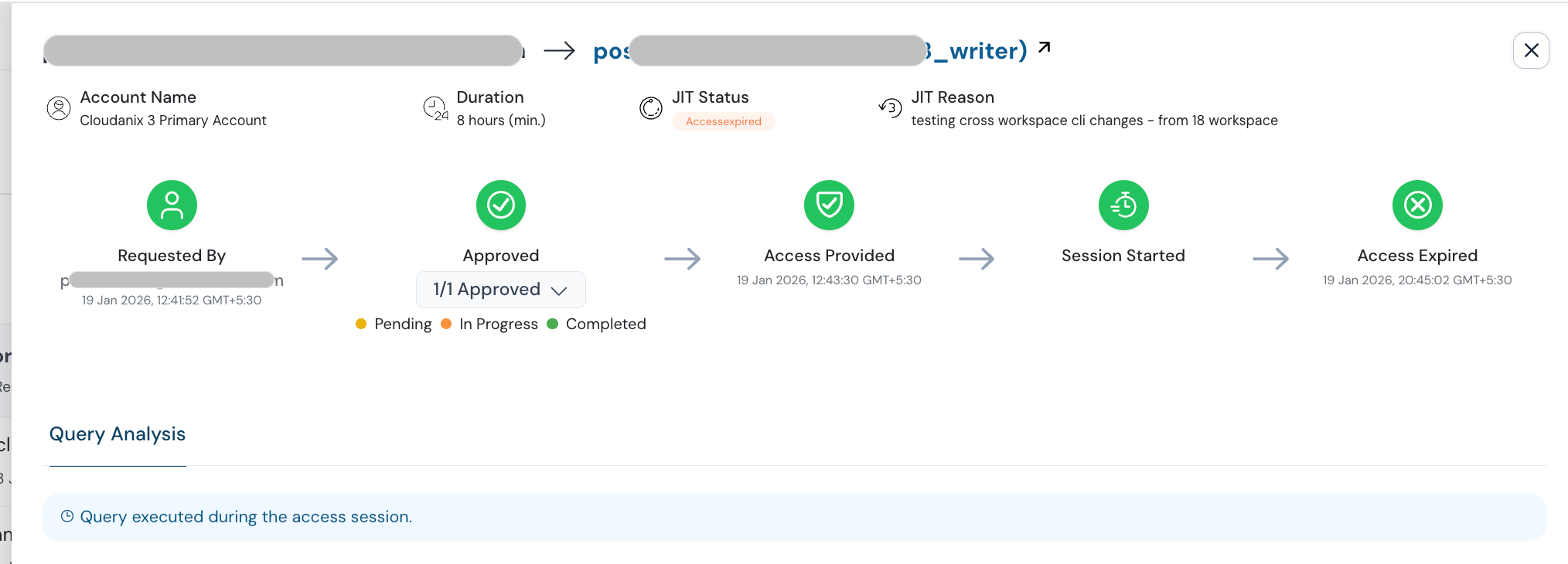
Removing the standing secret. Agentic JIT and Cloud JIT replace long-lived credentials for pipelines, service identities and AI agents with scoped credentials that are granted for a task and automatically revoked. A secret that expires in minutes is worth very little to an agent that finds it in a repository days later. Azure JIT applies the same model to Azure roles.
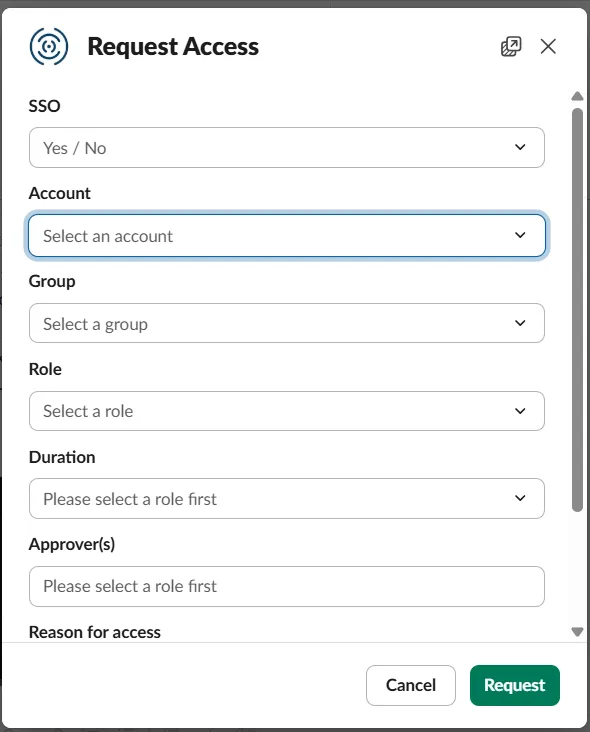
Grants expire on their own, so nothing durable remains to be found:
Knowing the blast radius. The unified asset graph and attack path view connect an identity to the Key Vaults, storage accounts and data it can reach, so “which identities would be worth stealing, and what do they open” has an answer before an incident rather than during one. This is the same correlation we describe in why your CSPM needs to correlate identity with posture.
Spotting abuse. Behavioral detection on identity activity, including cloud UEBA and cloud detection and response, is aimed at the signals above: unfamiliar locations, unusual burst patterns and credential-returning operations by identities that do not normally perform them.
What this does not do. JIT governs the credentials that flow through it. It does not retroactively revoke secrets already committed to public repositories, and it does not replace scanning, rotation or a log pipeline you actually collect. Think of scanning as finding the leaks you already have, and JIT plus federation as stopping the creation of new long-lived secrets to leak. You need both.
Quick Reference Checklist
| Priority | Action | Why it matters |
|---|---|---|
| Today | Scan org repos, gists and forks for verified secrets across full history | Finds live credentials an agent could already be using |
| Today | Rotate any secret that was ever public, and revoke sessions | Deleting the file does not revoke the credential |
| Today | Ensure service principal sign-in logs are collected | You cannot hunt in logs you do not have |
| This week | Hunt back to at least October 28, by behavior as well as IP | Microsoft saw activity four days before Todyl |
| This week | Inventory every app registration holding a secret, with owner and last sign-in | The inventory is the prerequisite for everything else |
| This week | Disable storage shared keys, lock down Key Vault, disable basic publishing auth | Removes the credential-returning pivots the agent relies on |
| This quarter | Replace secrets with managed identities, federation or certificates | A credential that does not exist cannot be found |
| This quarter | Apply Conditional Access for workload identities | Turns “valid anywhere” into “valid from known places” |
| This quarter | Put pre-execution secret checks and brokered credentials on AI agents | Agents are now a leading source of exposed credentials |
| Ongoing | Keep a decoy credential and alert on any use | Cheap, high-confidence early warning |
Key Takeaways
- The window is minutes, not days. Microsoft observed an AI agent go from a GitHub search to Key Vault exfiltration in five minutes, so any plan that relies on spotting a leak within a day is too slow.
- Service principals are the soft target. They are long-lived, bypass MFA, are frequently over-permissioned and are rarely monitored.
- Deleting is not revoking. Treat any secret that was public as compromised, rotate it and review activity from the moment it was exposed.
- Look back further than your first suspicion. The earliest successful sign-ins predated the first public report by four days.
- Credential-returning operations are the pivot. Cutting rights to list keys, read settings and fetch publishing credentials stops one stolen identity from becoming many.
- Eliminate the secret where you can. Managed identities, federation and certificates remove the thing being hunted, and JIT removes the standing privilege behind it.
- Your own agents are a source of leaks. Block secrets in agent actions and give agents short-lived, brokered credentials.
Want to see which service principals, service accounts and agent credentials in your environment hold standing access, and what each one could reach? Book a session and we will map it with you, then show you how to take the long-lived ones off the table.
People Also Read
- 24,000 Secrets Sitting in MCP Config Files: Why AI Agents Need JIT, Not Better Key Vaulting
- 3.6 Million Azure Records Stolen: Why Your CSPM Needs to Correlate Identity with Posture
- Governing Non-Human Identities with JIT: Service Accounts, Pipelines and Internal Products
- Governing CI/CD Pipeline Credentials Without Standing Secrets
- Zeabur Is Shutting Down After a Breach Built on Plaintext Credentials
- What is Secrets Sprawl?
- Cloudanix: Agentic JIT
Related Resources
- Why AI Coding Agents Become an Identity and Credential Risk
- The Aokigahara Infostealer Is Hunting Your AI Coding Assistant Tokens
- Azure JIT Access: Extending Zero Standing Privilege Across Multi-Cloud Environments
- What is an Attack Path and Why Isolated Findings Mislead You
- Understanding Non-Human Identities: Securing Machine-to-Machine Access
- How to Stop Secrets Leaking in Git
- Secret Scanning Guide to Prevent Data Breaches and Leaks
- What is Zero Standing Privilege?
- Cloudanix Non-Human Identity Security
- Cloudanix Code Security