

On November 12, 2026, the PostgreSQL Global Development Group released updates for every supported version: 18.7, 17.12, 16.16, 15.20 and 14.25. The release fixes 52 security vulnerabilities. One of them, CVE-2026-6460, has drawn the most attention because of its age and its effect. According to The Hacker News, it has been in the code for 22 years, and it lets a database user who can create objects run code on the database server itself.
If you run PostgreSQL yourself, on a virtual machine, in a container or on Kubernetes, you need to update. If you use a managed service such as Amazon RDS, Aurora, Google Cloud SQL or Azure Database for PostgreSQL, your provider applies the fix on its own schedule, and you need to check that schedule. In both cases, the bug raises a question that patches do not answer: who has a login to your production database, and what are they allowed to do with it?
This post explains what the flaw is in plain language, who can use it, what the update does and does not cover, and a practical plan covering patching, privilege review, monitoring and access design. It is written so that an engineer can follow the commands, and a security leader or auditor can follow the reasoning.
Primary sources: the PostgreSQL security page entry for CVE-2026-6460 and the project’s security information page, which lists the other fixes in this release. The Hacker News reports the 22-year age of the bug, the need to rebuild C extensions, and CISA’s assessment that exploitation is not known. We could not open every individual advisory for the 52 fixes, so statements about the other CVEs rely on the project’s summary lines. Commands and recommendations are our own guidance and should be tested first.
Who Should Read What
- Database administrators and platform engineers: “What Happened,” then Steps 1 to 4.
- Security engineers: the whole guide, especially Steps 3 to 6.
- CISOs and security leaders: “Why a ‘Low-Privilege’ Flaw Still Matters,” Step 5 and “Key Takeaways.”
- Compliance and audit teams: Steps 5 and 6. They cover proving who connected and what they ran.
- Application and engineering leaders: “What Happened” and Step 2, because your application roles may hold more rights than needed.
What Happened
The release
PostgreSQL ships security fixes in regular minor releases. This one, dated November 12, 2026, covers all supported major versions:
| Major version | Fixed in |
|---|---|
| 18 | 18.7 |
| 17 | 17.12 |
| 16 | 16.16 |
| 15 | 15.20 |
| 14 | 14.25 |
The project’s security page lists the fixes. The summaries include several memory-safety bugs and type-confusion bugs in core server components, bugs in procedural languages and contributed modules, a possible SQL injection through extension scripts, and an issue where INSERT ... ON CONFLICT could read rows despite row-level security policies. Many of the code-execution entries carry a CVSS score of 8.8.
The flaw that drew attention: CVE-2026-6460
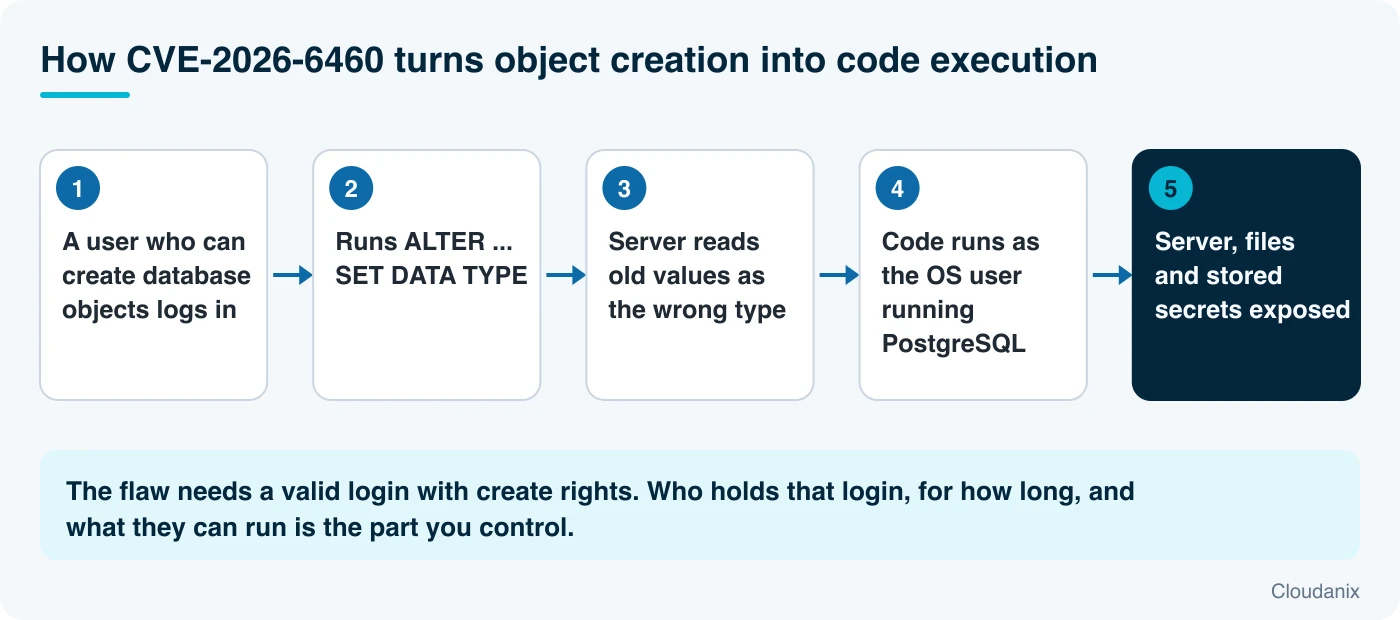
The project describes it as follows. A type confusion bug in PostgreSQL lets an object creator run arbitrary code as the operating system user that runs the database. The main route is the SQL command ALTER ... SET DATA TYPE, and the project notes other routes through different DDL commands, such as a sequence of ALTER TABLE ... ADD COLUMN, ROLLBACK, and another ALTER TABLE ... ADD COLUMN. It scores 8.8 on the CVSS scale. The affected versions are everything before the five fixed releases above.
Several terms need explaining.
Type confusion. Every value in a database has a type: a number, text, a date, a structured record. The server must always know which type a piece of memory holds. In a type confusion bug, the server keeps a value around after its type has changed and then reads it as if it still had the old type, or the reverse. That mismatch lets a crafted sequence of commands make the server treat attacker-controlled data as something else, such as an instruction or a pointer. The project’s explanation is that the system “had inadequate tracking of typed values, and values were not self-identifying,” so stale values could appear in places like data dictionary entries and PL/pgSQL variables.
Arbitrary code execution (remote code execution, RCE). Running commands of the attacker’s choosing on the target machine. Here, “remote” refers to the fact that the attacker works through a network connection to the database, not that they are anonymous.
Object creator. A database role with permission to create objects such as tables, types or functions in some schema. Many application and developer roles have this permission, sometimes without anyone realizing it.
CVSS 8.8 and its vector. CVSS is a standard severity score from 0 to 10. The vector for this flaw is AV:N/AC:L/PR:L/UI:N, which reads: attackable over the network, low complexity, only low privileges required, no user interaction. “Low privileges” means a normal login, not an administrator. High confidentiality, integrity and availability impact then means the attacker can read data, change data and take the service down.
The operating system user. PostgreSQL runs as an ordinary operating system account, usually called postgres. Code that runs “as that user” can read the database files on disk, read the server’s configuration, read any secrets stored on that host, and use whatever network access the host has. It cannot necessarily take over the whole machine, but it is already inside the most sensitive process on it.
What is not known
- The PostgreSQL project, according to The Hacker News, has not reported attacks that use the flaw. CISA’s assessment in the CVE record also lists exploitation as none.
- Full protection requires more than installing the new binaries: The Hacker News reports that C-language extensions installed on the server must be rebuilt as well.
- The bug has been present for 22 years, which shows how long a flaw can sit in widely used, well-reviewed software. It also means a version older than 14 is not “safe by being old.” Versions before 14 are out of support and will not receive this fix.
Why a “Low-Privilege” Flaw Still Matters
It is tempting to deprioritize a bug that needs a valid login. Three facts argue against that.
Many logins exist. A typical production database has a handful of administrators, several application service accounts, reporting tools, migration tools, analysts, support staff and developers who were “given access for a quick fix” months ago. Each one is a login. If any of them can create objects, any one of them is a possible starting point.
Credentials are the usual way in. Attackers rarely arrive without a login. They get one by stealing a password, finding one in a repository, reusing a leaked key or taking over a developer machine. Our recent posts on AI agents scanning GitHub for secrets and stolen AI keys show how quickly leaked credentials are put to use. A “needs authentication” bug becomes “needs one leaked password.”
The server is a high-value host. Code running as the database user sits next to the data. That includes data you have masked in the application layer, backups on the same disk, and connection settings for replicas and other systems.
The right response is two-sided: patch the flaw, and shrink the population of people and tools who can exploit it. The first is a one-time job. The second prevents the next bug of this kind.
The Protection Guide
Step 1: Find your version and your update path
-- Run on each PostgreSQL server
SHOW server_version;
SELECT version();
Compare with the fixed versions: 18.7, 17.12, 16.16, 15.20, 14.25. For your platform:
- Self-managed on a VM or bare metal: install the minor update from your package repository (
apt,yum/dnf, or the PostgreSQL project’s repositories) and restart PostgreSQL. A minor release does not require a dump and restore orpg_upgrade. It replaces binaries in place. - Containers: pull the patched image tag for your major version and redeploy. Pin the tag, not
latest. - Kubernetes operators: update the operator-managed image according to the operator’s documentation, and watch the rolling restart.
- Managed cloud databases: check your provider’s release notes for the engine version that includes these fixes, then schedule the upgrade in your maintenance window. Some providers apply minor upgrades automatically if you enabled that setting, so verify what is actually running.
- Out-of-support versions (13 and older): these will not get the fix. Plan a major upgrade. Until then, reduce who can log in and what they can create (Steps 2 and 3).
Step 2: Rebuild C-language extensions
The Hacker News reports that full protection requires rebuilding any C-language extensions installed on the server. Extensions compiled against the old server headers may keep the old behavior. List what you have:
SELECT extname, extversion FROM pg_extension ORDER BY extname;

-- Which functions are written in C (and so are compiled code)?
SELECT n.nspname, p.proname
FROM pg_proc p
JOIN pg_language l ON l.oid = p.prolang
JOIN pg_namespace n ON n.oid = p.pronamespace
WHERE l.lanname = 'c'
  AND n.nspname NOT IN ('pg_catalog', 'information_schema');
For extensions you install from packages, reinstall the package build that matches the new server version. For extensions you compile yourself, rebuild them against the updated server headers. Test in staging first.
Step 3: Find every login that can create objects
The flaw needs an object creator. Know who that is.
-- Login roles that can create objects in any non-system schema
SELECT r.rolname, n.nspname AS schema
FROM pg_roles r
CROSS JOIN pg_namespace n
WHERE r.rolcanlogin
  AND n.nspname NOT LIKE 'pg\_%'
  AND n.nspname <> 'information_schema'
  AND has_schema_privilege(r.oid, n.oid, 'CREATE')
ORDER BY r.rolname, n.nspname;

-- Roles that can create new schemas in a database
SELECT rolname
FROM pg_roles
WHERE rolcanlogin
  AND has_database_privilege(oid, current_database(), 'CREATE');
Then remove what is not needed:
-- Stop every role from creating objects in the public schema
REVOKE CREATE ON SCHEMA public FROM PUBLIC;

-- Remove create rights from a specific application role
REVOKE CREATE ON SCHEMA app FROM app_readonly;
REVOKE CREATE ON DATABASE appdb FROM app_readonly;
Applications rarely need to create tables at run time. Schema changes should come from a migration role that is used in a controlled pipeline, not by every service that reads data. Test these changes in staging first, because some tools do create temporary or helper objects.
Step 4: Reduce the blast radius of the database host
If code does run as the database user, these controls limit what it finds:
- Run PostgreSQL as an unprivileged operating system user, never as root.
- Keep secrets that the database does not need off the database host. Do not store cloud keys or application secrets in files that the
postgresuser can read. - Restrict outbound network traffic from the database host. A database server rarely needs to reach the public internet.
- Keep the instance off the public internet. A database with a public address turns every leaked credential into an immediate problem. See how to read the attack path of a publicly accessible database.
- Encrypt and separate backups, so a compromise of the live server does not hand over history.
Step 5: Replace standing logins with access that expires
Patching handles this release. The longer-term fix is to avoid having a large pool of always-on database logins.
- Remove shared and long-lived passwords. A password that has lived in a wiki, a chat message and three laptops cannot be tied to one person.
- Give each person their own identity when they connect, and make that identity time-limited.
- Approve access for a reason and a duration. “Debug order #4821 for 2 hours” is auditable. “Permanent read-write” is not.
- Make the audit trail name a human, not just
app_user.
This is the pattern called just-in-time (JIT) access: request, approve, time-boxed grant, automatic revoke. We describe it in What Is Zero Standing Privilege?.
Step 6: Record what people run, and limit what a session can do
Even with careful access, you want to answer three questions after the fact: who connected, what did they run, and what data came back? PostgreSQL’s native logging can show that a connection happened and, with the right settings, the statements. It does not tie a shared account to a person, and it does not mask sensitive columns.
Useful native settings to review:
-- See current logging settings
SHOW log_connections;
SHOW log_disconnections;
SHOW log_statement;

-- Log schema-changing statements (DDL), which is where this flaw lives
ALTER SYSTEM SET log_statement = 'ddl';
SELECT pg_reload_conf();
Logging DDL is cheap and directly relevant here: the flaw is triggered through DDL commands, so a stream of unexpected ALTER statements from an unexpected role is exactly what you want to notice. Ship the logs somewhere the database host cannot alter.
Beyond logging, put a control layer between the user and the data that can block risky statements, mask sensitive columns and record every query with the person’s identity. Our explainer Database Activity Monitoring: What It Is and How It Differs From Native DB Logging covers the differences.
Where Cloudanix Fits
Start with the boundary. Cloudanix does not patch PostgreSQL, and no access product replaces installing 18.7, 17.12, 16.16, 15.20 or 14.25. The platform’s role is on the questions in Steps 5 and 6: who can log in, for how long, and what was done.
Time-boxed, identity-stamped database access. Database JIT gives people keyless, identity-stamped access to PostgreSQL (and MySQL, MariaDB, SQL Server and CosmosDB) without shared passwords or a jump host. Access is requested, approved by the right people, granted for a window and revoked automatically. The effect on this class of bug is simple: the number of live logins with create rights at any moment drops from “everyone who ever needed access” to “whoever is approved right now.” See the end of permanent access for database security.
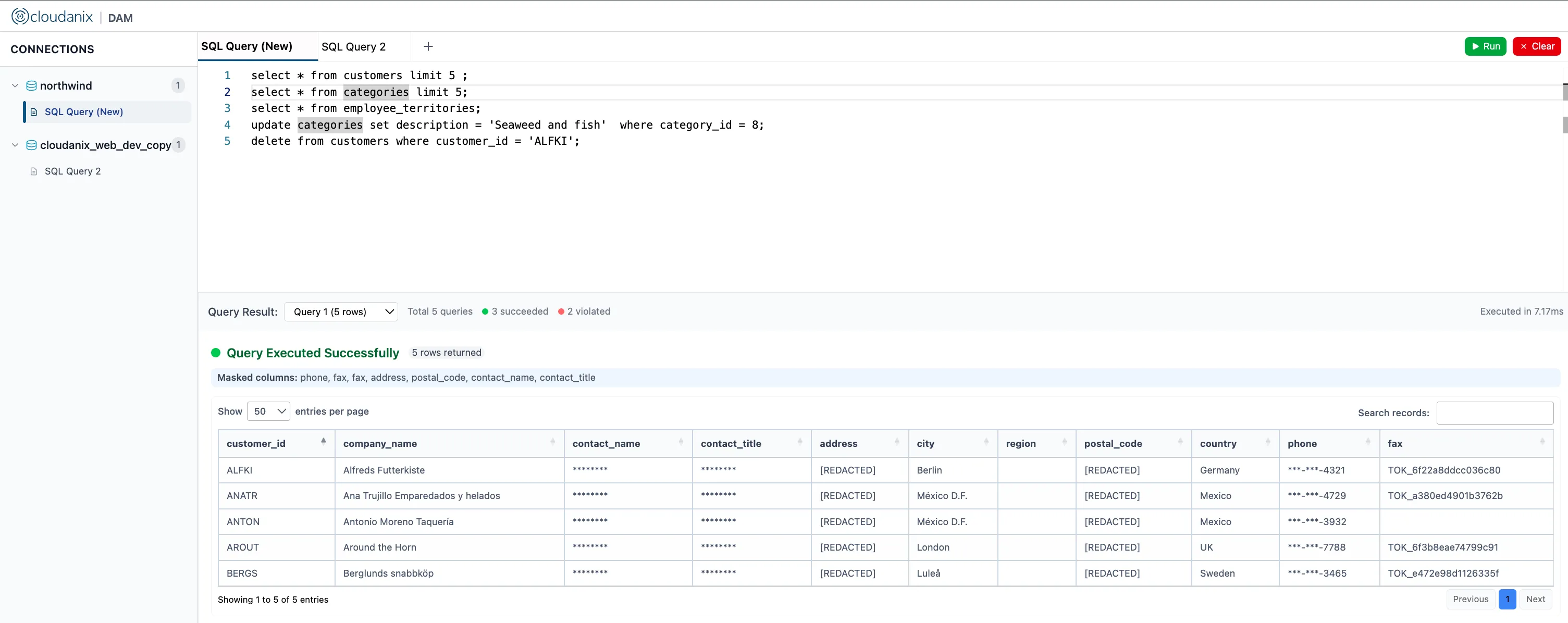
A query layer inside your own cloud. Database Access Management (DAM) is an add-on to Database JIT. It runs as a secure query proxy deployed in your environment, so the data it inspects stays in your infrastructure. For PostgreSQL, MySQL and MSSQL it can:
- sanity-check queries for tautologies and SQL injection patterns before execution
- block dangerous operations with guardrails (delete, drop and truncate can be disallowed, a
WHEREclause can be required, table and column access can be restricted, and row counts can be capped) - mask sensitive data after the query runs, based on the role of the person asking
- log every query with full metadata to storage you own, so you can search who ran what
For support teams that need production data, see safe production data fixes for support teams with DAM guardrails and approvals, and for the architecture, data-sovereign DAM on your existing ECS and VPC peering setup.
Be precise about what DAM does and does not claim here. DAM is not an exploit shield. The guardrails above are about data-changing queries, and we do not claim they block the specific DDL sequence that triggers CVE-2026-6460. DAM also cannot be bought on its own, because it builds on Database JIT. The value is in controlling who gets a session, narrowing what a session can do, and keeping a complete record that an investigator or auditor can search.
Finding exposure around the database. CSPM surfaces databases reachable from the internet, over-permissioned roles and weak network rules, and ranks them by exposure and context with contextual severity, so a public production database is not treated the same as an isolated test instance. The attack path view shows how an identity or a misconfiguration leads to that database.
Quick Reference Checklist
- Confirmed each PostgreSQL server’s version and compared to 18.7, 17.12, 16.16, 15.20, 14.25
- Scheduled minor updates (no dump and restore needed for minor releases)
- Checked managed-database provider release notes and maintenance windows
- Rebuilt or reinstalled C-language extensions after updating
- Listed every login role with CREATE rights, and revoked what is unneeded
- Moved schema changes to a controlled migration role
- Confirmed PostgreSQL runs as an unprivileged OS user, with restricted outbound traffic
- Removed shared and long-lived database passwords
- Enabled DDL logging and shipped logs off the database host
- Planned major upgrades for any version older than 14
Key Takeaways
- PostgreSQL 18.7, 17.12, 16.16, 15.20 and 14.25 fix 52 security flaws. Update every supported server.
- CVE-2026-6460 (CVSS 8.8) lets an object creator run code as the database’s operating system user through a type confusion bug. The PostgreSQL project describes the main route as
ALTER ... SET DATA TYPE. - No attacks are known, per the reporting and CISA’s assessment, but a flaw that needs only a low-privilege login is one leaked credential away from being usable.
- Patching is half the job. Rebuild C extensions, then review which logins can create objects.
- The lasting fix is fewer standing logins, shorter sessions, and a record that names the person behind each query.
Want to see which people, tools and service accounts hold standing access to your production databases, and what a time-boxed model would look like? Book a session and we will map it with you.
People Also Read
- Database Activity Monitoring Explained: What It Is and How It Differs From Native DB Logging
- Publicly Accessible Database: How to Read the Attack Path
- Securing Databases Behind ECS: The Data Tier Blind Spot in Cloud Security
- Database Activity Monitoring Use Cases: How DAM Prevents Data Loss
- The Hidden Cost of Permanent Database Access
- Cloudanix: Database JIT
Related Resources
- Top Database Activity Monitoring Tools 2026
- Which Vulnerabilities Are Actually Running in Production
- What is Real-Time Data Masking?
- Understanding Remote Code Execution (RCE)
- What is Zero Standing Privilege?
- Query-Level Audit and PII Masking for RDS Databases Behind ECS Workloads
- Cloudanix Database Access Management