
Customer Snapshot
| Attribute | Details |
|---|---|
| Industry | Workforce and services marketplace platform |
| Company Size | Roughly 300 employees |
| Cloud Environment | AWS (production and non-production accounts onboarded) |
| Databases | Amazon Aurora MySQL on RDS (about ten instances), plus a hosted document store |
| Who Touches the DB | 3 DevOps engineers hold direct access; support reads data through a BI tool in read-only mode |
| Change Process | Data fixes raised as pull requests; every database change needs at least one approval |
| Volume | At least one production data fix per day |
| Compliance | ISO 27001 and SOC 2 |
| Focus Area | Safe, fast production data fixes without standing write access |
The Situation: A Daily Fix That Needs Three Engineers
This team had done the hard thing right. Production database access was not handed out casually. Only a small DevOps group could connect directly, and the support team, which needs to see customer data every day, did so through a read-only BI tool. Nobody on support held a database password.
The side effect was a daily bottleneck. Production data is never perfectly clean. A record ends up in the wrong state, a status needs correcting, a duplicate needs merging. Support spots the problem, but support cannot change it. So the fix travels by pull request: support describes the change, a reviewer approves the script, and one of the three DevOps engineers runs it against production by hand. This happened at least once every day.
The process was careful, and it worked. It was also slow, it pulled infrastructure engineers into routine data corrections, and it depended on three people being available. The obvious shortcut was to give support time-bound write access. The team looked at that option and rejected it, for a reason that is easy to underestimate.
The Core Tension
Time-bound access limits when someone can act. It says nothing about what they can do inside that window. A support engineer granted write access for an hour can run one correction, or fifty, or a statement with no WHERE clause. The security lead put it plainly: with a time window alone, support could fire any number of queries, and that was exactly what they did not want.
That is the gap between access control and data control. Approval answers “who can get in, and for how long.” It does not answer “what may they do while they are in,” and it does not answer “what did they actually run.” Closing the daily bottleneck safely means keeping the approval step the team already trusts and adding a control layer on the statements themselves.
Where the Gaps Were
Access Was Binary: Nothing, or Everything
Native MySQL grants are coarse. A user can read a table or write it. Making a role that can update one narrow set of records but never delete, never touch the ledger tables, and never change more than a handful of rows at a time is not something database roles are built to express. The team was forced to choose between no access and too much access.
A Time Window Is Not a Scope
Even with approval and an expiry, a write session is open-ended inside its window. The risks are the ordinary ones: an UPDATE run without a WHERE, a DELETE meant for a test table pointed at the wrong schema, a DROP typed in the wrong terminal tab. None of these require bad intent. In a production database holding payment and worker records, one of them is an incident.
Manual Execution Hides the Real Audit Trail
The existing process did have a paper trail: the pull request, the approver, the ticket. What it lacked was a record of what actually ran. The script in the repository is the intent. The statement executed against production, the rows it affected, and the time it ran lived in whatever the engineer’s session happened to capture. For an ISO 27001 or SOC 2 auditor asking for evidence that approved changes matched executed changes, the answer required stitching together sources.
Routing Data Through a Vendor Was Off the Table
The team prefers a lean tool footprint and avoids adding third parties that increase access complexity. Any control that required sending production query traffic and result sets to a vendor’s cloud would have failed on that basis alone.
How Cloudanix Addresses This Situation
Approval Stays Exactly Where It Is
Cloudanix Database JIT keeps the approval model the team already believes in. A support engineer requests access to a specific database for a specific duration and a stated reason. A designated approver reviews and approves. Credentials are short-lived and minted per session, so no shared password exists to be reused later. When the window ends, or an approver revokes access, the session ends. (Database revocation takes up to about 15 minutes to take effect, which is worth planning around for emergency revokes.)
Every Statement Passes Through a Query Proxy in Your Own Account
Once access is granted, support does not connect straight to Aurora. Every SQL statement routes through the Cloudanix Database Activity Monitoring proxy, which runs as a container service in the customer’s own AWS account. The proxy is the point at which a policy decides whether a statement runs. Because it lives in the customer’s cloud, query text and result data never leave it.
Guardrails That Turn “Any Query” into “Only Safe Queries”
Policies are authored by an administrator in the Cloudanix console, so the security team decides what a support role may do. For a data-fix role, the policy looks like this:
| Guardrail | Effect for the support data-fix role |
|---|---|
Block DELETE, DROP, TRUNCATE | Destructive statements are rejected before they reach the database |
Require a WHERE clause | An unbounded UPDATE across a table cannot run |
| Table and column restrictions | Ledger, payment, and credential tables can be fenced off from this role entirely |
| Row-count limits | A runaway statement or mass export is stopped at a set ceiling |
| Pre-execution sanity checks | Tautologies such as WHERE 1=1 and common injection patterns are caught before execution |
When a statement breaks a rule, the engineer gets a clear block message that names the rule. Nothing reaches production, and nothing is left half-applied.
Masking Keeps Sensitive Columns Out of Reach During the Fix
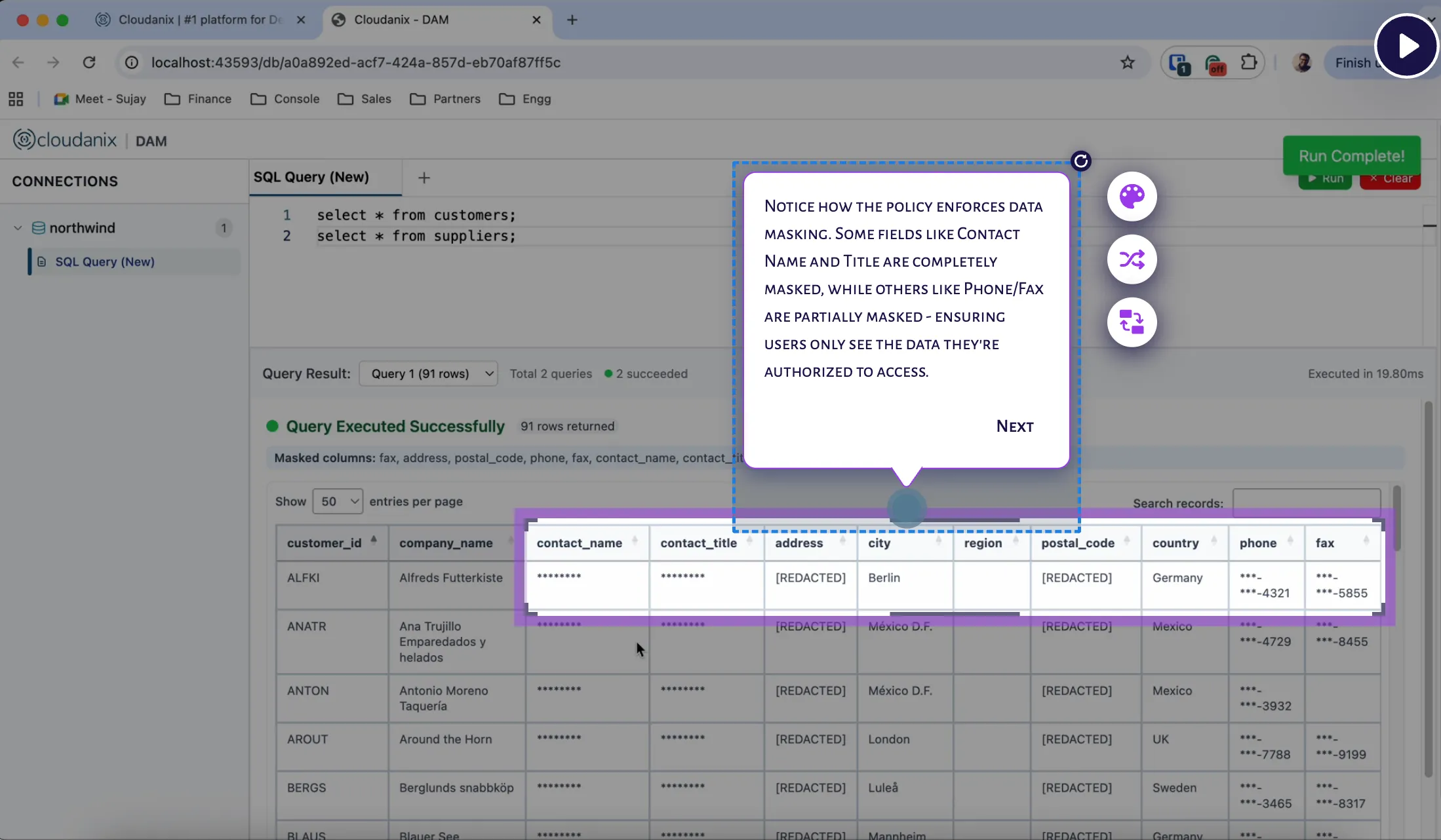
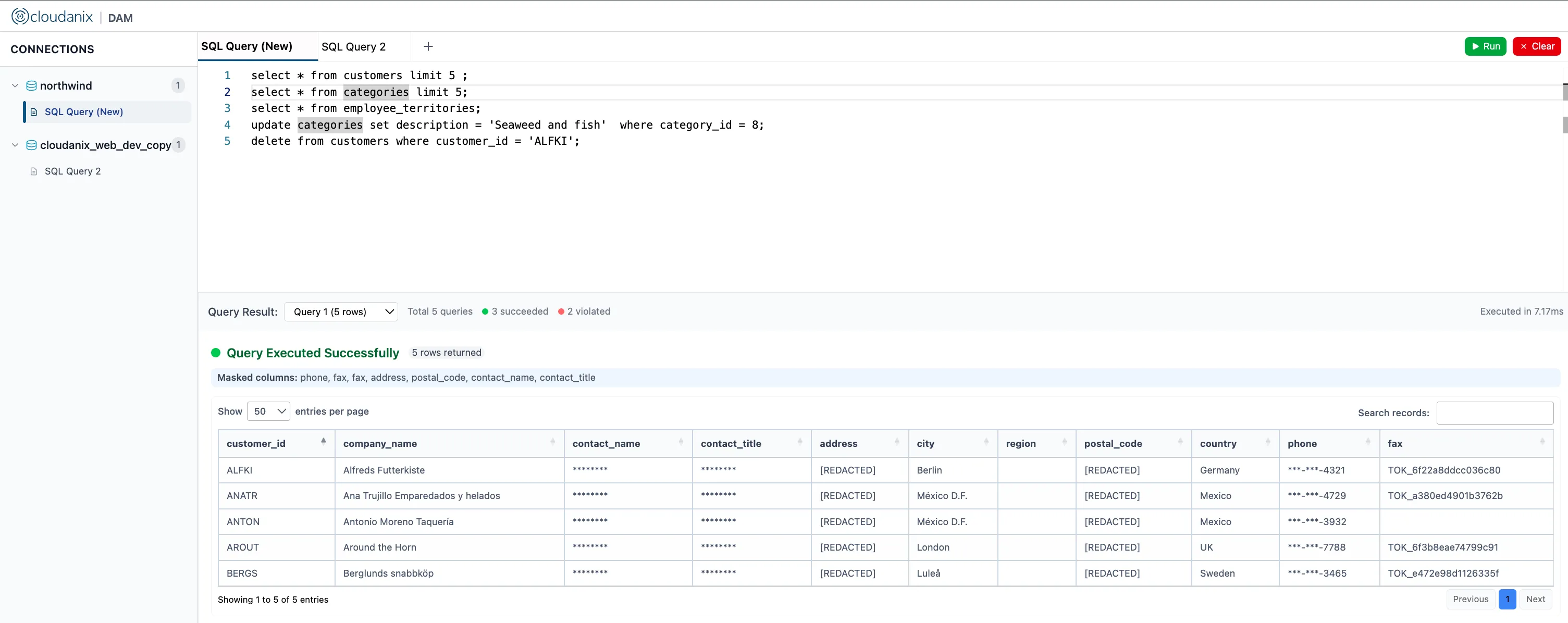
Fixing a record rarely requires reading every sensitive field on it. DAM applies role-based masking after the query executes, so identifiers, phone numbers, and bank details can appear masked to the support role while the fields needed to identify and correct the record remain visible.
Every Query Is Recorded With the Human Behind It
DAM writes each statement to storage in the customer’s own account with full metadata: who ran it, when, against which tables, and how many rows. That record sits next to the Database JIT approval, so an auditor can follow one thread from “who asked and who approved” to “what exactly executed.”
What a Data Fix Looks Like Now
- Support finds a record in the wrong state and raises a request for the relevant database, with the ticket reference as the reason.
- The designated approver reviews the request and approves a short window.
- Support connects with their usual MySQL client. DAM is the endpoint.
- They run the correction. A statement missing its
WHEREclause, or aimed at a fenced-off table, is blocked with a message. - The valid statement runs. Sensitive columns that were not needed stay masked.
- The window closes. The full session, with every query, is in the audit trail, linked to the approval.
The team keeps the single-approver discipline it already had. The three DevOps engineers are no longer the execution step for routine fixes, which frees them for infrastructure work.
What This Does and Does Not Do
Being clear about scope is part of earning trust, so here it is plainly.
- DAM bounds what kinds of statements can run and how much they can touch. It does not, by itself, restrict a session to one specific pre-approved query. Per-query approval, where a maker submits an exact statement and a checker approves that statement only, is a separate capability on the Cloudanix roadmap, and this customer has been kept informed about it. Guardrails plus a short approved window cover the daily fix today.
- DAM applies to the Aurora MySQL estate. The hosted document store in this environment continues to follow the access-control-only model for now.
- Policies are written by an administrator. Start strict, watch the blocked-query log for a couple of weeks, and loosen only where a genuine need appears.
Platform Impact
| Dimension | Before | After (JIT approval + DAM guardrails) |
|---|---|---|
| Who executes routine data fixes | One of 3 DevOps engineers | The support engineer, within policy |
| Scope inside an access window | Open-ended, any statement | Bounded by guardrails and table/column rules |
Unbounded UPDATE / DELETE / DROP | Possible with write access | Blocked before execution |
| Evidence of what actually ran | Script in the repo, session output | Every statement, human, row count, and time recorded |
| Sensitive fields during a fix | Visible to anyone with access | Masked by role unless needed |
| Where the data and logs live | N/A | Entirely in the customer’s own AWS account |
Key Outcomes
- ✅ Faster Fixes: Routine data corrections no longer queue behind three engineers.
- ✅ Bounded Write Access: Destructive and unbounded statements are stopped before they execute.
- ✅ Approval Preserved: The existing maker-and-approver discipline stays in place.
- ✅ Audit Alignment: Approved changes can be matched to executed statements.
- ✅ Least Exposure: Sensitive columns are masked for the role doing the fix.
- ✅ Data Sovereignty: The proxy and logs stay in your own AWS account.
Do Your Support Teams Wait on Engineers for Every Data Fix?
If production data corrections depend on a handful of people, and giving support write access feels too risky, Cloudanix pairs approved, time-bound access with query guardrails that make the fix safe to delegate.
Book a Free Assessment to see a guarded data fix on your own MySQL setup in under 30 minutes.
Related Resources
- Query-Level Audit and PII Masking for RDS Databases Behind ECS Workloads
- The End of Permanent Access: Next-Generation JIT for Granular Database Security
- Database Activity Monitoring: Real-Time Data Security
- What is Real-Time Data Masking?
- Database Activity Monitoring Use Cases: How DAM Prevents Data Loss