

A large share of the applications running in production today were not written by the teams that now own them. Organisations without in-house engineering routinely engage development partners to build their applications, ship them to production, conclude the contract, and move on. The application works from a user’s perspective, so its security posture is quietly assumed rather than verified.
That assumption is where the risk lives. “The app works” and “the app is secure” are entirely different statements, and the gap between them is exactly what an attacker looks for. If you have inherited an application you did not build, here is a practical checklist to find out whether you are sitting on verified software or on an unexamined liability.
Why Inherited Code Deserves Extra Scrutiny
When a partner builds an application, the incentives during the engagement are speed and functionality. Delivering working software on schedule is what gets rewarded. This is fundamentally a third-party risk management problem: security review, threat modelling, dependency hygiene, and secrets management are frequently out of scope, out of budget, or simply not requested. None of that shows up in a demo, so none of it gets noticed at handoff.
The result is a category of risk that is invisible but real: code that functions correctly while carrying hardcoded credentials, outdated dependencies with known vulnerabilities, or an attack surface that expanded quietly over the life of the engagement. Nobody introduced these problems maliciously. They simply were never checked.
The Checklist
1. Do You Have the Source, and Can You Actually Read It?
Before anything else: do you have full access to the source code, the commit history, and the build configuration? Partner engagements sometimes leave the customer with a running application but incomplete access to how it was built. If you cannot see the code, you cannot verify it. Confirm you own the repositories, the CI/CD configuration, and any infrastructure-as-code.
2. Has the Code Ever Been Statically Analysed?
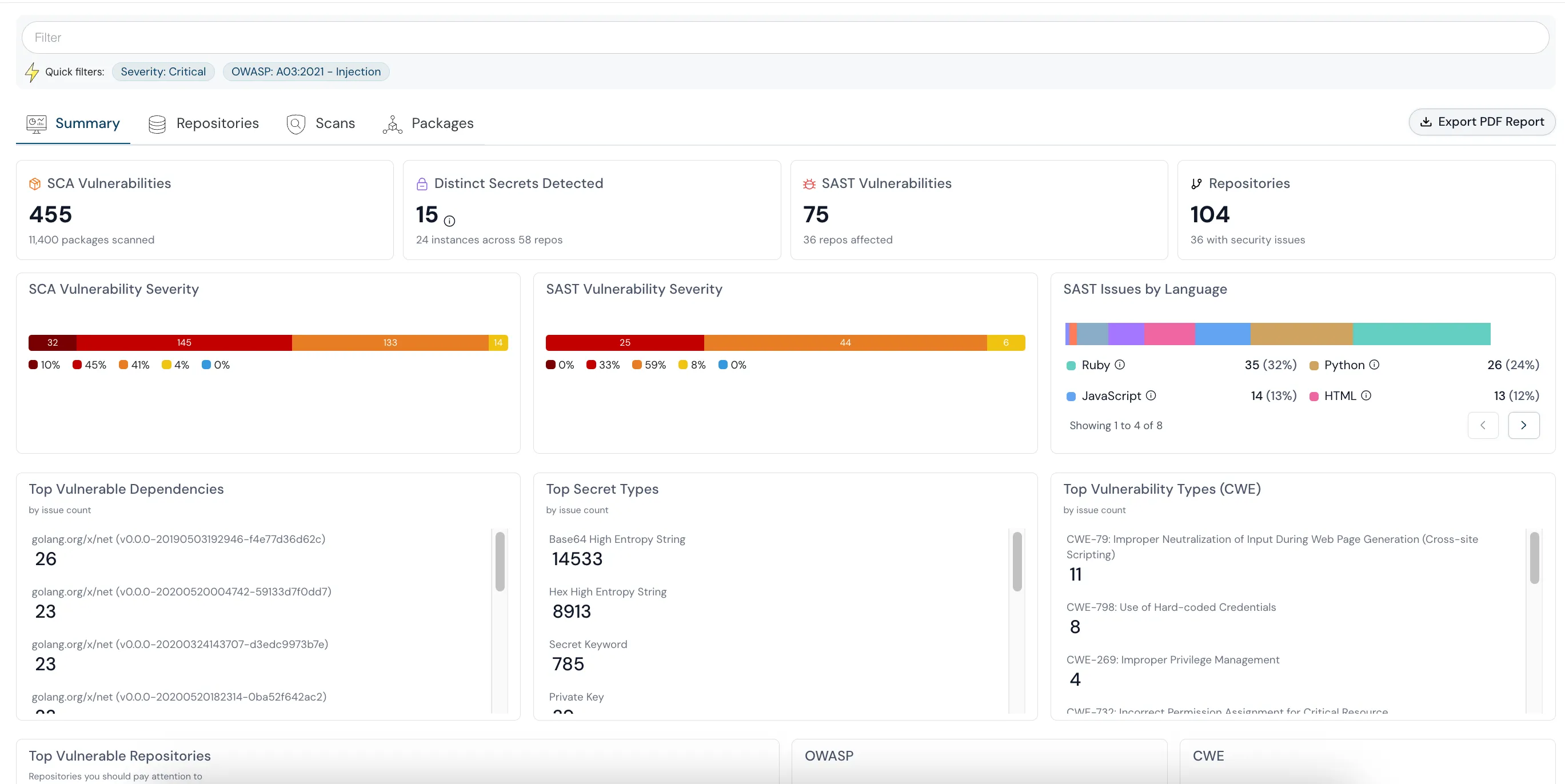
Ask a blunt question: has any static application security testing (SAST) ever been run against this codebase? For a lot of partner-built applications, the honest answer is no. Static analysis surfaces injection flaws, insecure deserialization, weak cryptography, and unsafe input handling, the classic vulnerability classes that never appear in a functional demo. A structured code security review checklist is a good place to start if you have never done this. For a sense of how this plays out on real inherited codebases, see how one team went from partner code to attack-path closure while securing healthcare applications.
3. Are There Secrets in the Code?
Hardcoded credentials are one of the most common findings in inherited code. API keys, database passwords, cloud access keys, and signing secrets committed directly into the repository, often “temporarily” during development and never removed. Scan the entire history, not just the current state; a secret removed in a later commit is still exposed in the git history. A thorough secret scanning approach walks the full commit tree rather than only the current tip.
4. What’s in Your Dependency Tree?
Modern applications are mostly other people’s code. A partner-built app can carry dozens or hundreds of third-party dependencies, some with known CVEs that have accumulated over multiple release cycles nobody tracked. Software composition analysis inventories the dependencies, checks them against known-vulnerability databases, and shows how far behind the safe versions you are. Teams that once juggled several point tools often end up replacing SonarCloud and Snyk with unified code security to keep this in one place.
5. Has the Attack Surface Expanded Unnoticed?
Applications tend to sprawl. Endpoints get added, debug interfaces get left enabled, permissive CORS settings get introduced to “make it work,” and administrative functions get exposed more broadly than intended. Map what the application actually exposes and compare it to what it needs to expose.
6. How Does It Handle Authentication and Authorization?
Review how the application authenticates users and enforces authorization. Weak session management, missing access controls on sensitive endpoints, and privilege checks that can be bypassed are common in software built under delivery pressure. This is especially critical if the application handles regulated data.
7. What Does It Do at Runtime?
Static review tells you about the code; it does not tell you what the application does once it is live. Consider whether you have any visibility into the application’s runtime behaviour, the processes it spawns, the connections it opens, the files it touches. This is where container runtime security comes in; an inherited application with no runtime monitoring is a blind spot sitting on top of your data.
8. Is There an Owner for Ongoing Fixes?
Finally, a process question that is as important as any technical one: when you find issues, who fixes them? The partner engagement has concluded. If you have no in-house engineering, you need a plan, whether that is a support contract, a new partner, or tooling that provides specific remediation guidance your existing people can act on.
Turning the Checklist Into a Baseline
The point of this exercise is not a one-time audit that produces a report nobody revisits. It is to establish a baseline you can maintain. Inherited code does not stop mattering once it passes an initial review; dependencies age, new vulnerabilities are disclosed, and any new development, including code written by AI assistants, adds to the surface.
The organisations that handle this well treat inherited code exactly like code they wrote: continuously scanned, with findings prioritised and owned. Code security is not a partner’s responsibility once the engagement ends; the fact that a partner wrote it does not change your responsibility for it once it is running in your environment and touching your data.
People Also Read
- What is Code Security?
- Code Security Review Checklist
- Is AI-Generated Code Safe to Ship? What to Check Before It Reaches Production
- Source Code Security Best Practices
- AI Code Security: The Real Problem
- What Is an Attack Path, and Why Isolated Security Findings Mislead You
The Bottom Line
“We outsourced it and it works” is not a security posture. If you have inherited applications you did not build, assume nothing about their security until you have verified it. Get the source, scan it, inventory the dependencies, map the attack surface, and establish who fixes what you find. The code is your responsibility now, whoever wrote it.













