

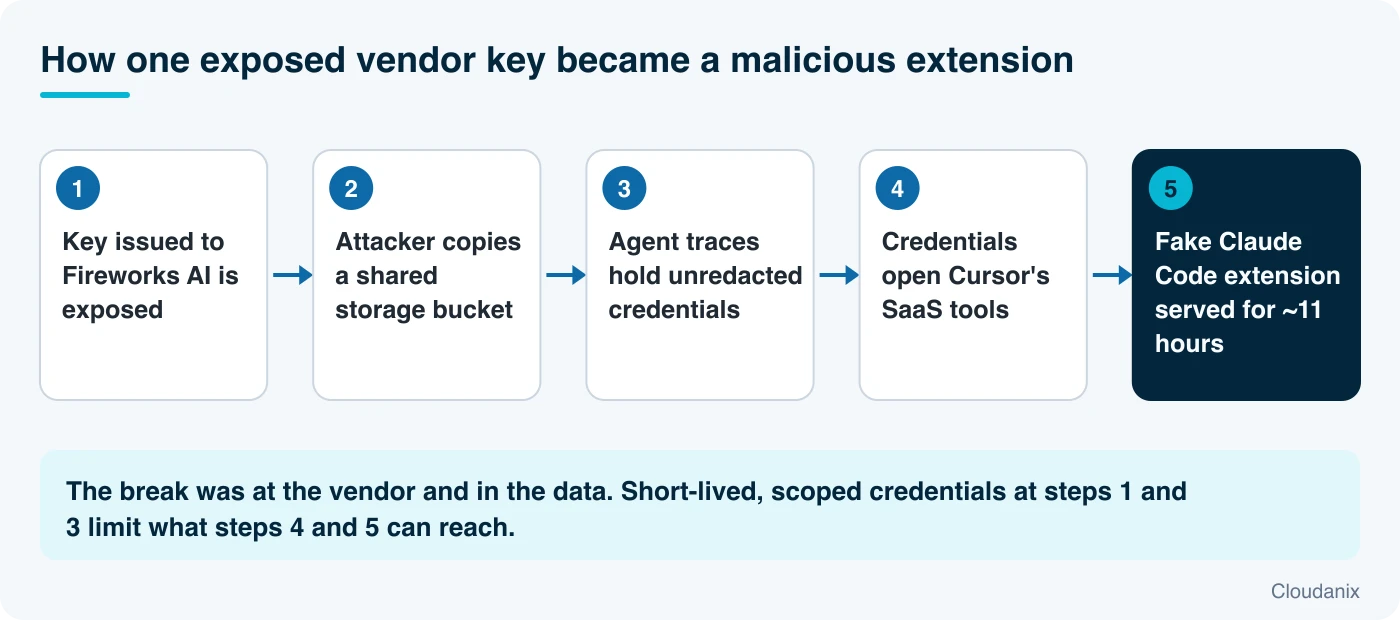
On November 13, 2026, Cursor published a detailed update on a security incident it first flagged on October 29. The short version: an access key that Cursor had issued to one of its AI vendors, Fireworks AI, was exposed. An attacker used that key to copy a storage bucket. Some of the data in that bucket contained credentials that nobody had removed. Those credentials opened Cursor’s internal software-as-a-service tools. And one of them allowed the attacker to place a fake copy of Anthropic’s Claude Code extension in front of Cursor users for about 11 hours.
If you use an AI coding assistant, build one, or buy tools from vendors that do, this incident is worth understanding step by step. No single step was exotic. Each one was an ordinary weakness (a key that outlived its usefulness, data shared more widely than needed, a secret sitting in a log) that became dangerous because it was connected to the next weakness.
This post explains what happened in plain terms, defines every piece of jargon as it comes up, shows how to check whether you were exposed, and describes the controls that reduce the damage from this kind of chain. It is written so that a developer, a security engineer and a security leader can each take what they need.
Primary sources: Cursor’s incident update (November 13, 2026) is the authoritative account, and every Cursor figure below comes from it. BleepingComputer’s report adds detail on the malicious extension’s behavior and on the wider wave of attacks against AI developer platforms. We did not open Cursor’s original October 29 security notice, so anything from it is attributed to the update or to BleepingComputer. The commands and checklists in this post are our own guidance, not Cursor’s, and should be tested before you rely on them.
Who Should Read What
- Developers and platform engineers: read “What Happened,” then “Step 1” in the guide to check whether you installed the affected versions.
- Security engineers and incident responders: read the whole guide. Steps 2 to 5 cover vendor keys, secrets in logs and extension governance.
- CISOs and security leaders: read “What Happened,” “Why This Is a Supply Chain Problem,” and “Key Takeaways.” The decisions that matter are about vendor access and AI tooling policy.
- Procurement, vendor management and compliance: read “Why This Is a Supply Chain Problem” and Step 3. The questions to ask AI vendors are listed there.
- Engineering leaders: read “Key Takeaways.” The cost of this incident was mostly clean-up work across many credentials.
What Happened
Here is the sequence as Cursor describes it, with the plain-language meaning of each term.
1. A key issued to a vendor was exposed. Cursor works with Fireworks AI, a company that provides AI model training and inference services. To share data with Fireworks, Cursor had set up a read-only storage bucket (a cloud folder that the vendor could read but not change) and had issued Fireworks an access key (a long-lived secret that proves “this request is from Fireworks”). According to Cursor, the key was exposed by Fireworks. An attacker obtained it.
2. The attacker copied the bucket. With the key, the attacker could read everything in the bucket. It held a limited set of coding agent traces, mostly from 2025. A trace is a record of what an AI coding agent saw and did during a session: the files it read, the commands it ran, the text it exchanged. These traces came from users who had not turned on Privacy Mode, which meant Cursor was permitted to use their data for model training.
3. Some traces contained working credentials. A small number of traces included credentials that had not been redacted. When a developer’s agent session touches an environment file, a configuration file or a terminal that prints a token, that value can end up in the trace. Cursor reports that fewer than 0.05% of users had traces exposed, and fewer than 0.01% of customers had API credentials exposed.
4. The credentials opened Cursor’s internal tools. Starting from those credentials, the attacker reached select software-as-a-service tools Cursor uses. Cursor says the attacker accessed archived non-production source code repositories (some containing business contact information), limited customer support data and email conversations, product usage metrics and contact details, summaries of some coding agent conversations, and some credentials that users had sent to the support team.
5. The attacker published a fake extension. On October 29, using a credential stolen from that exposed data, the attacker placed malicious copies of Anthropic’s Claude Code extension on the cache that serves Cursor’s VS Code extension marketplace. Two details matter here:
- This was not a flaw in Anthropic’s product, and Anthropic did not publish the copy. Cursor says so explicitly.
- Open VSX, the upstream marketplace that Cursor draws extensions from, never held the malware. The attacker went around it and wrote directly to the cache that Cursor’s own marketplace serves from.
The malicious versions were 2.1.312 and 2.1.313. Cursor estimates that at most 5,000 users who requested those cached versions on October 29 may have received them. They were available for roughly 11 hours before Cursor removed them.
6. What the fake extension tried to do. BleepingComputer, which analyzed the extension, reports that it ran malicious JavaScript that tried to install a persistent SSH backdoor. SSH is the standard remote login method for servers and many developer machines. The extension collected system information, added an attacker-controlled SSH key, tried to turn on SSH access and set up persistence so it would survive restarts. Researchers found coding mistakes that probably stopped it from working on many Windows and macOS machines where SSH was not already enabled.
7. Containment. Cursor says its monitoring flagged the unauthorized activity. It deactivated the vendor’s key, rotated credentials, took the extension marketplace offline, and moved all inference traffic away from Fireworks. The last attacker activity it saw was on November 1, and it was blocked. Cursor says the incident is contained and that it contacted each affected customer directly.
What was not affected, per Cursor: prompts and code for users with Privacy Mode on, live traffic, production infrastructure, the Cursor app and its official updates, release signing keys, customer code repositories, and every other extension in the marketplace.
The wider pattern
BleepingComputer notes that this incident sits inside a wave the security firm Wiz has named “Black October”: attacks on AI developer platforms aimed at stealing the credentials that unlock AI models. Companies named in that coverage include Railway, Northflank, Lightning AI, OpenCode and Warp. Fireworks AI itself disclosed several incidents in October, including one involving exposed API keys and tokens. We cover the economics behind that wave in A Dozen AI Developer Platforms Breached in a Month.
Why This Is a Supply Chain Problem
A supply chain attack goes after something you trust instead of attacking you directly. You did nothing wrong, but a tool or vendor you depend on was compromised, and the compromise reaches you through the normal update path. Three features make this case worth studying.
The weak point was a vendor’s handling of a key, not Cursor’s perimeter. The first domino fell at a company that Cursor had given access to. Cursor’s own monitoring did catch the activity, but the credential that started everything was issued to someone else and exposed by them. Whenever you give a vendor a long-lived key, you inherit that vendor’s security habits.
Logs and traces are data stores too. Teams protect databases carefully and treat logs as exhaust. But an agent trace is a faithful record of everything the agent touched, including secrets. When you share traces with a vendor for training or analysis, you share every secret that was ever visible to the agent.
The malicious update came through a trusted channel. Developers install extensions from a marketplace because they trust it. Here the attacker did not need to trick anyone into visiting a bad site. A developer who simply requested the extension during the window got the tampered version.
None of this means AI coding tools are unsafe to use. It means they sit on the same trust paths as every other piece of software, and the same rules apply: limit what each key can do, limit how long it lasts, and do not let secrets sit in places that get copied.
The Protection Guide
The steps below are general best practice. They do not depend on any particular product.
Step 1: Check whether you were exposed
If anyone on your team used Cursor on October 29, check the installed Claude Code extension version. The malicious versions are 2.1.312 and 2.1.313.
# List installed extensions with versions (Cursor)
cursor --list-extensions --show-versions | grep -i claude

# Same check for VS Code
code --list-extensions --show-versions | grep -i claude
If you see anthropic.claude-code@2.1.312 or @2.1.313, follow the steps in Cursor’s security notice. Cursor warns that uninstalling the extension alone may not be enough, because the backdoor tried to persist. As an extra check, look for SSH keys you did not add:
# Linux and macOS: review authorized keys for entries you do not recognize
cat ~/.ssh/authorized_keys

# Is the SSH service listening? (macOS: System Settings > General > Sharing > Remote Login)
# Linux:
sudo ss -tlnp | grep ':22'
An unfamiliar line in authorized_keys means someone else can log in as that user. Remove it, rotate every credential that user touched, and treat the machine as compromised until it is rebuilt.
Step 2: Rotate what the agent could see
If a developer’s agent session could read a secret, assume the secret could be in a trace somewhere. Prioritize by power: cloud administrator keys, source control tokens, package registry tokens, then database passwords and third-party API keys.
For AWS, find access keys by age and last use:
aws iam generate-credential-report
aws iam get-credential-report --query Content --output text | base64 -d \
  | cut -d, -f1,9,10,11,14,15,16
Any key that is old, still active, and tied to a human user is a candidate for replacement with a role or short-lived credential.
Step 3: Treat every vendor key as a liability with a lifespan
The first domino fell at a vendor. Controls that would have narrowed the blast radius:
- Scope. The key should allow exactly one action on exactly one resource. Cursor’s bucket was read-only, which helped. It was still enough to expose data.
- Location restriction. Limit where a key can be used from. Cursor says it has expanded network access restrictions across its service providers so that stolen credentials cannot be used outside their intended location. In AWS, you can do this with an IP condition on the policy:
{
  "Effect": "Deny",
  "Action": "s3:*",
  "Resource": ["arn:aws:s3:::shared-training-data", "arn:aws:s3:::shared-training-data/*"],
  "Condition": { "NotIpAddress": { "aws:SourceIp": ["203.0.113.0/24"] } }
}- Expiry. A vendor key should have an end date, an owner, and a calendar reminder to revoke it.
- Contract and questionnaire. Ask each AI vendor: Where do you store our keys? How are secrets in shared data redacted? How quickly will you notify us of exposure? Our vendor security questions and vendor risk template can be a starting point.
- Prefer roles to keys. Where the vendor runs in a cloud you control, let them assume a role for a few minutes instead of holding a key for months.
Step 4: Keep secrets out of what gets shared
Redaction must happen before data leaves the system that produced it. Do not rely on a later clean-up.
- Run secret scanning on logs, traces and exports before you share them. Open source tools such as
gitleaksandtrufflehogcan scan files and directories, not only repositories:
gitleaks detect --no-git --source ./exported-traces --report-path leaks.json
trufflehog filesystem ./exported-traces --only-verified- Block secrets at the source. Pre-commit hooks and pull request checks stop new credentials from entering history. Agent tooling that inspects commands and files before they leave a machine adds a second barrier.
- Turn on the privacy features your tools offer. Cursor says its Privacy Mode users were not affected by the trace exposure.
Step 5: Govern extensions like any other dependency
An editor extension runs with the developer’s permissions. That is often enough to read source, tokens and SSH keys.
- Maintain an allowlist of approved extensions and publishers. Enterprise editor settings and managed devices can enforce it.
- Pin versions for critical extensions and review updates before rolling them out.
- Prefer marketplaces and builds you can verify. Cursor says it has rebuilt its marketplace and validated all other extensions.
- Alert on unusual behavior from developer machines: new SSH keys, new listening ports, and outbound connections to unfamiliar hosts right after an extension update.
Step 6: Give agents credentials that expire
The deeper lesson is that an AI coding agent often needs real credentials to be useful, and the usual way to supply them is a long-lived secret in an environment variable. That secret then appears in traces, shell history and logs.
The safer pattern is to give the agent a credential created for one task, scoped to that task, that disappears when the task ends, with a person approving anything sensitive. A secret that expired an hour after the session is worth very little to someone who finds it in a trace months later.
Step 7: Have a runbook for “a vendor holding our access was breached”
Write this before you need it:
- Identify every key, token and integration you issued to that vendor.
- Revoke and reissue them, highest privilege first.
- Pull access logs for each from the earliest plausible date. Cursor’s investigation ran two weeks.
- Check data you shared with the vendor for secrets, and rotate what you find.
- Notify your own customers if their data could be affected.
Where Cloudanix Fits
Let us be clear about the boundary first. No product un-exposes a key that a vendor already lost, and none replaces extension allowlisting on developer machines. What a platform can do is shrink what a stolen credential can reach, shorten how long it works, and make it obvious which credentials exist.
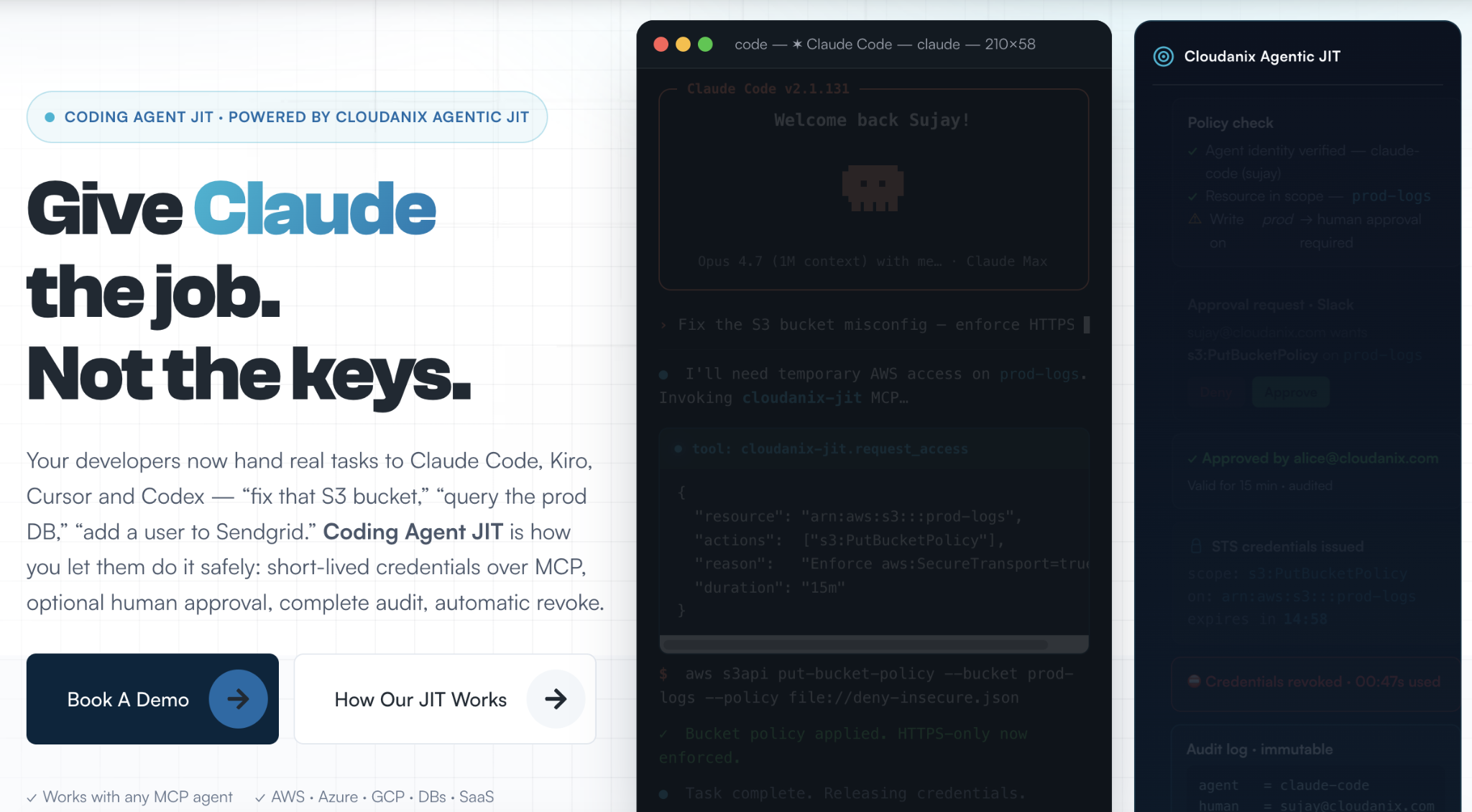
Credentials that expire for AI coding agents. Coding Agent JIT uses an MCP server to create, scope and destroy credentials for agents such as Claude Code, Cursor and Kiro, with a human in the loop for sensitive requests. The agent gets what it needs for the task and nothing that lingers afterwards. A trace that records one of those credentials records something that has already been revoked.
Stopping secrets before they leave the machine. The Coding Agent Firewall adds on-host data loss prevention, so secrets and personal data are blocked before an agent sends them out, including secrets that an agent writes into commands and files. Code Security scans pull requests and full git history for hardcoded credentials, and can fail a pull request that introduces one. See secret-aware PR quality gates.
Vendor and pipeline access without standing keys. Agentic JIT lets a pipeline or service register once and request elevated access through an SDK call for a few seconds, which then revokes itself. Cloud JIT applies the same request, approve, time-boxed grant, auto-revoke lifecycle to people and third parties in AWS, Azure and GCP, with identity-stamped audit logs written to your own S3 bucket. For third-party patterns, see mastering third-party access with JIT.
Knowing which identities exist. Non-human identity visibility and CIEM show service accounts, keys and roles across your clouds, which are stale, and what each could reach. That is the inventory in Step 2, kept current.
What this does not do. Cloudanix does not remove a malicious extension from a laptop or decide which extensions your developers may install. It does not revoke a key that a vendor has already leaked, and it does not clean data that has already been shared. It limits what a credential can do and how long it lives, so that one exposed key is a smaller event.
Quick Reference Checklist
- Checked every developer machine for
claude-code2.1.312 and 2.1.313 - Reviewed
~/.ssh/authorized_keyson any machine that had them - Rotated credentials an agent could read, highest privilege first
- Listed every key issued to AI and data vendors, with owner and end date
- Restricted vendor keys by action, resource and source location
- Scanned logs, traces and exports for secrets before sharing them
- Set an extension allowlist and version pinning for developer editors
- Moved agents and pipelines to short-lived, task-scoped credentials
- Written a “vendor breached” runbook
Key Takeaways
- Cursor’s update describes a chain: an exposed vendor key, a copied bucket, unredacted credentials in traces, access to internal tools, then a malicious extension served for about 11 hours to at most 5,000 users.
- The affected extension versions are 2.1.312 and 2.1.313. Uninstalling is not enough on its own.
- This was a vendor-key and data-handling failure, not a flaw in Anthropic’s product, and Open VSX never held the malware, per Cursor.
- Logs and agent traces are data stores. Redact secrets before data is shared, not after.
- The strongest defense against this class of incident is credentials that expire and are scoped to a task, so a copy found later is worthless.
Want to see which keys, service accounts and agent credentials in your environment never expire, and what each could reach? Book a session and we will map it with you.
People Also Read
- A Dozen AI Developer Platforms Breached in a Month: Why Your AI Provider Keys Are Now Resale Inventory
- When the AI Coding Agent Becomes the Attacker: Lessons From the Cursor Breaches
- Why AI Coding Agents Become an Identity and Credential Risk
- 24,000 Secrets Sitting in MCP Config Files: Why AI Agents Need JIT, Not Better Key Vaulting
- The Aokigahara Infostealer Is Hunting Your AI Coding Assistant Tokens
- Cloudanix: Coding Agent JIT
Related Resources
- AI Coding Agents Are Leaking Credentials: What Security Teams Need to Know
- Governing CI/CD Pipeline Credentials Without Standing Secrets
- Free Vendor Risk Assessment Template (Including Questionnaire)
- What is Software Supply Chain Security?
- What is Secrets Sprawl?
- What is Third-Party Risk Management?
- Cloudanix Non-Human Identity Security
- Cloudanix Code Security