

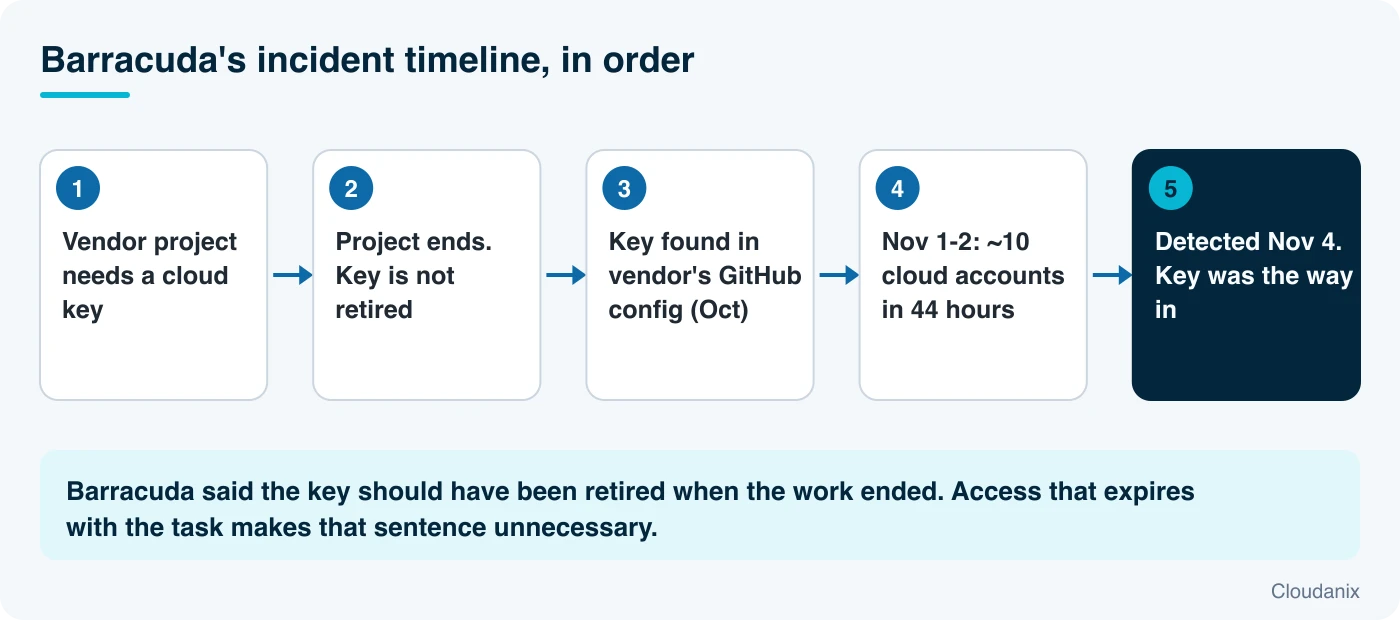
Barracuda Networks sells network and email security. On November 16, 2026, it described how an attacker got into its own cloud environment earlier this month. The way in was a cloud access key that Barracuda had given to an outside vendor for a past project. The project ended. The key was never switched off. According to Barracuda, the attacker then used an AI penetration-testing framework called ARTEX to move through roughly ten cloud accounts in 44 hours.
Barracuda’s own summary of the cause is short and unusually direct: it did not retire the key when the vendor finished the work, and that is on the company. This is a useful incident to study because it is so ordinary. Nearly every organization has a key, account or role that was created for a project, a contractor or a pilot and then forgotten.
This post explains what Barracuda reported, defines the terms it relies on, shows why “finished project, live key” is so dangerous when attackers use automation, and gives a practical process for making sure outside access ends when the work does. It is written for engineers who will run the commands, and for the security, procurement and compliance people who decide how vendor access is approved.
Primary source: BleepingComputer’s report on Barracuda’s disclosure. We could not open Barracuda’s own post directly, so the company’s statements are as quoted there. Background on ARTEX comes from BleepingComputer’s report on the FBI advisory. Barracuda describes some conclusions as its belief, and we preserve that wording. Commands and policies are our own guidance and should be tested first.
Who Should Read What
- CISOs and security leaders: “Why This Keeps Happening,” Step 1 and “Key Takeaways.” The fix is a lifecycle, not a tool.
- Cloud, platform and DevOps engineers: Steps 2 to 5 have commands you can run today.
- Procurement, vendor management and legal: Step 1 and Step 6. Contracts and onboarding forms are where access end dates should start.
- Compliance and audit teams: Steps 1 and 6. Auditors increasingly ask who had access, why, and when it ended.
- Managed service providers and consultancies: the final section on what the vendor side should do. Your customers’ keys are in your repositories.
What Happened
Here is what Barracuda reported, as relayed by BleepingComputer, with the plain meaning of each term.
The access key. An access key is a pair of values that lets a program or person sign in to a cloud account without a password. Unlike a password tied to a person, a key often belongs to no one, never expires on its own, and can be used from anywhere. Barracuda had issued one to a third-party vendor, a company working in AI, for the length of a past project.
The mistake. The project finished. Barracuda says it did not retire the key when the work ended. In the company’s words, that is on it.
How the attacker got it. Barracuda believes the attacker stole the key from the vendor in October. The key was stored in a configuration file in the vendor’s GitHub repository. A repository is a store of code and files, and a configuration file is where programs keep their settings. When a secret is saved in one, anyone who can read the repository, or any copy of it, can read the secret. This is a very common way for keys to leak, and automated tools search public repositories for them constantly. We described that exact search in our post on AI agents scanning GitHub for secrets.
The intrusion. Between November 1 and 2, the attacker accessed approximately 10 of Barracuda’s cloud accounts over 44 hours. Barracuda discovered the activity on November 4. It used credentials found in one system to move through the company’s data analytics environment, source-code repositories and Kubernetes clusters. Kubernetes is the system many companies use to run and manage containers (packaged applications).
The tool. Barracuda says the attack used machine-style labels, particular probing methods and built-in hunting routines that match ARTEX, an open-source AI penetration-testing framework. It described a “machine-speed intrusion.” The FBI warned the same week that ARTEX can take some intrusions from first contact to privileged access in under three hours. We cover that advisory in The FBI Warns That ARTEX Can Take an Attacker From First Contact to Privileged Access in Under Three Hours.
What the attacker tried to do.
- Look for crypto-related secrets. The attacker’s commands targeted cryptocurrency-related secrets, including private keys, Ethereum keystore files and seed phrases. Barracuda believes the motive was financial, though it does not rule out that this was a diversion from the real goal.
- Stay in. The attacker tried to set up persistence by deploying a container that mounted the host’s file system, which would expose credentials stored on the host.
- Create a new administrator. A separate attempt to create a new cloud administrator identity was blocked.
Customer impact. The attacker reached a system that stores customer integration credentials for Barracuda XDR. Barracuda found no evidence that those credentials were accessed or stolen. As a precaution, it asked potentially affected Managed XDR Cloud or Monitored Endpoint customers to revoke and recreate their integration credentials. Customers who received no direct message were told they need to take no action.
A pattern. Barracuda noted the attack closely resembles a recent incident at the cloud hosting provider Railway, which also involved credential chaining and the apparent use of ARTEX.
Why This Keeps Happening
Access is easy to give and hard to take back
Granting access takes one request. Ending it takes someone to remember, know where the key lives, and have the authority to revoke it. Projects end on calendars. Keys end only when a person acts. Without a recorded owner and end date, the default outcome is that nobody ends it.
The vendor’s habits become your exposure
The key leaked from the vendor’s repository, not from Barracuda’s. When you give an outside party a long-lived credential, your security depends on how well they store it. You rarely get to inspect that. The same pattern appeared in Cursor’s breach through a key exposed at its vendor Fireworks AI.
Automation removes the grace period
A forgotten key used to be a latent risk that a human attacker had to stumble on. An automated agent with a list of leaked credentials tries them all, quickly, and follows what it finds from one system to the next. Barracuda’s attacker went from a single key to analytics, source code and Kubernetes within 44 hours. The time you used to have to discover and clean up forgotten access has shrunk.
One key reached many systems
The key gave the attacker a foothold, and credentials found inside the first system opened the next. That chain is the standard shape of a cloud breach: the first credential is rarely the goal, it is the key to the next one. The size of the final damage depends on how much each step can reach.
The Protection Guide
Step 1: Give every outside access an owner, a purpose and an end date
Before any vendor, contractor or partner gets access, record:
- Who owns it on your side (a named person, not a team alias)
- What it is for (the project or ticket)
- What it can do (specific systems and actions)
- When it ends (a date, not “when the work is done”)
- How it ends (who revokes it, and how that is confirmed)
Put the end date in the contract, the onboarding form and a calendar or ticket. When the date arrives, the default should be that access ends unless someone renews it with a reason.
Step 2: Find every access key you have issued, and how old it is
# AWS: report on every IAM user and key, then show keys and last use
aws iam generate-credential-report
aws iam get-credential-report --query Content --output text | base64 -d \
  | cut -d, -f1,9,10,11,14,15,16

# AWS: details for one key
aws iam list-access-keys --user-name VENDOR_USER
aws iam get-access-key-last-used --access-key-id AKIAEXAMPLEKEYID

# Google Cloud: service account keys (user-managed keys are the risky ones)
gcloud iam service-accounts list --format="value(email)" | while read sa; do
  echo "== $sa"; gcloud iam service-accounts keys list --iam-account="$sa" --managed-by=user
done
Look for: keys older than 90 days, keys not used in 30 days or more, keys attached to human or vendor users instead of roles, and any vendor name in a user or role name. For each one, ask: who owns this, and is the work finished?
Step 3: Retire what is finished
# AWS: deactivate first (reversible), then delete after a quiet period
aws iam update-access-key --user-name VENDOR_USER \
  --access-key-id AKIAEXAMPLEKEYID --status Inactive

# After confirming nothing broke:
aws iam delete-access-key --user-name VENDOR_USER --access-key-id AKIAEXAMPLEKEYID
Deactivating first is safe: if something breaks, you can turn it back on. Also review cross-account roles that third parties can assume, and remove those whose trust policy still lists a finished vendor’s account.
Step 4: Narrow what remains
For access that must stay, limit what it can do and where it can be used from:
{
  "Version": "2012-10-17",
  "Statement": [{
    "Effect": "Deny",
    "Action": "*",
    "Resource": "*",
    "Condition": {
      "NotIpAddress": { "aws:SourceIp": ["203.0.113.0/24"] },
      "BoolIfExists": { "aws:ViaAWSService": "false" }
    }
  }]
}
This example denies use from outside an allowed address range (replace the sample range with the vendor’s). Combine it with a permissions boundary that caps what the vendor can ever be granted. See AWS IAM permission boundaries and why you shouldn’t ignore them.
Step 5: Watch for the early signs
Barracuda’s attacker was inside for about 44 hours before the company noticed on November 4. Faster detection narrows the window. If CloudTrail goes to CloudWatch Logs, this query finds unusual use of one identity:
fields @timestamp, userIdentity.arn, userIdentity.accessKeyId, sourceIPAddress, eventName
| filter userIdentity.accessKeyId = "AKIAEXAMPLEKEYID"
| stats count() as calls, count_distinct(eventName) as distinct_actions by sourceIPAddress, bin(1h)
| sort calls desc
Alert on any of these: use of a vendor key from an unfamiliar address, calls from an identity that was quiet for months, attempts to create users, roles or keys, and containers that mount the host file system (Barracuda’s persistence attempt). A “created a new administrator” event should page someone.
Step 6: Keep keys out of repositories, yours and your vendors’
- Scan your own repositories and their full history for credentials (
gitleaks,trufflehog), and block new ones at pull-request time. - Make it a contract term that vendors must not store your credentials in code or configuration files, must use a secrets manager, and must tell you quickly if anything leaks.
- Prefer no key at all. Where the vendor runs in a cloud account, let them assume a role for a short session. A role that issues credentials lasting an hour leaves nothing durable to find in a repository.
Step 7: Write the “vendor access” runbook
When a vendor reports a problem, or a key shows up in the wrong place, you will not have time to design a response. Write down:
- Where the register of vendor access lives and who updates it
- How to revoke each type of access (cloud key, SaaS login, VPN, database account)
- Who must be told, and how fast
- How to check logs back to the earliest plausible date
- How to confirm that the revoked access is truly dead
Where Cloudanix Fits
Barracuda’s own lesson is that access should have ended with the project. The most reliable way to make that happen is to make ending automatic.
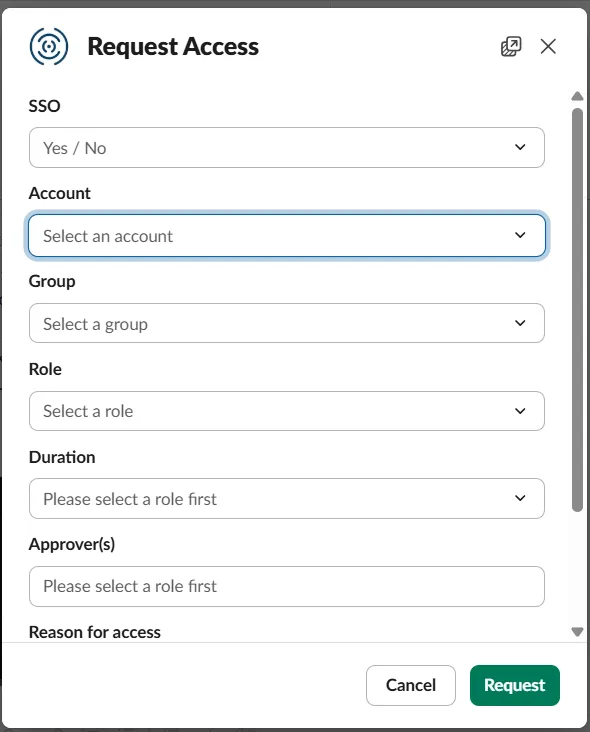
Vendor access that expires on its own. Cloud JIT gives third parties time-boxed access to AWS, Azure and GCP through your existing identity provider (it works with AWS IAM Identity Center, Entra ID, Okta, JumpCloud, Google Cloud Identity, OneLogin and Ping). The lifecycle is request, approve, time-boxed grant, auto-revoke. Approvers can be configured per environment, from auto-approve for read-only to a quorum for production administration. When the window closes, the access is gone without anyone remembering to remove it. Every request, approval, session and revocation is logged with the real person’s identity to an S3 bucket that you own. See contractor access and mastering third-party access with just-in-time access.
Customer evidence. In the Finfinity case study, a fintech marketplace that works with more than 50 financial institution partners used Cloudanix JIT Cloud with CSPM and reported a 100% reduction in privileged access exposure and zero third-party risk, with vendor standing access in AWS eliminated. Treat that as one customer’s experience, not a guarantee.
For machines and AI vendors. Agentic JIT lets a pipeline or service register once and request elevated access through an SDK call that lasts seconds and then revokes itself. A vendor integration built this way has no long-lived key to leak into a configuration file.
Finding the forgotten keys. Non-human identity visibility and CIEM list service accounts, keys and roles across AWS, Azure and GCP, flag the stale and over-permissioned ones, and show what each could reach. That is the inventory in Steps 2 and 3, kept current instead of rebuilt before each audit. CSPM ranks the results by exposure, environment and data sensitivity with contextual severity.
Spotting the burst. Cloud UEBA and cloud detection and response look for identities behaving unlike themselves, such as an old key suddenly active from a new place, which is the signal in Step 5.
What this does not do. Cloudanix cannot see into a vendor’s own repository, and it cannot retire a key that was never brought under its control. If a long-lived key already exists outside JIT, it needs to be found, rotated and replaced. JIT governs the access that flows through it. The aim is to make the safe path the easy one, so that new vendor access is born with an end date.
Quick Reference Checklist
- Every vendor access has a named owner, purpose, scope and end date
- End dates are in contracts, onboarding forms and a ticket or calendar
- Listed all access keys, with age and last use
- Deactivated, then deleted, keys for finished projects
- Reviewed cross-account roles that third parties can assume
- Limited remaining vendor access by action, resource and source address
- Added alerts for vendor key use from new places and for new admin creation
- Scanned repositories for secrets, and made “no keys in code” a vendor contract term
- Moved vendors from keys to short-lived role sessions where possible
- Wrote and rehearsed a vendor-access runbook
Key Takeaways
- Barracuda says an attacker used a cloud key issued to a vendor for a finished project, believed to have been stolen from the vendor’s GitHub repository in October, and reached about 10 cloud accounts over 44 hours between November 1 and 2.
- Barracuda attributes the attack to ARTEX and says the failure to retire the key was its own.
- The attacker moved from one credential to analytics, source code and Kubernetes, and tried to create a new admin identity, which was blocked.
- The pattern repeats across recent incidents: a key given to a vendor, stored in code, found by automation.
- Access that ends automatically, with a recorded owner and date, removes the step that failed here.
Want to see which vendors, contractors and service accounts still hold access to your cloud, and which of it should have ended? Book a session and we will map it with you.
People Also Read
- The FBI Warns That ARTEX Can Take an Attacker From First Contact to Privileged Access in Under Three Hours
- A Vendor’s Exposed Key Put a Fake Claude Code Extension in Cursor’s Marketplace
- AI Agents Are Scanning GitHub for Your Secrets, and One Reached Azure Key Vault in Five Minutes
- Zeabur Is Shutting Down After a Breach Built on Plaintext Credentials
- The ASOS Breach: One Stolen Employee Login, and Why Standing Access Is the Real Exposure
- Cloudanix: Contractor Access