
Customer Snapshot
| Attribute | Details |
|---|---|
| Industry | Conversational AI / SaaS Platform |
| Cloud Environment | AWS (primary), Azure (significant multi-region presence), GCP (smaller footprint) |
| Workloads | 1,000+ VMs, Kubernetes-heavy container estate, Docker on VMs |
| Code & CI | GitHub, Jenkins for CI |
| Identity | Keycloak for SSO |
| Prior Stack | Wazuh (VM security), SonarCloud (SAST/secrets), Snyk (SCA), Nessus (VA scans) |
| Team Size | Small central InfoSec team, large distributed engineering org |
| Cloudanix Scope | CSPM, Code Security, Workload/Container Security, JIT Access |
The Situation: Secure in Places, Fragmented Everywhere
This organization runs a mature, multi-cloud engineering operation. The bulk of their infrastructure is on AWS, with a significant Azure presence spanning multiple regions and a smaller GCP footprint. Their workloads run across more than a thousand virtual machines and a container estate where most services are deployed on Kubernetes. Their code lives in GitHub, their CI runs on Jenkins, and identity is handled through Keycloak.
They were not starting from zero. Over time they had assembled a stack of capable point tools: an open-source security monitoring platform for VM telemetry and vulnerability detection, one vendor for static analysis and secrets scanning, another for software composition analysis, and a separate scanner for vulnerability assessments. Each tool did its job. The problem was that none of them talked to each other.
The recurring theme across every conversation with this team was the same: they did not want more systems. They wanted one source of truth. A central security team covering code, cloud, workloads, and identity across three clouds cannot afford to spend its days context-switching between five dashboards and manually correlating findings that were never designed to be correlated.
The Core Challenge
A small central security team was responsible for a large, fast-moving, multi-cloud environment — but the tools they relied on produced siloed findings. VM vulnerabilities lived in one place, code findings in two others, cloud posture in a fourth, and identity access was managed manually. There was no single view that could answer “what is the actual risk here, and what should we fix first?”
Where the Fragmentation Showed Up
1. VM Vulnerability Management That Generated More Noise Than Signal
The team ran an open-source security monitoring agent on their most critical machines. It worked, but it came with the operational cost that open-source security tooling often carries at scale: management overhead, upgrade cycles, a high volume of notifications, and a false-positive rate that eroded trust in the signal. With more than a thousand VMs in the estate and only a subset instrumented, the team faced a choice between expanding a noisy system or leaving machines uninstrumented. Neither was acceptable.
What they wanted was not necessarily to rip out what they had — it was for the vulnerability management layer to actually solve the problems that mattered: management, upgrades, false positives, and notification volume. If those were handled, they were open to a managed approach.
2. Container and Kubernetes Workloads Left to Manual Effort
Most of their workloads ran on Kubernetes, with some Docker containers deployed directly on VMs. Container and workload security was, by their own description, an open area — handled manually, when someone had time. For a platform company shipping continuously, “when someone has time” is not a security posture. Images, running containers, and the VMs underneath them were an attack surface with no continuous, automated coverage.
3. Code Security Split Across Two Tools With Gaps in Both
Static analysis and secrets scanning ran through one platform; software composition analysis ran through another. This created the classic fragmentation problem: two dashboards, two false-positive profiles, two sets of findings to reconcile, and no unified view of code-level risk across repositories. There were repo-count discrepancies between what the SCM showed and what the tools reported, package-level vulnerabilities that one tool caught and the other missed, and no single prioritized list of what to fix.
The static analysis platform in particular created friction: it was largely a view-only dashboard with no straightforward way to route individual findings to the developers who needed to act on them. The team had resorted to periodic manual exports to get findings into developers’ hands — a quarterly or six-monthly exercise that does not fit a team shipping every week.
4. Identity and Access Managed by Hand
Access to cloud consoles, VMs, and Kubernetes was governed through existing SSO and manual processes. There was no time-bound, approval-gated elevation and no identity-stamped audit trail of who accessed what and when. Non-human identities — Jenkins pipelines and service accounts — had even less oversight than human ones.
The Cloudanix Approach: One Platform, One Graph
Cloudanix was introduced as a CNAPP+ platform — the core CNAPP pillars (CSPM, CWPP, CIEM, code/shift-left) plus the adjacent surfaces most stacks leave uncovered: Just-In-Time access and workload protection, all running on a single asset graph and a single rule engine. The consolidation argument was not “trade depth for convenience.” It was that findings which live in separate tools cannot be correlated, and correlation is where a small team gets its leverage back.
Unified Cloud Posture Across AWS, Azure, and GCP
Cloudanix operates as an independent CSPM layer across all three clouds, capturing control-plane events in real time and surfacing misconfigurations, IAM risk, and least-privilege recommendations in one dashboard. Rather than one posture tool per cloud, the team gets a single model across AWS, Azure, and GCP — multi-cloud parity with one place to look.
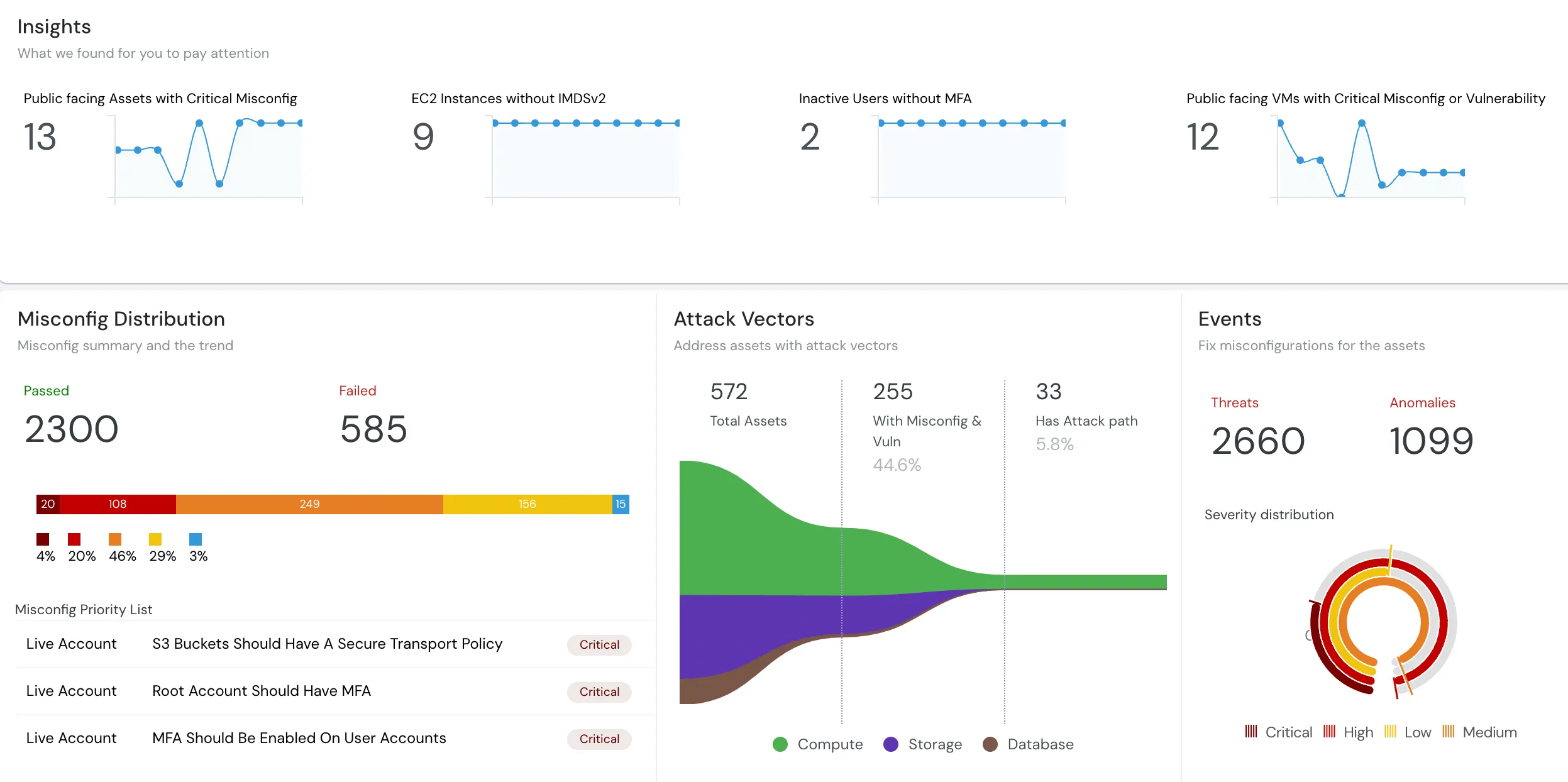
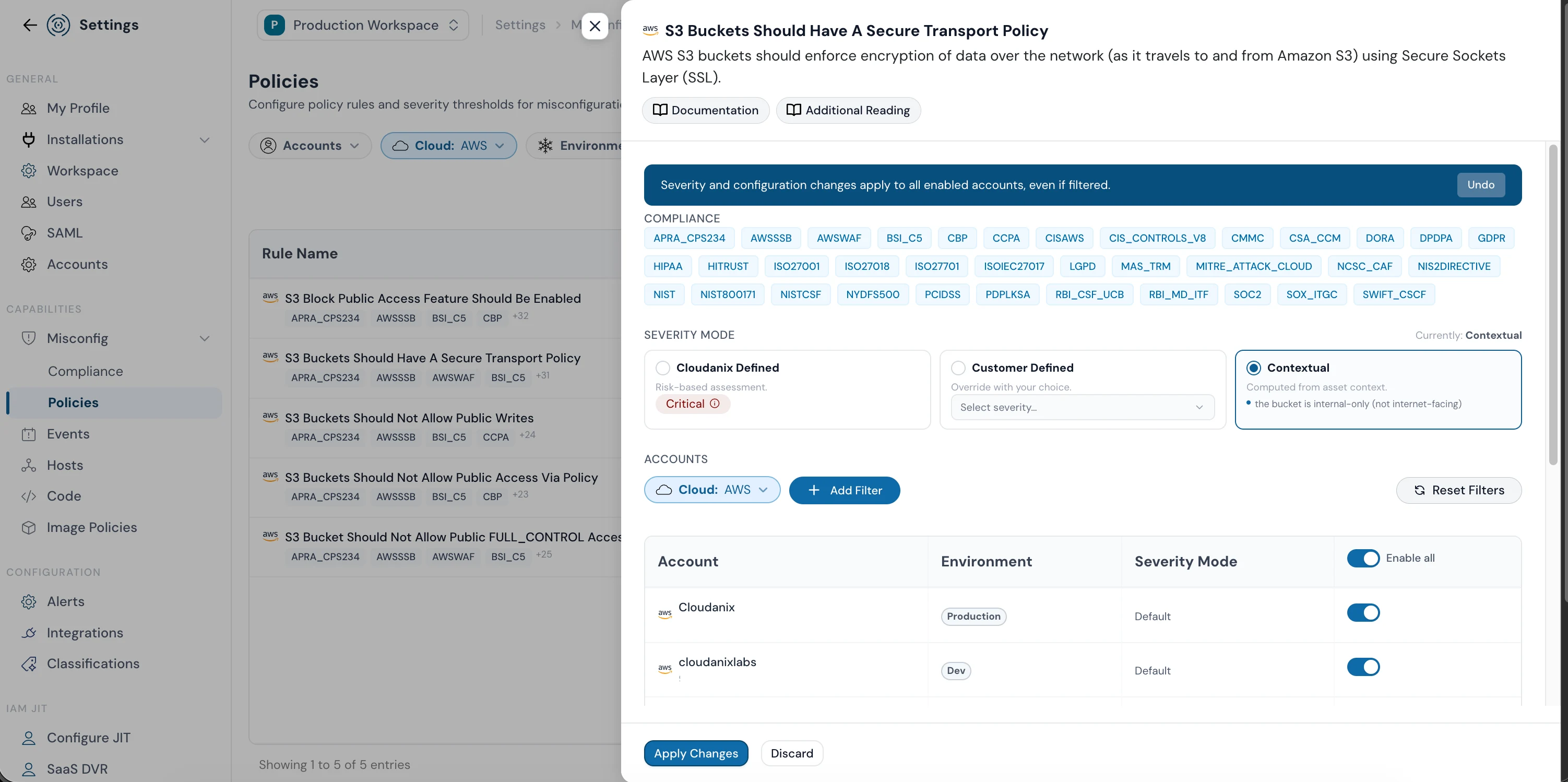
Crucially, findings are not flat. Contextual severity recomputes the severity of each finding per asset — factoring in exposure, environment, data sensitivity, and identity — so an internal-only development resource is not badged the same as an internet-facing production bucket. That is the single biggest lever against alert fatigue for a small team.
Workload Protection for VMs and Containers
Cloudanix’s Workload Protection covers the VM and container estate as one layer. For VMs, this addresses the exact pain the team had with their prior monitoring setup: managed vulnerability detection without the management, upgrade, and notification-volume burden of a self-run open-source deployment. For containers, image scanning and runtime protection extend across both Kubernetes and Docker-on-VM deployments — closing the “handled manually when we get time” gap with continuous, automated coverage.
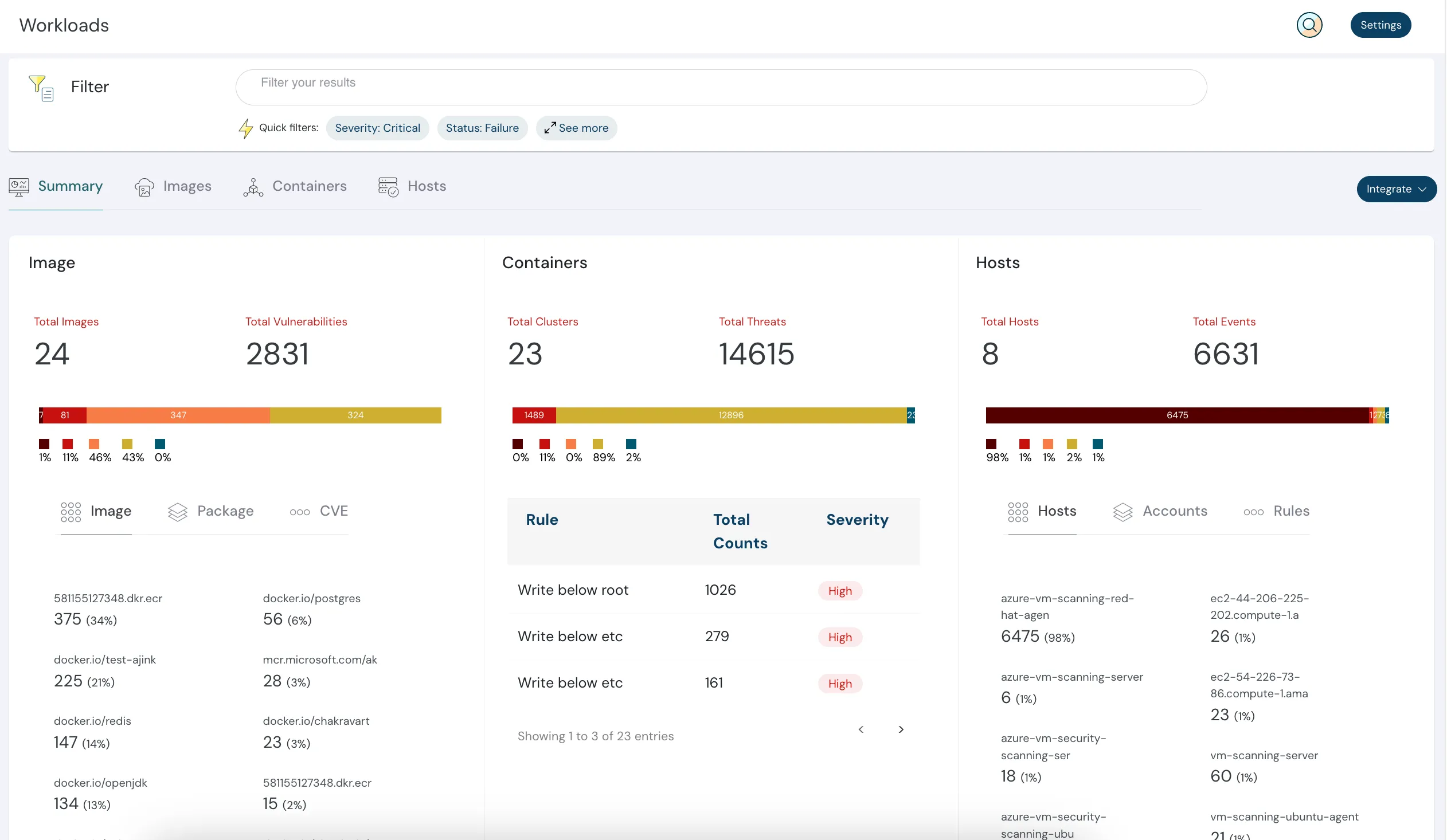
Consistent with an honest posture on architecture: most coverage is agentless (posture, identity, code, control-plane events), while runtime VM and container telemetry uses a lightweight agent where it genuinely earns its place.
Code Security in One Place
Cloudanix integrates directly with GitHub to run SAST, SCA, secrets detection, and IaC scanning as a single layer, with findings surfaced as pull request annotations at the relevant code line. This collapses the two-tool split into one unified findings view across all repositories, deduplicated and ranked by severity. Secrets detection ships with 2,000+ patterns plus bring-your-own-pattern support, and findings arrive with GenAI-powered remediation guidance rather than a bare CVE number.
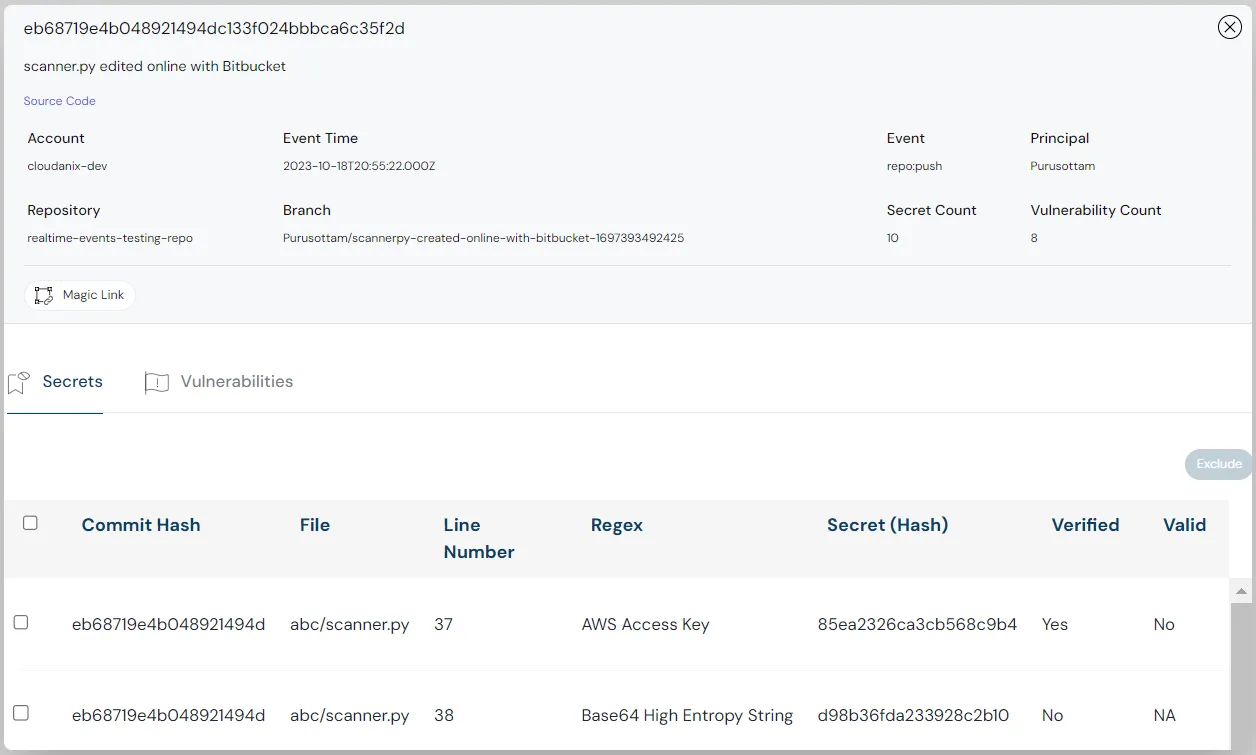
For a team that previously had to manually export findings to get them to developers, the model is different: developers are invited with appropriate roles and see findings in their own workflow — no periodic export exercise required.
JIT Access on Top of Existing SSO
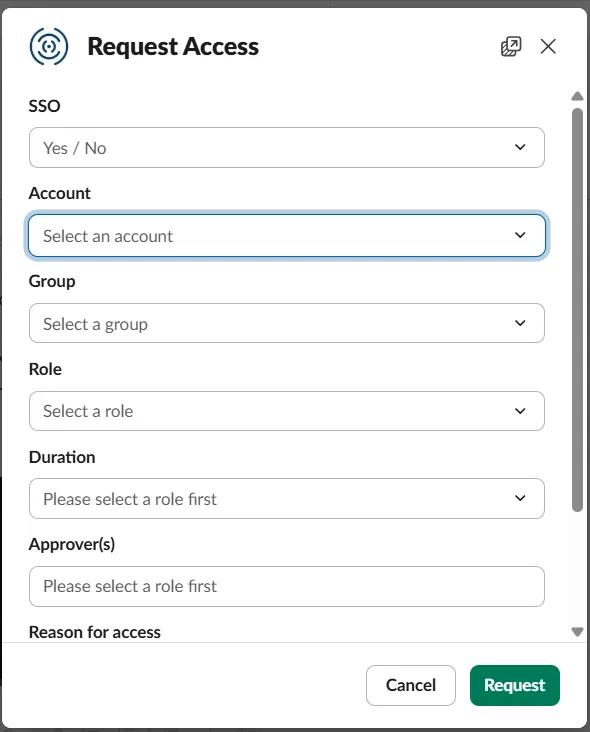
Cloudanix’s Just-In-Time access provides time-bound, approval-gated elevation for cloud consoles, VMs, and Kubernetes — and does so on top of the identity provider the team already runs. Cloudanix does not replace SSO; it operates as an access layer after authentication, flipping assignments at the identity layer. It extends the same request → approve → time-boxed grant → auto-revoke lifecycle to non-human identities such as Jenkins pipelines and service accounts, with an identity-stamped audit trail for every session.
Why Consolidation Is a Security Decision, Not Just an Operational One
When security tools are siloed, findings are siloed too. A vulnerable container image, an over-privileged service account, and an internet-facing misconfiguration may each be visible in their respective tools — but the attack path they collectively enable is invisible unless someone manually connects the dots. For a small team covering three clouds, that manual connection is time they do not have.
Consolidating onto one platform is about gaining the context that siloed tools structurally cannot provide, and reducing the overhead of managing, upgrading, and reporting across five separate systems that were never designed to talk to each other. It also simplifies compliance: one platform means one audit trail and one reporting surface.
The Outcome
The organization moved toward a single platform spanning cloud posture, workload and container security, code security, and JIT access across its AWS, Azure, and GCP environments — replacing a stack of point tools with one dashboard and one asset graph. The central security team gained a unified, prioritized view of risk across code, cloud, workload, and identity, without manual correlation between tools.
Key Results
- One Source of Truth: Single dashboard across code, cloud, workload, and identity
- Multi-Cloud Parity: AWS, Azure, and GCP under one model
- Less Noise: Contextual severity cuts alert fatigue without hiding findings
- Managed VM & Container Coverage: Vulnerability detection without the self-run overhead
- Unified Code Findings: SAST, SCA, secrets, and IaC in one prioritized view
- Findings in Developers’ Hands: Role-based access, no manual export exercise
- Zero Standing Privilege: JIT on top of existing SSO, extended to non-human identities
See What Cloudanix Can Consolidate for Your Team
If your security stack is a collection of point tools with no unified view — a separate system for VMs, another for containers, two for code, and manual access management on top — Cloudanix was built for exactly that problem.
Schedule a Demo to see the platform across code, cloud, workload, and identity in one dashboard.
Related Resources
- What is CNAPP - Cloud Native Application Protection Platform
- What is CSPM?
- What is CWPP?
- What is Code Security?
- What is IAM JIT (Just-In-Time Access)?
- Understanding Non-Human Identities
- From Tool Sprawl to a Single Dashboard: E-Commerce Cloud Security
- Container Security and Real-Time Visibility for Modern Cloud
- Top 10 CNAPP Tools in 2026: Complete Guide













