
Database Activity Monitoring (DAM) is a critical security technology that gives organizations real-time visibility into who is accessing their databases, what queries they are running, and whether any activity violates security policies. The inability of traditional perimeter defenses (such as firewalls) to protect data from insider threats and privileged users led to the introduction of database activity monitoring. Before DAM, organizations relied solely on slow, post-incident native database logs, which were easily circumvented or incomplete. This made real-time alerting and granular auditing nearly impossible, leaving a critical security gap in data protection and compliance.
What is Database Activity Monitoring?
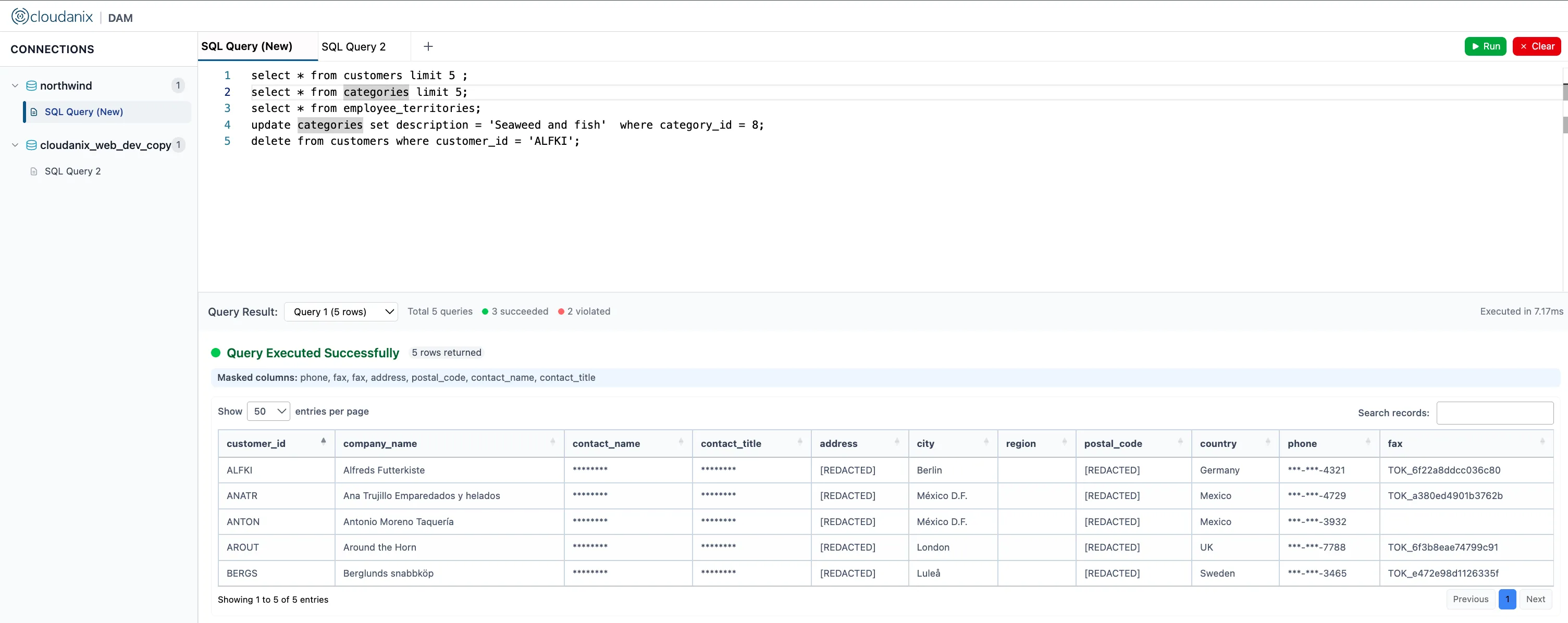
Database Activity Monitoring (DAM) is a security technology that captures, analyzes, and records all events and transactions occurring in real-time between database users/applications and the database itself. In short, DAM answers a fundamental question: who accessed what data, when, from where, and what did they do with it?
In essence, DAM provides an independent layer of visibility into the “data plane” by:
- Auditing and Logging: Monitoring and recording details like the specific SQL queries executed, the results returned, the identity of the user, and the time of the transaction.
- Real-Time Protection: Identifying and alerting on policy violations or suspicious activities, such as unauthorized access to sensitive tables, changes to the database schema, or signs of a SQL injection attack.
- Enforcing Security Policies: Serving as a primary control point to enforce the principle of least privilege and provide an unalterable audit trail necessary for regulatory compliance (e.g., GDPR, HIPAA, PCI DSS).
What is the difference between Database Access Management and Database Activity Monitoring?
Often, there is confusion between Database Access Management (DAM) and Database Activity Monitoring (DAM) because they both use the same acronym and are closely related security disciplines.
While one is about prevention and control, the other is about visibility and detection. They are best viewed as complementary pillars of an overall data security strategy.
Database Access Management (DAM) - The Gatekeeper
Database Access Management refers to the policies, processes, and technologies focused on governing and securing who can access what data, when, and under what conditions. It is a proactive, pre-access control mechanism.
- Primary Goal: Control and Prevention. To block unauthorized users and actions before they can occur.
- Core Functions:
- Authentication: Verifying the user’s identity (e.g., MFA, SSO).
- Authorization: Defining and enforcing permissions (e.g., RBAC or ABAC).
- Privilege Management: Implementing Just-in-Time (JIT) Access to remove static, standing privileges.
- Focus: Identity and Permissions. Who you are and what you are allowed to do.
- Key Output: A secure connection where the user has the minimum necessary privileges.
Database Activity Monitoring (DAM) - The Security Camera
Database Activity Monitoring (the industry-standard definition of DAM) refers to a security technology that observes, records, and analyzes every action performed inside the database system. It is a reactive and real-time visibility control, operating during and after access.
- Primary Goal: Detection and Auditing. To identify suspicious or unauthorized behavior and maintain an unalterable log for compliance and forensics.
- Core Functions: Real-time Logging: Capturing every SQL query (SELECT, DML, DDL), results, and privileged command, independently of native database logs. Anomaly Detection: Identifying activities that deviate from the normal baseline (e.g., a DBA querying a sensitive table they never normally touch). Alerting: Generating immediate alerts for policy violations or signs of threat.
- Focus: Behavior and Transactions. What the user actually did, when, and how.
- Key Output: A persistent, forensic-quality audit trail and real-time threat alerts.
How does Database Activity Monitoring (DAM) work?
The working process of Database Activity Monitoring (DAM) in the cloud context fundamentally follows the same four steps as Database Access Management, but the implementation methods (Step 1) are adapted due to the constraints of Database-as-a-Service (DBaaS) platforms like Azure SQL Database, AWS RDS, or Google Cloud SQL. In these managed environments, traditional host-based agents often cannot be installed.
Here is the step-by-step process of how a DAM solution operates:
Step 1: Activity Capture
Because you typically can’t install an agent on the underlying database server (the “host”) in a DBaaS model, cloud DAM solutions rely on two primary, non-intrusive methods:
- API/Log-Based Collection: This is the most common method. The DAM solution connects to the cloud provider’s native auditing features to collect the activity logs and events. For example, it might integrate with Azure Auditing or AWS CloudTrail/RDS Audit Logs to pull all recorded SQL statements and session details.
- Gateway or Proxy Deployment (Network-Based): The solution deploys an independent, proxy-based gateway (often a container or VM) that sits between the users/applications and the cloud database endpoint. All traffic passes through this gateway, allowing the DAM solution to sniff, intercept, and record the SQL wire protocol transparently, achieving network-based monitoring.
- Virtual Appliance/Sidecar: For Kubernetes (K8s) or Infrastructure-as-a-Service (IaaS) database deployments (e.g., SQL Server on an Azure VM), a lightweight DAM agent might still be deployed as a sidecar container or a virtual appliance on the same virtual network.
Step 2: Interpretation and Normalization
This step remains largely unchanged, but the normalization process is crucial in multi-cloud or hybrid environments:
- Reconstruction and Translation: Raw log data or intercepted packets are reconstructed into complete SQL statements (DML, DDL, DCL).
- Normalization Across Services: The DAM system normalizes the audit records, whether they came from an Azure SQL audit log, an AWS RDS log, or a containerized database, into a single, unified format. This is vital for centralized reporting and applying consistent policies across a heterogeneous cloud database fleet.
Step 3: Analysis and Enforcement (Centralized Cloud Policy)
The analysis phase is often enhanced by the scalability of the cloud environment and its integrated identity services:
- Policy Correlation: Normalized activities are checked against security policies. Crucially, in the cloud, these policies often integrate directly with Identity and Access Management (IAM) systems like Microsoft Entra ID or AWS IAM to resolve the identity of the user who executed the query.
- Behavioral Anomaly Detection: Cloud DAM platforms leverage scalable cloud infrastructure to run machine learning algorithms against large volumes of historical data to establish baselines of normal behavior and flag anomalies in real-time.
- Real-time Alerting and SIEM Integration: Upon detecting a threat (e.g., unauthorized data deletion), the system generates immediate alerts that are typically streamed directly to a centralized Security Information and Event Management (SIEM) tool (like Azure Sentinel or Splunk) for correlation with non-database events.
Step 4: Centralized Auditing and Compliance (Tamper-Proof Cloud Storage)
The cloud provides secure, cost-effective storage for the forensic trail:
- Secure Log Storage: The independent, comprehensive audit trail is securely stored in a scalable, tamper-proof cloud storage solution (e.g., an encrypted Azure Blob Storage account or S3 bucket). This storage is completely segregated from the original database to ensure a true separation of duties.
- Compliance Reporting: This centralized repository enables the generation of unified reports for auditors, proving that access and activity were monitored and controlled across the entire multi-cloud data estate.
In essence, DAM works by decoupling monitoring from access. Whether deployed via agents (on-prem/IaaS) or cloud-native integration/proxies (DBaaS), the system creates an independent, immutable, and normalized audit trail of every database event.
Database Activity Monitoring Architecture
Understanding database activity monitoring architecture is essential for selecting and deploying a DAM solution that matches your environment. The architecture defines how activity data flows from the database layer to the monitoring, analysis, and alerting systems.
Core Architecture Components
A complete database activity monitoring architecture consists of five layers:
- Data Source Layer — The databases being monitored: relational (PostgreSQL, MySQL, SQL Server, Oracle), NoSQL (MongoDB, DynamoDB), and data warehouses (Snowflake, Redshift, BigQuery).
- Collection Layer — The sensors or integration points that capture raw activity (agents, proxies, API collectors, or native log streams).
- Processing Layer — The normalization engine that parses, reconstructs, and correlates SQL statements with identity context (IAM, SSO, service accounts).
- Analysis Layer — The policy engine and ML models that evaluate activity against rules, baselines, and sensitive data classification.
- Action Layer — The output: real-time alerts, SIEM integration, automated responses (session termination, query blocking), dashboards, and compliance reports.
Architecture Patterns for Cloud Environments
| Pattern | Best For | Pros | Cons |
|---|---|---|---|
| Proxy/Gateway | DBaaS (RDS, Azure SQL, Cloud SQL) | Full SQL visibility, query blocking, no host access needed | Adds network hop; must handle TLS termination |
| API/Log-Based | Serverless and managed databases | Zero performance overhead on DB; native cloud integration | Slight delay (seconds to minutes); limited to what the provider exposes |
| Agent-Based | Self-managed databases on VMs or bare metal | Deepest visibility including local/stored-procedure activity | Requires host access; agent maintenance overhead |
| Sidecar/Service Mesh | Kubernetes and containerized databases | Scales with pods; no application changes | Adds complexity to orchestration; ephemeral pod challenges |
Multi-Cloud and Hybrid Architecture Considerations
Most enterprises run databases across AWS, Azure, GCP, and on-premises. A production-grade database activity monitoring architecture must:
- Normalize heterogeneous log formats: AWS CloudTrail, Azure Diagnostic Logs, and GCP Audit Logs each use different schemas. The processing layer must unify these into a single event format.
- Resolve identity across providers: Map cloud IAM roles, service accounts, and federated identities back to a single human or workload identity for accurate attribution.
- Store audit data in customer-controlled storage: For compliance and sovereignty, the audit trail should land in the customer’s own S3, Blob Storage, or GCS bucket, segregated from the monitoring vendor’s infrastructure.
- Support horizontal scaling: High-transaction databases (10,000+ queries per second) require the collection and processing layers to scale independently without introducing latency.
A well-designed database activity monitoring architecture ensures that no database interaction goes unrecorded, regardless of whether the access originates from a human, an application, a CI/CD pipeline, or an AI coding agent.
What are the benefits of DAM?
Implementing Database Activity Monitoring (DAM) in a cloud context provides a robust defense layer that satisfies both deep technical security requirements and broad non-technical governance and compliance needs.
Cloud DAM significantly shrinks the attack surface and provides unparalleled security visibility, regardless of the underlying database service (DBaaS or IaaS).
- Detection of Insider and Privileged User Threats: DAM monitors all activities of database administrators (DBAs) and privileged users, who often bypass perimeter security. Since this monitoring is independent of native database logs, privileged users cannot erase the audit trail of their actions, enabling true separation of duties.
- Real-Time Threat Detection and Alerting: It captures and analyzes database traffic and events in real-time, allowing security teams to immediately detect and receive alerts on suspicious behaviors, such as unauthorized data access, schema changes, or signs of a SQL injection attack.
- Comprehensive Auditing and Forensic Trail: DAM creates a persistent, immutable, and forensic-quality audit trail of every SQL query, user identity, and result set. This capability is essential for post-incident analysis and understanding the full scope of a breach.
- Anomaly and Behavioral Analysis: Modern DAM solutions use machine learning to establish a baseline of normal user activity. They automatically detect deviations from this baseline—such as a developer accessing production data they normally don’t touch—which helps flag sophisticated threats that policy checks might miss.
The visibility provided by DAM directly translates into better governance, reduced financial risk, and streamlined operations.
- Simplified Regulatory Compliance: DAM provides the necessary, detailed evidence (the “who, what, and when”) required to satisfy stringent audit requirements for standards like GDPR, HIPAA, PCI DSS, and SOX. It turns compliance from a manual burden into an automated reporting function.
- Reduction of Data Breach Risk and Cost: By providing real-time detection and preventing unauthorized data access or exfiltration, DAM significantly lowers the probability of a costly data breach.
- Support for Zero Trust Architecture: DAM is a critical technology for enforcing the “Verify Explicitly” and “Least Privilege Access” principles of Zero Trust. It continuously monitors that users, even trusted ones, are only accessing the resources they explicitly need, when they need them.
- Operational Efficiency and DBA Accountability: By centralizing audit logs and normalizing data across different database platforms (heterogeneous environments), DAM reduces the manual effort and performance overhead typically associated with enabling resource-intensive native database auditing features.
Cloud DAM provides independent, real-time visibility and control over all database activities, effectively closing the security gap left by perimeter defenses and fulfilling the stringent auditing requirements of cloud-native governance and compliance.
What are the challenges of implementing the Database Access Management tool, and how to overcome?
Implementing a Database Activity Monitoring (DAM) tool, especially in dynamic cloud environments, presents several technical and operational challenges.
Performance and Resource Overhead
-
Agent Overhead (Host-Based): Solutions that rely on installing an agent directly on the database server can consume CPU and disk resources with every query, potentially degrading database speed and responsiveness, especially under high transaction volumes.
-
Decryption Load: Monitoring encrypted traffic (common via SSL/TLS in cloud databases) requires the DAM solution to decrypt and re-encrypt the data stream to inspect the SQL payload. This process adds latency to the query execution and increases the system load.
Encrypted Traffic and Blind Spots
The method of deployment dictates the visibility of the DAM solution.
Network-based DAM (using taps or sniffing) will often miss encrypted traffic unless a man-in-the-middle or SSL decryption capability is implemented, which adds complexity. It can also fail to capture local database activity (e.g., stored procedures, scheduled jobs, or privileged users logging in directly on the host).
In Database-as-a-Service (DBaaS) environments, you cannot install host agents. This forces reliance on native cloud audit logs, which, while convenient, can sometimes lack the deep, granular, and independent context provided by agent-based monitoring.
Operational Complexity and Scalability
Managing a DAM solution across a large, hybrid environment is operationally demanding.
In hybrid or IaaS environments, managing, updating, and ensuring compatibility of agents across hundreds of databases running various OS versions and database versions (e.g., Oracle, PostgreSQL, SQL Server) creates a significant and costly operational burden.
Databases generate a massive amount of data, and logging every single query creates huge volumes of audit data. The DAM system must efficiently handle this data growth, or it risks leading to delays, data loss, or overwhelming security teams with unprioritized alerts (“alert fatigue”).
Contextualizing Activity and Alert Fidelity
A primary challenge is transitioning from raw activity logs to actionable security intelligence.
DAM captures the activity, but without sensitive data classification (knowing which data is highly sensitive, like PII or credit card numbers), security teams struggle to prioritize the immense volume of alerts and focus on genuine threats versus routine activity.
In complex, multi-tiered application environments, identifying the true end-user or the specific application code that initiated a transaction can be difficult. Without accurate correlation, the resulting audit log lacks the necessary accountability for compliance and forensics.
To address the challenges of implementing Database Activity Monitoring (DAM) in the cloud, a shift from traditional agent-based thinking to a cloud-native, hybrid model is required.
Database Activity Monitoring Best Practices
Following database activity monitoring best practices ensures that your DAM deployment delivers actionable security intelligence rather than overwhelming noise. These practices apply whether you run databases on-premises, in the cloud, or across a hybrid estate.
1. Start with Sensitive Data Discovery and Classification
Before configuring monitoring policies, identify and classify the data in your databases. Without knowing which tables contain PII, PHI, financial records, or intellectual property, you cannot prioritize alerts effectively. Pair DAM with Data Security Posture Management (DSPM) to maintain an always-current data inventory.
2. Implement Least-Privilege Access Before Monitoring
DAM works best when paired with strong access controls. If every developer has full admin rights, the signal-to-noise ratio in your audit logs will be poor. Use Just-in-Time (JIT) access to grant temporary, scoped privileges. Then DAM monitors what happens during those time-bound sessions.
3. Define Clear, Risk-Based Alerting Policies
Avoid the temptation to alert on everything. Structure your policies in tiers:
- Critical — Alerts on access to the most sensitive tables (cardholder data, authentication secrets), schema modifications (DROP, ALTER), and bulk data exports exceeding a threshold.
- High — Alerts on privileged user activity outside normal business hours, new connection sources, and failed authentication spikes.
- Medium — Alerts on access pattern deviations detected by behavioral baselines.
- Low/Log-Only — Routine read queries logged for forensic completeness but not actively alerted.
4. Monitor All Privileged and Service Accounts
DBAs, service accounts, CI/CD pipelines, and AI coding agents often have elevated privileges. These accounts should have the most stringent monitoring policies because they represent the highest-risk access paths. Ensure your DAM solution can distinguish between human and non-human identities.
5. Separate Audit Storage from Database Infrastructure
The audit trail must be independent and tamper-proof. Store DAM logs in a separate storage account (S3, Blob Storage, GCS) with:
- Write-once/immutable retention policies
- Encryption at rest and in transit
- Access restricted to security teams only (not DBAs)
6. Integrate with Your Security Ecosystem
DAM data becomes more powerful when correlated with other signals. Integrate with:
- SIEM (Splunk, Sentinel, Chronicle) for cross-domain correlation
- SOAR for automated response playbooks
- Identity providers (Entra ID, Okta) for resolving federated user context
- Ticketing systems for audit-ready incident documentation
7. Establish Behavioral Baselines Before Enforcement
Run DAM in observation mode for 2–4 weeks before enabling blocking rules. This allows the ML models to learn normal patterns—typical query volumes, access times, source IPs, and table access frequency—reducing false positives when enforcement begins.
8. Regularly Review and Tune Policies
Database environments evolve: new tables are created, applications are deployed, team members change roles. Schedule quarterly reviews of your DAM policies to retire stale rules, adjust thresholds, and incorporate new sensitive data classifications.
9. Cover All Database Types in Your Estate
A common gap is monitoring only production relational databases while ignoring staging environments, NoSQL stores, data warehouses, and analytics databases. Attackers target the path of least resistance—ensure your database activity monitoring solution covers the full estate.
10. Use DAM for Compliance Automation
Map your alerting policies directly to compliance control IDs (PCI DSS 10.2, HIPAA §164.312, SOX Section 404). This allows your DAM solution to generate audit-ready reports automatically, reducing the manual effort during compliance cycles.
How quickly and accurately can DAM detect and alert to an active data exfiltration attempt?
Database Activity Monitoring (DAM) can detect and alert on active data exfiltration attempts in near real-time to real-time, achieving a significant reduction in the Mean Time to Detect (MTTD) a breach. The accuracy is generally high, especially when machine learning is employed, but it is fundamentally dependent on how the tool is deployed and configured.
Detection Speed: Near Real-Time
The goal of DAM is to shrink the detection window from days or months (which is the industry average for many breaches) to seconds or minutes.
For attacks involving compromised credentials or privilege misuse, the average time for organizations to identify a breach is alarmingly long—often over 200 days.
DAM operates by intercepting and analyzing SQL queries as they are executed. This continuous, stream-based analysis means detection is synchronous with the attacker’s activity. For instance, an alert is triggered the moment a privileged user runs a suspiciously large SELECT * query on a sensitive table. This ability to spot anomalies at the moment of access is what enables the massive reduction in MTTD.
Detection Accuracy: High, Context-Dependent
DAM’s accuracy is considered high, particularly when it relies on behavioral context, but it must be carefully managed to prevent alert fatigue.
Modern DAM systems use machine learning (ML) and behavioral analytics to establish a baseline of normal activity for every user, application, and database. This allows the system to achieve high accuracy (e.g., in testing for covert data channels, models can achieve over 95% accuracy) in detecting deviations that signify exfiltration, such as:
- Unusual queries (e.g., accessing credit card numbers late at night).
- High volume of data returned (e.g., a developer suddenly extracting millions of rows).
- Connection from an unexpected source IP address.
A major challenge is tuning the detection sensitivity to minimize False Positive Rates (FPR). If a DAM solution generates too many irrelevant alerts, security analysts will suffer from alert fatigue and may miss a genuine exfiltration attempt. Best practices involve:
- Integrating sensitive data classification to prioritize alerts only on high-value data.
- Implementing feedback loops where security analysts tag false positives, allowing the ML models to continuously improve and suppress recurring benign activity.
Conclusion
Database Activity Monitoring (DAM) is an indispensable layer of the modern cloud security stack, essential for achieving Zero Trust for data. Organizations evaluating database activity monitoring solutions should prioritize architecture fit (proxy vs. agent vs. API-based), multi-cloud normalization, and integration depth with their existing identity and SIEM infrastructure.
It directly addresses the most critical security gap by operating as an independent, tamper-proof security camera that watches the data plane. DAM’s ability to transition from passive logging to real-time behavioral analysis provides immediate alerts on potential data exfiltration attempts, drastically reducing the Mean Time to Detect (MTTD) a breach. Ultimately, DAM transforms compliance reporting from a burden into an automated, verifiable process.
By following database activity monitoring best practices—starting with data classification, implementing least-privilege access, defining risk-tiered alerting, and integrating with your broader security ecosystem—organizations can operationalize DAM as the foundation of their data security program rather than treating it as a standalone audit tool.
How Cloudanix helps
Cloudanix brings database activity monitoring into the CNAPP+ platform, combining DAM with identity context, JIT access, and data security posture in a single control plane. Key capabilities include:
- Keyless database access: Engineers connect through their native IDE (DBeaver, DataGrip, TablePlus, pgAdmin) without knowing the database password. The system brokers a short-lived connection tied to the engineer’s identity.
- Dynamic PII masking at query time: Sensitive columns are masked in real-time based on the user’s role and access context, without requiring application changes.
- Destructive query prevention: DROP, TRUNCATE, and bulk DELETE statements are intercepted and blocked before execution, with policy exceptions for approved maintenance windows.
- Full audit trail in your own storage: All activity logs land in the customer’s own S3 bucket, not Cloudanix’s infrastructure, ensuring data sovereignty and compliance readiness.
- Multi-database coverage: Supports PostgreSQL, MySQL, MS SQL, Azure SQL, MongoDB, and more across AWS, Azure, and GCP.
Related pages: DAM, Database JIT, Data Exfiltration Detection, DSPM vs DAM, and Data Residency.
People Also Read
- DSPM vs DAM: What Is the Difference?
- Release of Database Activity Monitoring
- What is Real-Time Data Masking?
- Container Security and Real-time Visibility
- Privileged Access Management
- Privilege Elevation and Delegation Management
- What is IAM JIT? Just-In-Time Access Explained
- A Masterclass in Cloud Detective Controls, Logging, and Monitoring













