

During the week of November 9, 2026, an international police operation took down servers behind three pieces of malware: Gootloader, CastleRAT and StealC. Criminals used these tools to get into computers, steal passwords and launch ransomware attacks. Germany’s Federal Criminal Police Office (the BKA) said police also seized about 6.4 million stolen logins belonging to more than 40,000 victims. The action is part of Operation Endgame, an ongoing, coordinated law-enforcement effort against the tools that criminals rent and sell to each other.
That is good news. It is also an incomplete answer to the question every security team should ask: was any of that data about us? And the broader question: if one of our people’s logins is stolen by something like this, what can the thief do with it?
This post explains what these three tools do, how stolen credentials turn into breaches, what the takedown changes and does not change, and a practical plan: reduce the chance of theft, reduce the value of a stolen login, and detect misuse quickly. Every term is explained, and the guide has commands for common cloud setups.
Primary sources: The Hacker News on the Operation Endgame takedown, which reports the BKA’s figure of about 6.4 million seized logins from more than 40,000 victims and the U.S. Justice Department’s figures on Gootloader. The same outlet’s coverage of an earlier SmokeLoader action describes Operation Endgame as an ongoing coordinated effort. We could not open Europol, BKA or Justice Department statements directly, and the excerpt we could read did not cover CastleRAT and StealC in detail, so descriptions of those two tools come from general knowledge of what such tools do and are marked as such. Commands and recommendations are our own guidance and should be tested first.
Who Should Read What
- CISOs and security leaders: “Why a Stolen Login Is Still Enough” and “Key Takeaways.” The question to ask is how much power one login has.
- Security engineers and SOC analysts: Steps 3 to 6 on detection, session revocation and access design.
- IT and identity administrators: Steps 1, 2 and 5 on authentication, devices and sessions.
- Cloud and platform engineers: Steps 5 and 6 on cloud sign-in, standing privilege and database and server access.
- Compliance, HR and general managers: “What Happened” and Step 7, which cover how employees can reduce their own risk.
What Happened
The operation. Police from several countries took down servers behind Gootloader, CastleRAT and StealC this week, according to The Hacker News. Germany’s BKA reported the seizure of about 6.4 million stolen logins from more than 40,000 victims. A “login” here is a stolen credential, usually a username and password for a website, service or company system, sometimes together with the browser data that proves a user is already signed in.
What each tool does.
- Gootloader is a loader: once it runs on a computer, it can download and start other malware, especially ransomware. It spread through fake legal documents placed on hacked websites, often WordPress sites. Criminals used search engine poisoning (also called SEO poisoning) to push those pages to the top of search results, so a person searching for something like a contract template could land on the booby-trapped page and download the malware. The U.S. Justice Department says Gootloader has infected at least 25,000 computers worldwide since 2018. Its operators then sold access to the infected computers to ransomware criminals. In the United States, it was used in ransomware attacks against at least 44 victims, with about $28.8 million in losses.
- CastleRAT is described as a tool that gives criminals access to computers. A RAT (remote access trojan) lets an attacker control a machine remotely: view the screen, run commands, copy files. We did not read the specifics of this family’s capabilities, so treat this as the general meaning of the term.
- StealC is an infostealer: a program that collects saved passwords, browser cookies, session tokens, autofill data and cryptocurrency wallet files from an infected computer and sends them to the attacker. Again, this describes the category of tool, not details from the reporting.
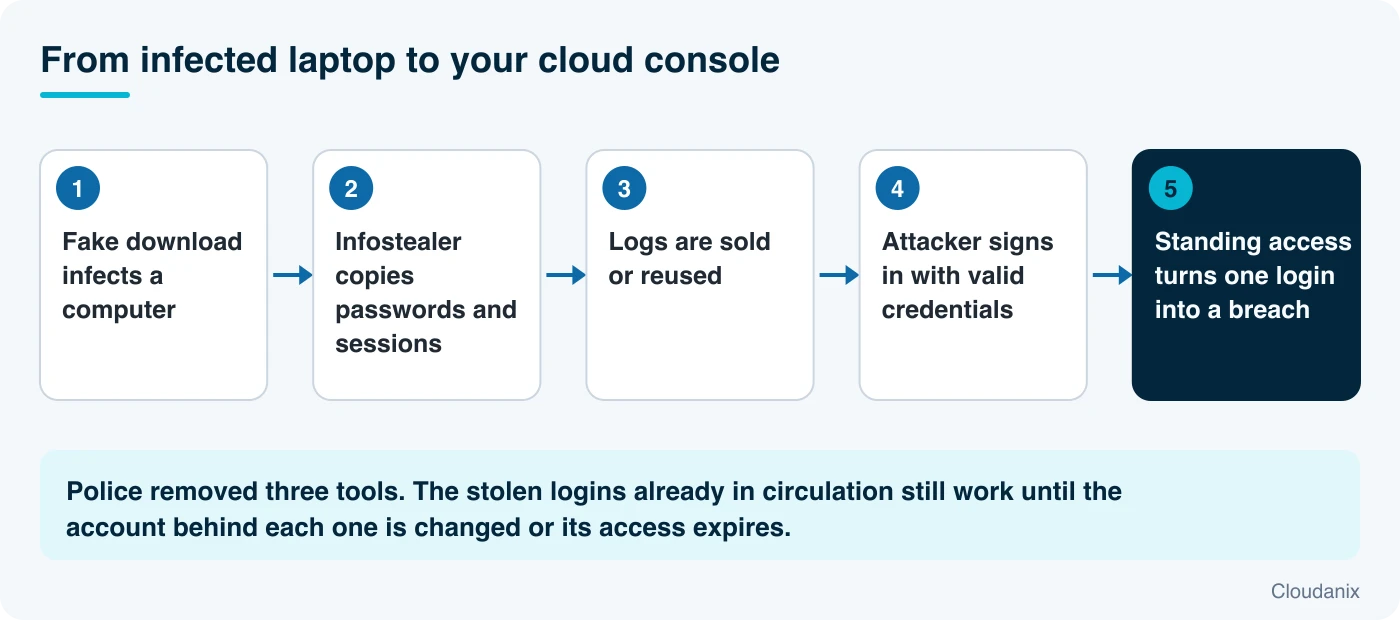
The business model. These tools are not used by one gang for its own attacks. They are services. One group builds a loader. Another buys access to infected machines. A third runs ransomware. The stolen data is packaged into logs (dumps of one victim’s stolen data) and sold on criminal markets or used directly. This division of labor is why a takedown of three tools affects many crime groups, and why the damage from earlier infections continues after the servers are gone.
Why a Stolen Login Is Still Enough
Infostealers take more than passwords
Modern infostealers do not stop at the passwords someone typed. They also take session cookies and tokens: small files that a website gives your browser after you sign in so that you do not have to sign in again for every click. An attacker who holds a valid session token can often act as you without knowing your password and without triggering a multi-factor prompt, because the site believes you have already proven who you are. For that reason, “we use MFA” is a good control with an important gap: it does not by itself protect against stolen sessions.
A seized server does not cancel a copied credential
Police can shut down the machines that collect data. They cannot recall data that has already been sold, copied or reused. The 6.4 million seized logins are the ones police found. Earlier copies may exist elsewhere. A password is only safe again after it has been changed, and a session is only dead after it has been revoked.
Most breaches begin with something legitimate-looking
An attacker who signs in with a valid account looks like a user. There is no exploit, no malware on your servers and often no alert. The question then becomes how much that account can do. If a developer’s login can reach production databases, cloud administrator roles and customer data at any hour, one infected laptop becomes a breach. If that same login can reach only what the person is approved to use right now, the thief gets very little.
The ransomware connection
Gootloader’s operators sold access to ransomware crews. That means a single infection on one employee’s laptop, caused by a search for a document, could end up as a company-wide encryption event weeks later. The delay between infection and attack is why a “clean” week can still hide risk.
The Protection Guide
Step 1: Make stolen passwords and sessions less useful
- Use phishing-resistant multi-factor authentication for administrators, developers and anyone with access to sensitive systems. Passkeys and FIDO2 security keys are bound to the real site and cannot be handed to a fake one.
- Shorten session lifetimes for sensitive applications and require re-authentication for risky actions. A stolen token that expires in an hour is worth far less than one that lasts 30 days.
- Use conditional access. Require a compliant, managed device and block sign-ins from unexpected locations or unfamiliar devices.
- Stop browsers from storing work passwords. Use a password manager that is not exposed to the browser profile an infostealer reads, and policy-block password saving for corporate accounts.
Step 2: Reduce the chance of infection
- Run endpoint detection and response (EDR) on laptops and servers, and make sure it is actually reporting.
- Keep browsers and operating systems patched.
- Block known-bad download behavior, such as running scripts from the Downloads folder or archives from search results, with application control where you can.
- Train people on the Gootloader pattern specifically: a search for a template or contract leads to a site that offers a document that is really an installer. When a document download asks to run something, stop and report it.
- For WordPress and other sites you run, keep them patched, because compromised sites are how Gootloader spread.
Step 3: Know whether your people’s credentials are exposed
- Check your company’s domain with breach and credential-exposure monitoring services, and ask your security vendors whether they ingest infostealer log data.
- Watch your national CERT and law-enforcement notices. After takedowns, authorities sometimes publish ways to check whether you were affected. We could not confirm such a service for this operation, so verify before relying on one.
- If an employee machine is found infected, treat every credential and session that person had as stolen: passwords, tokens, cloud keys and saved SSH keys.
Step 4: Revoke, don’t just reset
When you suspect a login was stolen, changing the password is not enough if the attacker holds a live session.
For Microsoft Entra ID (using Microsoft Graph PowerShell):
Connect-MgGraph -Scopes "User.ReadWrite.All"
Revoke-MgUserSignInSession -UserId user@yourcompany.com
For an AWS IAM user or role session, attach a policy that denies actions for tokens issued before a time, which is what the console’s “Revoke active sessions” button does:
{
  "Version": "2012-10-17",
  "Statement": [{
    "Effect": "Deny",
    "Action": "*",
    "Resource": "*",
    "Condition": { "DateLessThan": { "aws:TokenIssueTime": "2026-11-17T09:00:00Z" } }
  }]
}
Then rotate the underlying credentials, and for any AWS access keys the person held, deactivate them:
aws iam update-access-key --user-name jdoe --access-key-id AKIAEXAMPLEKEYID --status InactiveStep 5: Look for sign-ins that do not fit
If AWS CloudTrail goes to CloudWatch Logs, look for console sign-ins from places and addresses you do not expect:
fields @timestamp, userIdentity.arn, sourceIPAddress, additionalEventData.MFAUsed, responseElements.ConsoleLogin
| filter eventName = "ConsoleLogin"
| stats count() as logins, count_distinct(sourceIPAddress) as ips by userIdentity.arn, bin(1d)
| sort ips desc
An identity that suddenly signs in from many addresses, or from a country where you have no staff, deserves a look. Also review “impossible travel”: the same user appearing in two distant places within a short time. Identity providers and cloud security tools can score this for you.
Step 6: Make a stolen login worth less
This is the step that decides whether a stolen credential is an annoyance or a breach. The principle is least privilege over time: a person should hold powerful access only while they are using it.
- Remove standing administrator and production access. Give people read-only or no access by default, and let them request elevated access for a reason and a duration.
- Approve by risk. Low-risk requests can be auto-approved. Production administration can require one or more approvers.
- Avoid shared and long-lived credentials for databases, servers and Kubernetes. Use per-person, expiring access.
- Log with the real person’s identity, not just a shared role, so that misuse can be traced.
- Cut the blast radius. Separate production from development accounts, and keep sensitive data stores reachable only through approved paths.
See What is Zero Standing Privilege? and What is Credential Theft? for the underlying concepts. Our case study on ASOS shows what happens when one stolen login reaches too far.
Step 7: Tell people what to do
Give employees a short, blameless instruction: if you downloaded something odd, clicked a prompt you did not expect, or see a sign-in alert you do not recognize, report it at once and do not wait to be sure. Speed matters, because the gap between infection and abuse can be short.
Where Cloudanix Fits
Cloudanix does not detect or remove infostealers from laptops, and it is not a replacement for EDR, phishing-resistant MFA or session controls. Its role is Step 6: shrinking what a stolen login can reach, and making abuse visible.
Access that does not sit around. Cloud JIT removes standing access to AWS, Azure and GCP. People request access for a reason and a duration, approvals follow the policy you set (auto-approve read-only, one approver for staging, a quorum for production administration, or automatic approval for an on-call incident), and the grant revokes itself. It works through your identity provider, so engineers keep the same single sign-on portal. If an attacker holds a stolen login for an engineer who has no active grant, the login opens very little.
Keyless, per-person access to servers and data. Database JIT, VM JIT and Kubernetes JIT replace shared passwords, SSH keys and permanent kubeconfig files with identity-stamped, expiring sessions. VM sessions can be recorded. All audit logs go to storage you own and name the human behind each action.
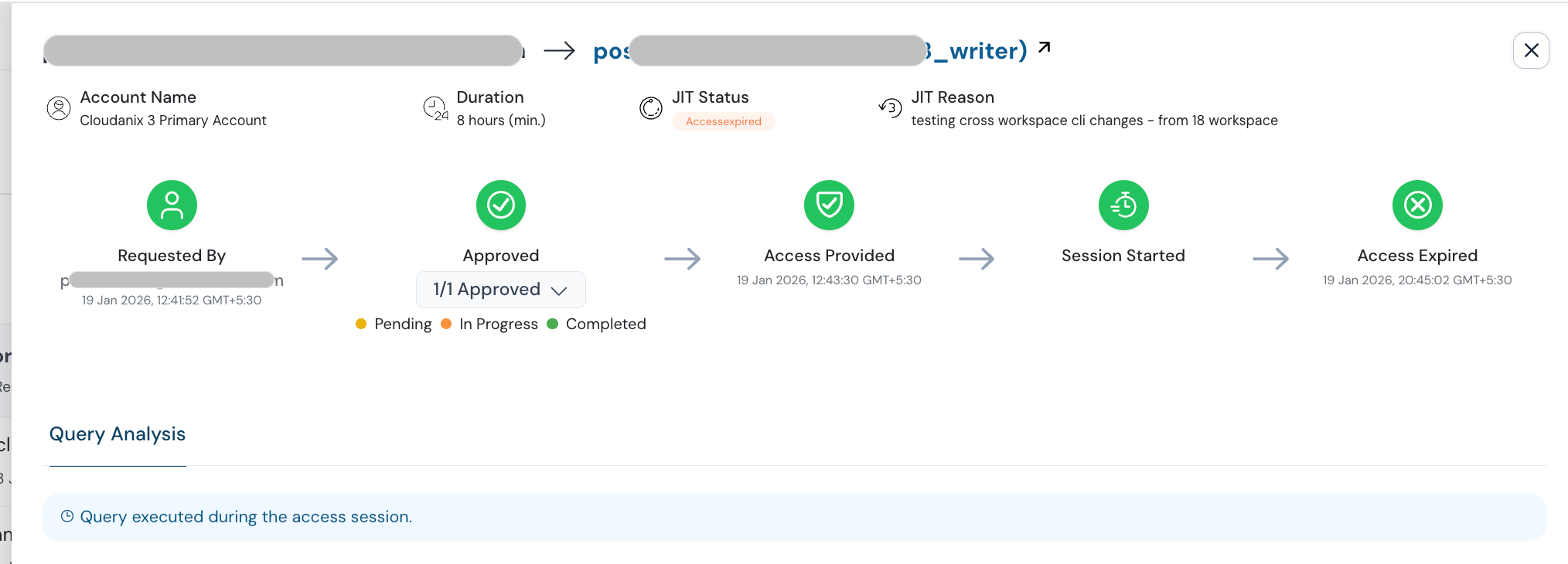
Seeing who could have been abused. CIEM and CSPM show which identities hold powerful or unused permissions and what they can reach, ranked with contextual severity, so you can cut the highest-value targets first. Over-privileged identities that CSPM or CIEM flags can feed into JIT policy, closing the loop between finding and fixing. The attack path view shows how one identity connects to sensitive data.
Spotting unusual use. Cloud UEBA and cloud detection and response look for identities acting unlike themselves, and the impossible travel detection use case covers the pattern in Step 5.
What this does not do. JIT cannot prevent the first sign-in to your identity provider, and it does not stop malware on a laptop. It does not recover data that was already stolen from that machine, and it does not replace rotation of exposed credentials. It limits how much a stolen login can do, and for how long.
Quick Reference Checklist
- Phishing-resistant MFA for administrators and developers
- Short session lifetimes and conditional access on sensitive apps
- EDR deployed and reporting on all laptops and servers
- Employees briefed on the “document download from a search” pattern
- Credential-exposure monitoring in place; national CERT notices followed
- Process to revoke sessions (not just reset passwords) on suspected theft
- Alerts for new locations, many addresses per user and impossible travel
- Standing administrator and production access removed, replaced with time-boxed grants
- Shared database, server and cluster credentials replaced with per-person access
- Employees know to report odd downloads and prompts immediately
Key Takeaways
- Police took down servers for Gootloader, CastleRAT and StealC in the week of November 9, and Germany’s BKA reports seizing about 6.4 million stolen logins from more than 40,000 victims. Gootloader alone infected at least 25,000 computers since 2018, per the U.S. Justice Department.
- These tools are sold as services, so a takedown affects many criminal groups, but copies of data already sold can still be used.
- Infostealers take session tokens as well as passwords, so MFA alone does not make a stolen login useless.
- A password reset is not a response. Revoke sessions, rotate keys and review activity.
- The most useful control is making any single login worth less: no standing administrator access, no shared credentials, expiring approvals and a record that names the person.
Want to see how much a single stolen engineer login could reach in your cloud today, and what it would look like with time-boxed access? Book a session and we will map it with you.
People Also Read
- The Aokigahara Infostealer Is Hunting Your AI Coding Assistant Tokens
- The ASOS Breach: One Stolen Employee Login, and Why Standing Access Is the Real Exposure
- Barracuda’s Cloud Breach Started With a Vendor Key That Was Never Retired
- The FBI Warns That ARTEX Can Take an Attacker From First Contact to Privileged Access in Under Three Hours
- Cloudanix: Cloud JIT
Related Resources
- Eliminating Standing Cloud Access for SOC 2 and ISO 27001
- Elevate Your Security With IAM Just-in-Time (JIT) Access
- Slack-First JIT Access: How DevOps Teams Adopt JIT Without Changing Developer Workflows
- What is Credential Theft?
- What is Zero Standing Privilege?
- What is Zero Trust Security?
- Cloudanix Database JIT