
Customer Snapshot
| Attribute | Details |
|---|---|
| Industry | Technology / Enterprise SaaS |
| Cloud Environment | A large AWS Organization (~120 accounts) absorbing a smaller org’s accounts |
| Identity Provider | AWS IAM Identity Center, synced from an upstream IdP |
| Scope Needed | Only one business unit’s accounts and groups should appear in its JIT portal |
| Problem | Enterprise-wide groups and users threatened to flood a single team’s access console |
| Sync Behaviour | Scheduled every 12 hours, plus manual/on-demand refresh |
| Cloudanix Scope | Cloud Console JIT with filtered sync scope, Kubernetes/EKS JIT (separate setup) |
The Situation: One Business Unit, One Enormous Shared Org
When a smaller company’s AWS accounts are folded into a much larger parent organization, access governance meets a problem it didn’t have before: scale that isn’t yours. The business unit that used to run a handful of accounts now lives inside an AWS Organization with roughly 120 accounts belonging to many teams. The upstream identity provider syncs a correspondingly large population of groups and users into AWS IAM Identity Center.
For the one business unit that needs JIT access to its accounts, this is a sudden, unwelcome change of surroundings. The team’s access console should show its accounts, its groups, its permission sets. Instead, without scoping, it risks showing the entire organization’s identity surface — every group, every user, every permission set that the parent org has ever defined, most of which have nothing to do with this team and should never be requestable from its portal.
The requirement that emerged was precise and non-negotiable: only the business unit’s own groups and users should appear in its JIT console. The parent organization’s internal groups should not load into the portal at all.
The Core Challenge
A JIT access portal is only usable — and only safe — if it shows the right identities. In a shared AWS Organization with ~120 accounts, the default of “sync everything the IdP knows about” produces an access console cluttered with thousands of irrelevant groups and permission sets, buries the ones that matter, and creates a governance surface where a misconfigured mapping could expose the wrong team’s access. The challenge was to constrain what synced into the business unit’s JIT view to exactly its own identities, without re-architecting the shared organization.
Where the Gaps Were
Scale That Drowns the Right Answer
An access console that lists everything is an access console nobody can use. With a 120-account organization feeding Identity Center, an unscoped sync means:
- Signal lost in noise. The handful of groups and permission sets the business unit actually governs are buried under thousands that belong to other teams. Finding the right role to request becomes a search problem.
- Cognitive load on approvers. Approvers reviewing requests need to recognise what’s legitimate at a glance. A portal padded with foreign groups makes “is this a normal request?” harder to answer, which is exactly the moment approval quality drops.
- A larger surface to misconfigure. Every group and permission set present in the console is something that could be mapped to an account. The more foreign identities are loaded, the larger the surface where an accidental mapping grants the wrong people a path to request access.
The Mental Model That Prevents Mistakes
Part of what made this tractable was being clear about what the JIT engine does and does not do with identity. Three facts shaped the whole design:
- Cloudanix does not add users into groups. Group membership is owned upstream — it comes from AWS Identity Center, which gets it from the IdP. The JIT engine never mutates who belongs to which group.
- JIT only grants temporary permission-set access during a request. What JIT changes is assignment of a permission set for a bounded window — not identity, not membership.
- Access is driven by explicit mappings. A group can only request access to an account if a mapping exists for it inside the governance layer: group → account → permission set. A group with no mapping cannot request anything, even if it’s synced.
That last point is the safety net, but it’s not a substitute for scoping. Relying only on “unmapped groups can’t do anything” means importing thousands of foreign groups and trusting that none of them ever get mapped by mistake. The cleaner answer is to not import them at all.
Sync Timing Is Part of the Design
The sync between the IdP, Identity Center, and the governance layer runs on a schedule — every 12 hours — with manual, on-demand refresh available for when a change can’t wait. In a large environment, a manual refresh can take several minutes, and up to about an hour for very large populations. This matters for scoping in a practical way: the larger the synced population, the slower every refresh. Constraining sync scope to one business unit’s identities doesn’t just clean up the console — it keeps refreshes fast, because the system isn’t reconciling thousands of irrelevant groups on every cycle.
The Cloudanix Solution: Scope the Sync, Map Deliberately, Verify
The resolution had two layers working together: limit what synchronises into the business unit’s view, and map access explicitly so that even within the scoped set, nothing is requestable unless it’s meant to be.
Filtering Sync Scope to the Right Identities
Rather than mirroring the entire 120-account organization’s identity surface, the sync was constrained to the business unit’s own groups and users. The practical effect:
- The portal shows only what belongs to the team. The business unit’s engineers open their JIT console and see their accounts, their groups, their permission sets — not the parent organization’s internal groups.
- Foreign groups never load. The parent org’s internal groups are filtered out at the sync boundary. They aren’t hidden in the UI; they aren’t imported in the first place. There’s nothing to accidentally map.
- Refreshes stay fast. With a bounded population, scheduled and on-demand syncs reconcile quickly, so configuration changes show up without the long waits a full-org sync would impose.
Mapping Access Deliberately: Group → Account → Permission Set
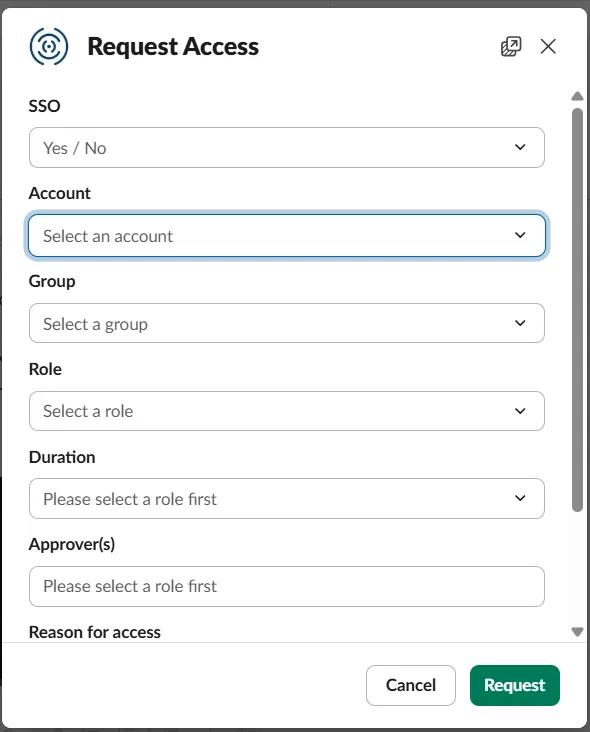
Within the scoped set, access is still governed by explicit mappings. Each group is mapped to the accounts it may request, and to the permission sets it may request within those accounts. This is where least privilege is enforced at the structural level:
- A group that should only reach non-production accounts is mapped only to those accounts.
- A group that should only ever request a read-only permission set is mapped only to that permission set.
- A group with no business reason to request access anywhere has no mapping — and therefore no ability to request, regardless of what the IdP says about it.
The combination is defense in depth: scoping keeps foreign identities out of the view entirely, and explicit mapping ensures that even the identities that are in view can only reach exactly what they’re meant to.
Verifying the Scope After a Change
Scoping is only trustworthy if you can confirm it took effect — especially after the kind of configuration churn that comes with absorbing accounts into a new organization. The team validated the setup by walking the chain end to end:
- Confirming that permission sets from Identity Center synced correctly into the governance layer for the in-scope groups.
- Confirming that group mappings and role visibility behaved as expected — the right roles appeared when an in-scope account and group were selected, and nothing foreign appeared.
- Confirming that an in-scope user could raise a JIT request successfully and that it routed to the correct approver.
One subtlety surfaced during validation and is worth calling out, because it’s a common source of confusion: a group can be perfectly synced and still have requests that go nowhere if approvers were never configured for it. A request raised against a group with no approvers simply sits. The fix is not a sync problem — it’s an approver-configuration step, and verifying it is part of confirming the scope is genuinely usable, not just visually correct.
A Note on Kubernetes
EKS-level JIT in this environment follows a separate setup from account-level JIT. The scoping discipline is the same idea — constrain what a given team sees and can request — but Kubernetes access is configured on its own track rather than inheriting the account-level mappings automatically. Teams expecting a newly added EKS cluster to appear in the JIT view immediately should expect a dedicated configuration step and an identity/account refresh before it shows up. For the broader pattern of eliminating standing cluster access, see JIT access for EKS cluster RBAC.
Platform Impact
| Dimension | Unscoped (Sync Everything) | Scoped Sync + Explicit Mapping |
|---|---|---|
| Identities in the portal | Entire ~120-account org | Only the business unit’s groups/users |
| Foreign groups loaded | Yes | No — filtered at the sync boundary |
| Risk of accidental mapping | High (large surface) | Low (small, deliberate surface) |
| Refresh speed | Slow (reconciles everything) | Fast (bounded population) |
| Approver clarity | Degraded by noise | Clean, recognisable requests |
| Least privilege | Depends on nobody mis-mapping | Enforced structurally |
Why Multi-Tenant Scale Demands Scoping, Not Just Mapping
It is tempting to believe that explicit mappings alone are enough — that since an unmapped group can’t request anything, importing the whole organization’s identity surface is harmless. It isn’t. Every foreign group in the console is a latent risk (one mistaken mapping away from exposure), a drag on sync performance, and a tax on every approver’s attention. In a shared AWS Organization at the scale of ~120 accounts, scoping the sync is the difference between a JIT portal that reflects one team’s world and one that reflects everyone’s.
The right posture is both: scope the sync so the portal shows only what belongs to the team, and map access deliberately so that even in-scope identities reach only what they should. Together they keep a single business unit’s access governance clean, fast, and correct — even when it lives inside someone else’s very large organization.
Running JIT Inside a Large Shared AWS Organization?
If your team’s accounts live inside a parent organization with dozens or hundreds of accounts, and your access portal is at risk of drowning in identities that aren’t yours, Cloudanix lets you scope sync to exactly the groups and users that matter, map access deliberately, and verify the result end to end — so each team governs its own world without inheriting the whole organization’s.
Book a Free Assessment to see scoped-sync JIT configured for your organization’s structure.
Related Resources
- OU-Based vs Account-Based Onboarding: Restricting Cloudanix Scope in Large AWS Organizations
- Managing IAM Identity Center Permissions at Scale: JIT for AWS SSO Permission Sets
- Permissions Assignment to Users vs Groups in Identity Center
- JIT Cloud for Multi-Account AWS Organizations: SSO and Permission Sets
- JIT Access for EKS Cluster RBAC: Eliminating Standing Kubernetes Privileges













