
Customer Snapshot
| Attribute | Details |
|---|---|
| Industry | Technology / AI SaaS |
| Cloud Environment | AWS (4 accounts), EKS clusters, RDS databases |
| Database Types | MariaDB (primary), with plans to move to PostgreSQL |
| Team Size | ~150 users (Developers 70–80, DevOps 8–9) |
| Current DB Access | HashiCorp Vault for temp tokens → EKS socat tunnel → IDE |
| IDEs Used | DataGrip, TablePlus, DBeaver, Sequel Ace, DbVisualizer, Sequel Pro, mycli |
| Network | Private subnets, NAT gateway per subnet, no SSL enforcement |
| Logging | Required but not fully implemented |
| Primary Interest | Replace Vault-based workflow with audited, identity-stamped DB JIT |
| Cloudanix Scope | Database JIT |
The Situation: A Five-Step Database Access Workflow That Sort Of Works
Getting database access at this AI SaaS company was a ritual with five distinct steps, each owned by a different system:
- Developer requests EKS cluster access via the existing Kubernetes JIT workflow.
- Developer connects to the EKS cluster and accesses a specific pod running a socat container — a lightweight TCP relay that tunnels database connections from the cluster to the RDS instance in a private subnet.
- Developer authenticates to HashiCorp Vault to generate a temporary database username and password.
- Developer configures their local IDE (DataGrip, TablePlus, DBeaver, Sequel Pro, or mycli) with the tunnel endpoint (localhost via port-forwarding through the EKS pod) and the Vault-generated credentials.
- Developer runs their queries until the Vault token expires.
Each step worked. The combination of steps created friction that compounded daily for 70–80 developers:
- The workflow took 5–10 minutes to establish each time. For a developer who needs to check a single query result, that’s 5 minutes of setup for 30 seconds of work.
- The socat tunnel pod was a shared resource that occasionally went down, breaking database access for everyone until DevOps restarted it.
- HashiCorp Vault credentials expired on Vault’s schedule, not aligned with the developer’s work session. A credential expiring mid-investigation meant restarting the entire workflow.
- No identity attribution in database logs. Vault generated generic temporary usernames — all queries appeared as “vault-token-xxxx” in database logs, not as the actual developer.
- Logging was a requirement (for compliance), but the current setup couldn’t deliver it because Vault credentials didn’t carry human identity through to the database audit layer.
The Core Challenge
Database access required traversing four systems (JIT → EKS → Vault → IDE) with no identity continuity between them. The result: friction for developers, no audit trail connecting queries to humans, and a compliance requirement (logging) that the architecture couldn’t satisfy.
Where the Gaps Were
HashiCorp Vault: Credential Broker Without Identity Attribution
HashiCorp Vault is a solid secrets management platform. For database access, it generates temporary credentials that expire after a configured TTL. But Vault solves the credential problem without solving the identity problem:
- Generic usernames. Vault generates credentials like
v-token-readonly-abc123. The database sees queries from this generic user. Audit logs record “v-token-readonly-abc123 ran SELECT * FROM users” — but which human is behind that token? - TTL-based expiry, not session-based. Vault credentials expire on a timer regardless of whether the developer is actively working. A 1-hour token that expires 45 minutes into a debugging session means the developer restarts the entire workflow — new Vault token, reconfigure IDE, re-establish context.
- No query-level audit linked to humans. Even if RDS slow query logs or audit logs capture the SQL, they attribute it to the Vault-generated username. Correlating back to a human requires cross-referencing Vault audit logs with database audit logs with access request timestamps — an exercise nobody does routinely.
- No access governance. Vault doesn’t know why the developer needs database access, who approved it, or how long they should have it in business terms. It generates a credential when asked, with whatever TTL it’s configured for.
The socat Tunnel: Infrastructure That Becomes a Liability
The socat tunnel running in an EKS pod was clever engineering: it bridged developers’ local machines to RDS instances in private subnets without exposing databases to the public internet. But it carried operational costs:
- Single point of failure. If the socat pod crashed, restarted, or was evicted (during node scaling), all developers lost database connectivity simultaneously.
- No access control on the tunnel itself. Any developer with EKS access could port-forward to the socat pod. The tunnel didn’t enforce who could reach which databases — it was an open pipe once you could reach the pod.
- Maintenance overhead. The socat deployment needed monitoring, health checks, resource limits, and restarts. Someone on the DevOps team owned this component — infrastructure maintained solely to enable a database access pattern.
- No SSL enforcement. The tunnel operated without SSL between the socat pod and RDS. Database connections were unencrypted within the cluster network. While technically “internal,” this meant credentials and query data traversed network segments in plaintext.
Logging: A Compliance Requirement Without a Solution
The team explicitly identified logging as a requirement. Compliance frameworks (SOC 2, ISO 27001) require knowing who accessed what data, when, and what they did. The current architecture couldn’t deliver this because:
- Database audit logs record the Vault-generated username — not the human.
- Vault audit logs record who requested a credential — but not what queries they subsequently ran.
- EKS pod logs record who port-forwarded to the socat container — but not which database they accessed or what they queried.
- No single system ties together: the human → the approval → the credential → the queries → the revocation in one timeline.
Meeting the logging requirement meant either building a custom correlation system across three independent log streams, or replacing the architecture with one that carries identity end-to-end.
The Cloudanix Solution: Database JIT with Identity End-to-End
Cloudanix Database JIT replaces the Vault + socat + manual IDE configuration workflow with a single system that carries human identity from request to revocation, backed by Database Activity Monitoring for query-level auditing:
How It Works
-
Developer requests database access via Slack, Teams, or the Cloudanix Console — specifying the database, the access level (read-only, read-write), and the duration. A reason (incident ID, task) is attached.
-
Approval routes per policy. Read-only access to development databases auto-approves. Write access to production databases requires human approval with appropriate scrutiny.
-
Developer runs the Cloudanix CLI (
cdxcommand). The CLI:- Authenticates the developer using their existing identity (Google SSO).
- Retrieves time-bound, IAM-authenticated database credentials scoped to the approved access level.
- Presents connection details (host, port, temporary username) ready for their preferred IDE.
-
Developer connects with their existing IDE. DataGrip, TablePlus, DBeaver, Sequel Ace, mycli — whatever they already use. No new tool. They paste the connection details and work normally.
-
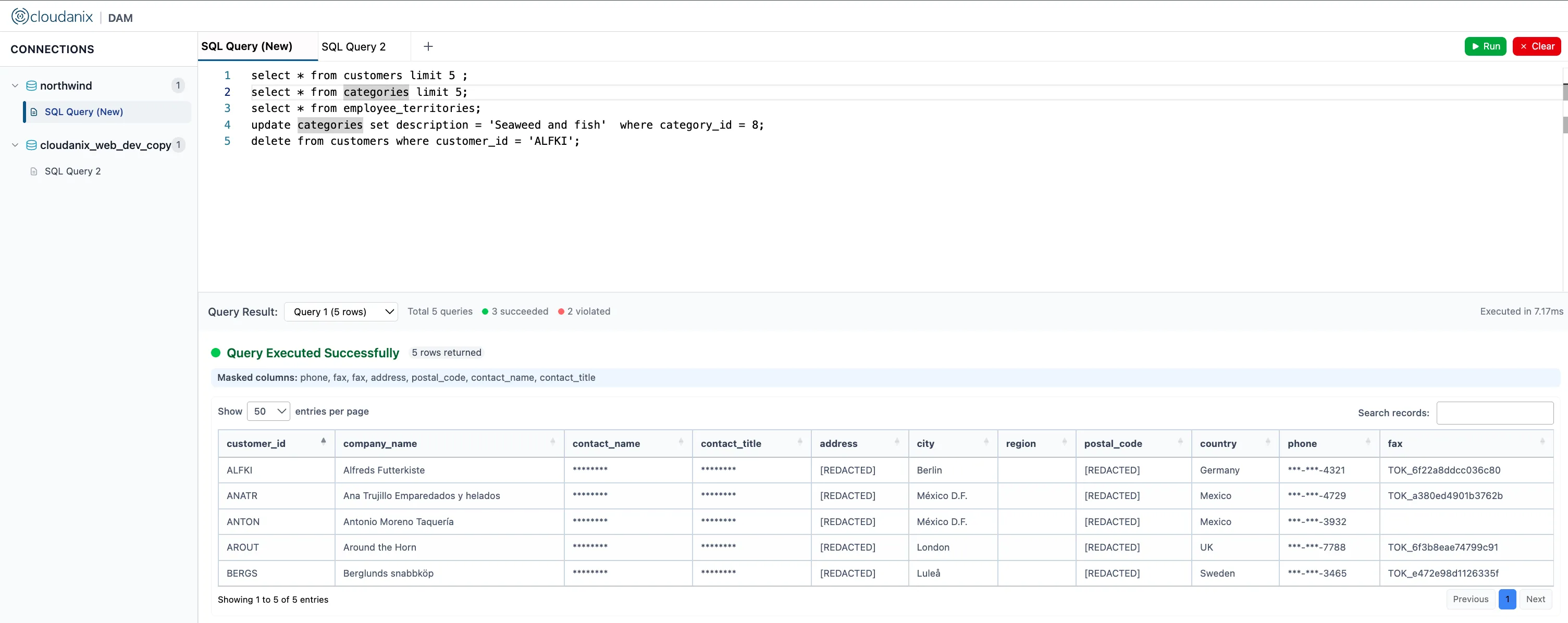
Every query is logged with human identity. The database session is identity-stamped. Audit logs record “engineer@company.com ran SELECT on users table at 14:32” — not “v-token-readonly-abc123.”
-
Access auto-revokes. When the time window expires, the credentials are invalidated. No lingering sessions, no forgotten tokens, no credentials that outlive their purpose.
What Changes for Developers
| Before (Vault + socat) | After (Cloudanix DB JIT) |
|---|---|
| 5-step setup process (5–10 min) | Single CLI command + IDE connection (under 2 min) |
| Vault token expires mid-session | Session duration aligned to approved window |
| socat pod outage = everyone blocked | No shared infrastructure dependency |
| Generic Vault username in DB logs | Real human identity in every audit entry |
| No approval context | Full request/approval chain in audit |
| Manual IDE reconfiguration each time | CLI provides ready-to-use connection details |
| No revocation enforcement | Automatic expiry at session end |
What Changes for Security and Compliance
| Before | After |
|---|---|
| 3 separate log streams, no correlation | Single audit timeline: request → approval → session → queries → revocation |
| “Who ran that query?” = forensics exercise | “Who ran that query?” = one lookup |
| Compliance evidence requires manual assembly | Exportable audit trail per session, per user, per quarter |
| No visibility into query content | Query-level logging with identity attribution |
| Database access not governed by access policy | Every DB session requires approval (or auto-approval per policy) |
Supporting Multiple Database Types
The team’s primary databases are MariaDB, with plans to migrate to PostgreSQL. Cloudanix Database JIT supports:
- PostgreSQL (RDS, Aurora) — fully supported with IAM authentication.
- MySQL/MariaDB — supported through the same credential mechanism.
- SQL Server and Oracle — additional database engines supported across cloud providers.
The team can begin with their current MariaDB instances and maintain the same JIT workflow as they migrate to PostgreSQL — no architecture change, no re-tooling, just a configuration update pointing to the new database endpoints.
Network Architecture: No socat, No VPC Peering
The team had ruled out VPC peering due to CIDR conflicts from past infrastructure decisions. Cloudanix Database JIT operates via an ECS-based component deployed in the customer’s own VPC (in a private subnet with access to the RDS instances), avoiding the network constraints that made VPC peering impossible:
- Deployed in the customer’s VPC. The Cloudanix DB proxy component runs as an ECS service in the same VPC as the RDS instances. No cross-VPC networking required.
- No CIDR conflicts. The component lives within the existing network topology. It doesn’t require peering to an external VPC with potentially conflicting address ranges.
- Customer controls the infrastructure. The ECS service runs in the customer’s AWS account, in their VPC, under their security groups. Cloudanix manages the software; the customer owns the infrastructure.
This solved the specific constraint that had made other approaches (VPC peering to an external Cloudanix network) non-viable for this customer’s environment.
Platform Impact
| Metric | Before | After |
|---|---|---|
| Database access setup time | 5–10 minutes | Under 2 minutes |
| Identity in database audit logs | Vault-generated generic username | Real human identity |
| Credential expiry alignment | Vault TTL (fixed, arbitrary) | Session-aligned to approved duration |
| Infrastructure dependency | socat pod (shared, fragile) | ECS service (managed, resilient) |
| Compliance evidence assembly | Manual, across 3 systems | Single exportable timeline |
| Developer workflow | 5 steps across 4 systems | 1 CLI command + IDE |
| Revocation mechanism | Vault TTL (no early revoke option) | Automatic + manual early revoke |
Why Database Access Is the Hardest JIT Surface
Database JIT is more complex than cloud console JIT for a specific reason: the developer needs to interact with data through existing tools (IDEs, CLI clients) that expect traditional credential-based authentication. You can’t simply “assign a role and let them see it in the SSO portal.” The credential needs to be usable in DataGrip, in DBeaver, in mycli — each with different connection configuration expectations.
Cloudanix Database JIT solves this by generating credentials that work with any standard database client — no proprietary connector, no browser-based query interface, no lock-in to a specific IDE. The developer’s workflow changes minimally (CLI command for credentials instead of Vault + tunnel), while the security and compliance properties change fundamentally (identity-stamped, time-bound, governed by policy, audited end-to-end). For a deeper look at continuous query-level auditing, see what Database Activity Monitoring is.
Using HashiCorp Vault for Database Access Today?
If your database access workflow involves Vault for credential generation, tunnel infrastructure for network access, and manual IDE configuration — and you’re missing the identity-stamped audit trail and access governance layer that compliance requires — Cloudanix Database JIT replaces the credential broker + tunnel + manual workflow with a single system that carries human identity from request to query to revocation.
Book a Free Assessment to see Database JIT working with your RDS instances and your team’s preferred IDEs in a single session.













