
Most teams think about database permissions as a question of which tables a login can read or change. A new piece of research shows that this is only half of the picture. Security researcher Zheng Yu of Depthfirst published proof-of-concept exploits showing that a database account that cannot read a single application table can still be used to run code on the database server itself, by reaching memory-corruption bugs in the database engine’s own code. The research covers PostgreSQL, MySQL and ClickHouse, plus a separate Oracle Database chain that needs no login at all. All five flaws have vendor fixes. The research reports no sign that any has been used in a real attack, and the full attack chains were not independently reproduced. The Hacker News has the report.
This post explains the research in plain language, shows you how to find out whether it applies to you, and gives a concrete plan: what to patch, which permissions to take away, how to limit what a compromised database server can do, and how to make routine database access safer. We include general steps that need no extra product, and then how Cloudanix can help.
Primary source: The Hacker News report (corrected November 20 to add ClickHouse’s fix details), based on the researcher’s published analysis and statements from ClickHouse and Oracle. Identifiers below follow that report. If you use PostgreSQL, also see our earlier post on the PostgreSQL release, and confirm the identifier that applies to your version in PostgreSQL’s own advisory. Commands are our own guidance. Test them in a non-production environment first.
Who Should Read What
- DBAs and database engineers: “What the Research Showed,” Steps 1 to 5. The commands are for you.
- Platform and cloud engineers: Steps 4 and 6. The server’s blast radius is an infrastructure question.
- Application developers: Step 3. Application accounts often have more rights than they need.
- Security leaders and CISOs: “Why This Matters” and “Key Takeaways.” Permission reviews now need to cover what a login can do to the engine, not only which data it can read.
- Compliance teams: Step 7. Auditors want to know who can reach production databases and how it is recorded.
What the Research Showed
Each term is explained so you do not need prior knowledge.
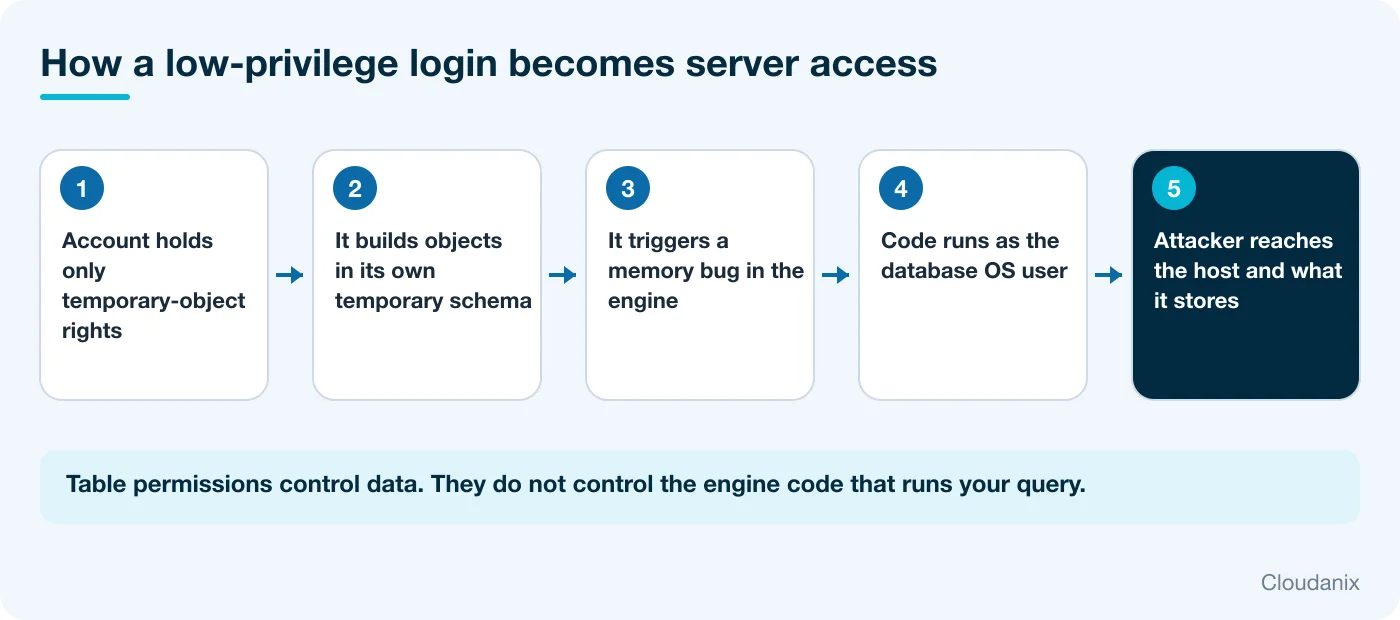
The core idea. A database account has permissions that say which tables and schemas it can read or change. But to answer any query, the database runs a large amount of internal code, written in the C and C++ languages, which reads, plans and runs your SQL. Those languages are called memory-unsafe, because a mistake can let input overwrite parts of the computer’s memory it should not touch. The researcher’s argument is that SQL permissions control access to tables, not access to this internal code. If an account can send the engine certain input, it can reach a bug in that code, whatever it is allowed to read.
What “low privilege” means here. The accounts used in the research could not read application data. What they could do was create temporary objects or send the engine specially shaped input. Temporary tables are short-lived tables that exist only for a session, and they are commonly granted to ordinary users because applications use them. In PostgreSQL, the right to create temporary objects is granted by default through a privilege called TEMPORARY. In MySQL and ClickHouse, the right to create temporary tables is a similar common grant.
The five flaws. All now have fixes. Four have CVE numbers (a CVE is a public identifier for a security flaw).
| Software | Identifier | Affected versions | Fixed |
|---|---|---|---|
| PostgreSQL | CVE-2026-116331 | Before 18.7, 17.12, 16.16, 15.20 and 14.25 | November 12 |
| MySQL Server and Cluster | CVE-2026-101786 | 26.7.0 to 26.7.1 | October 20 |
| Oracle Database (Oracle Text) | CVE-2026-114819 | 19.3 to 19.32, 21.3 to 21.24, 23.4.0 to 23.26.3 | November 17 |
| Oracle REST Data Services | CVE-2026-91609 | 24.2.0 to 26.2.1 | October 20 |
| ClickHouse | No CVE assigned | 26.7.5.10 tested | September (version 26.9 and later, with backports to 26.8.3.41, 26.7.7.30, 26.6.5.55 and 26.3.32.8) |
PostgreSQL. The flaw lets an account that can create database objects run code as the operating system user that runs the database. The researcher’s analysis shows a plain login role building the objects it needs in its own temporary schema, without touching application data, and turning a type-confusion bug into control of the server. (Type confusion means the engine treats a piece of memory as the wrong kind of data.)
MySQL. A similar flaw sits in the query optimizer, the part that decides how to run a query. The researcher reached code execution on version 26.7.0 with an account that could only create temporary tables and could not read existing ones. Oracle rates it as needing high privileges, but the researcher’s access was narrower than that rating suggests.
ClickHouse. An integer-overflow write when reading a binary row format, reached by a user who sets one option, format_binary_max_string_size, to zero. The researcher reproduced a shell on one version. ClickHouse says the flaw was reported through its bug bounty and fixed in September.
Oracle. This is the one case that needs no account at all. A bug in Oracle Text and a flaw in the GraphQL interface of Oracle REST Data Services, chained against an exposed web endpoint, reach the engine’s code and run commands before any login. Oracle rates neither as exploitable without a login on its own, and the researcher’s chain combines them.
What the report says to do. Besides installing the updates, review what accounts can do, not only what they can read, and take away the TEMPORARY privilege and broad temporary-table rights from accounts that do not need them. That step does not close the Oracle path, which starts without any account.
Why This Matters
Permission reviews usually stop at the table
A typical access review asks, “Can this login read the customers table?” If the answer is no, the login is marked low risk. This research shows a login that can read nothing may still be a path to the whole server. The unit to review is not only data access but also what a login can make the engine do.
The default grants are generous
Many databases give ordinary users the right to create temporary objects out of the box, because applications rely on it. That means the number of logins that could reach this class of bug is often much larger than the list of administrators.
The database server is a target-rich host
Code running as the database’s operating-system user can read the database’s data files, its configuration, its backups on local disks, and often credentials for other systems. A server compromise is a data breach and a way to move to the next system.
Shared and long-lived logins multiply the risk
Many companies have a handful of shared database logins used by many people and tools. One of them leaking, or one engineer’s laptop being compromised, hands an attacker the same ability the researcher used. And if three people share one login, your logs cannot tell which of them acted.
The patch is not the only control
Vendors fixed these flaws, and you should apply the fixes. But the next memory bug in a database engine is a matter of when, not whether. Controls that limit who can send input to the engine, and what the server can reach, work against the whole class.
The Protection Guide
Step 1: Find your versions and compare them to the fixed ones
-- PostgreSQL
SELECT version();
-- MySQL
SELECT VERSION();
# ClickHouse
clickhouse-client --query "SELECT version()"
# Cloud-managed databases: list engine versions
aws rds describe-db-instances \
--query "DBInstances[].[DBInstanceIdentifier,Engine,EngineVersion]" --output tableCompare to the table above. For managed services (Amazon RDS, Aurora, Azure Database, Cloud SQL), check the provider’s release notes for when the fixed engine version becomes available, and schedule the upgrade. Self-managed servers need the vendor’s update and a restart.
Step 2: Find out which logins can create objects
PostgreSQL. The TEMPORARY privilege is granted to everyone (PUBLIC) by default on new databases. See what the current grants are:
-- Who holds CREATE or TEMPORARY on each database.
-- An empty (NULL) datacl means the defaults apply, and by default PUBLIC (everyone) has TEMPORARY.
-- An entry beginning with '=' followed by a 'T' also means PUBLIC has it.
SELECT datname, datacl FROM pg_database WHERE datallowconn;

-- Roles that can create objects in the current database
SELECT r.rolname,
       has_database_privilege(r.rolname, current_database(), 'CREATE')    AS can_create,
       has_database_privilege(r.rolname, current_database(), 'TEMPORARY') AS can_temp
FROM pg_roles r
WHERE r.rolcanlogin
ORDER BY can_create DESC, can_temp DESC, r.rolname;
MySQL.
-- Accounts holding the temporary-table privilege at schema level
SELECT grantee, table_schema, privilege_type
FROM information_schema.schema_privileges
WHERE privilege_type = 'CREATE TEMPORARY TABLES';

-- ... and at global level
SELECT grantee, privilege_type
FROM information_schema.user_privileges
WHERE privilege_type IN ('CREATE TEMPORARY TABLES','SUPER');
Make a list of who and what holds each right, and sort it into “needs it” and “does not.”
Step 3: Take away rights that nothing needs, carefully
Remove what is unneeded, one application at a time, because some programs do rely on temporary tables.
-- PostgreSQL: stop granting temporary objects to everyone, then grant to named roles that need them
REVOKE TEMPORARY ON DATABASE appdb FROM PUBLIC;
GRANT  TEMPORARY ON DATABASE appdb TO app_reporting;

-- Make sure nobody can create objects in the shared schema
REVOKE CREATE ON SCHEMA public FROM PUBLIC;
-- MySQL
REVOKE CREATE TEMPORARY TABLES ON appdb.* FROM 'readonly_user'@'%';Test in a staging copy and watch for application errors. For application accounts, ask the developers which queries truly need temporary tables. Support and read-only accounts almost never do. Treat this as a hardening step that reduces exposure, not as a replacement for patching: the report notes it does not close the Oracle path, and it only narrows the others.
Step 4: Patch, then restart
Apply the vendor updates in Step 1’s table. For PostgreSQL and MySQL that means a package or image upgrade, followed by a restart; for Oracle, the quarterly or November update; for ClickHouse, a fixed build for your release line. Confirm the version afterward with the commands in Step 1. For Oracle’s Text and REST Data Services flaws, also check whether those components are enabled at all. If you do not use them, turning them off removes the path.
Step 5: Do not expose what does not need to be exposed
The Oracle chain needs an exposed web endpoint. Check what in your environment can be reached from the internet:
# AWS: databases that are publicly accessible
aws rds describe-db-instances \
  --query "DBInstances[?PubliclyAccessible==\`true\`].[DBInstanceIdentifier,Engine]" --output table

# AWS: security groups open to the world on common database ports
aws ec2 describe-security-groups \
  --query "SecurityGroups[?IpPermissions[?(FromPort==\`5432\` || FromPort==\`3306\` || FromPort==\`1521\` || FromPort==\`8123\`) && IpRanges[?CidrIp=='0.0.0.0/0']]].[GroupId,GroupName]" \
  --output table
Databases and database web interfaces (such as REST gateways and admin consoles) should sit in private networks, reachable only through an approved path. Our guide on publicly accessible databases and how to read the attack path explains why an exposed port matters.
Step 6: Shrink what a compromised server can do
Assume one of these bugs, or the next one, works against you. Limit the damage:
- Run the database as an unprivileged operating-system user with no ability to log in interactively, and no sudo.
- Keep secrets off the server. Do not store cloud keys, application passwords or backup credentials in files the database user can read.
- Use an identity with narrow permissions for the server’s own cloud role: for example, write to the backup bucket but not read other buckets or create users.
- Restrict outbound network traffic from database hosts to what they need, so a shell cannot freely call out.
- For containers, avoid mounting the host’s file system or the container runtime socket, drop unneeded capabilities, and use a read-only root file system where the database allows it.
- Encrypt backups with keys the database host cannot read.
Step 7: Make routine database access short-lived and attributable
The research points to a simple principle: the fewer people and tools that can send input to your engine, and the more clearly you know who they are, the smaller your exposure.
- Replace shared logins with individual, short-lived access granted for a stated reason and approved by someone.
- Give support and analysts read-only access on a replica, not the primary.
- Turn on database logging for connections and for schema changes.
# postgresql.conf
log_connections = on
log_disconnections = on
log_statement = 'ddl'          # records CREATE/ALTER/DROP, including temporary objects
log_min_error_statement = error- Watch for signs of trouble: an unexpected restart or a “server process terminated by signal” message in the logs, new temporary objects from a login that never made them, unusual outbound connections from the database host, and queries from unfamiliar sources.
Step 8: Write down the plan
Record the engines and versions you run, who owns each, the date each was patched, which logins hold object-creation rights and why, and what the database server can reach. That page is what you will want the next time a bulletin arrives.
How Cloudanix Can Help
Everything above works without Cloudanix. The platform helps with the parts that are hard to keep up: removing shared logins, attributing every session to a person, and showing what a database and its host can reach.
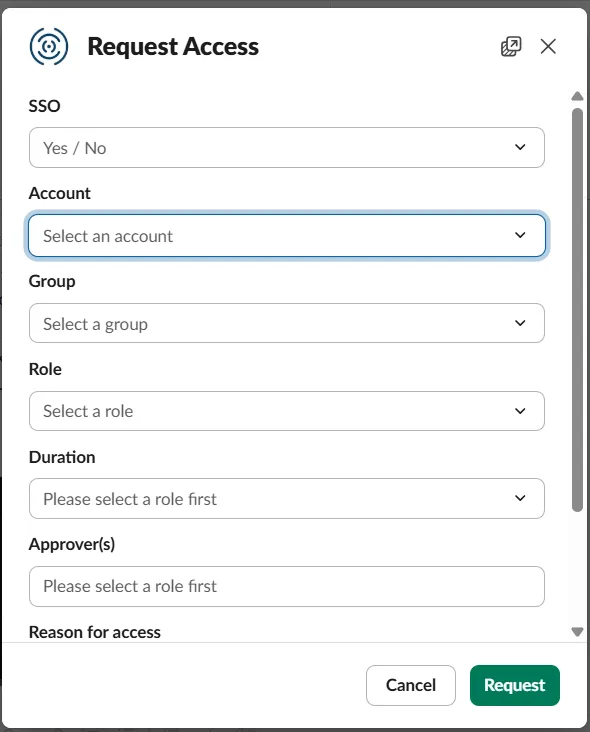
Remove shared logins and attribute every query. Database JIT replaces a shared db_reader or db_writer password with short-lived, approved access. An engineer requests access to a specific database for a stated time and reason (with a Jira ticket attached if you wish), an approver confirms in Slack or Microsoft Teams, and a temporary credential is issued and then revoked when the session ends. Engineers keep using their usual tools: DBeaver, DataGrip, TablePlus, pgAdmin or MySQL Workbench. Every query is stamped with the real person’s identity, and the audit trail lands in your own S3 bucket. Read access can be approved automatically while production writes need a human. The tunnel is outbound-only, so there is no inbound firewall hole or jump host. This supports Step 7 and cuts the number of standing logins that could reach engine bugs.
Control and record what sessions can do. Cloudanix DAM runs inside your own cloud account and sits on top of Database JIT. Each query in a governed session passes through a control layer that can block dangerous operations such as drop, truncate and unrestricted deletes, require a WHERE clause, limit rows returned, restrict tables and columns, mask sensitive data by role, and log every query. DAM works with PostgreSQL, MySQL and SQL Server. This limits what a person can do through a governed session and gives you a record of it. It is not a substitute for patching, and it does not currently promise to block every statement type an exploit might use, so keep Steps 3 and 4.
Show what a database and its host can reach. CSPM, CIEM and attack path analysis show which databases are internet-reachable, what identity each database host runs with, and what that identity can reach. Contextual severity ranks the findings by exposure, environment, data and identity. This is the visibility behind Steps 5 and 6.
Match new flaws to what you run. Zero-Day Watch ingests CISA KEV and EPSS data and matches new flaws against your container images, running pods, VM packages and language dependencies. Confirm with us how engine versions of managed databases are covered in your environment before depending on it for them.
For the evidence trail. The query-level audit evidence use case shows how teams use session records for SOC 2 and ISO 27001 reviews.
What this does not do. Cloudanix does not patch your database engine, and it cannot protect a database that is directly reachable by an attacker who never uses a governed session, such as the pre-login Oracle path. Database JIT and DAM govern the sessions that go through them. Keeping the engine patched, the network closed and the server’s own permissions narrow remains your responsibility, and the platform makes those easier to see and prove.
Quick Reference Checklist
- Listed every database engine and version, including managed and containerized ones
- Compared versions with the fixed versions for PostgreSQL, MySQL, Oracle and ClickHouse
- Scheduled patches, then restarts, and confirmed afterward
- Listed logins that can create objects or temporary tables
- Revoked
TEMPORARYfromPUBLICand temporary-table rights where not needed, testing first - Confirmed no database or database web interface is exposed to the internet
- Checked whether Oracle Text and REST Data Services are needed, and turned them off if not
- Ran database processes as unprivileged users, kept secrets off the host, narrowed the host’s cloud role and outbound traffic
- Replaced shared logins with individual, short-lived, approved access
- Turned on connection and DDL logging, and set alerts on crashes and unusual outbound traffic
- Wrote down owners, versions, patch dates and privileged logins
Key Takeaways
- A researcher showed that logins unable to read application tables can still reach engine bugs in PostgreSQL, MySQL and ClickHouse and run code on the server, and that Oracle has a chain needing no login. All five flaws are fixed, and no attacks have been reported.
- Table permissions do not control the engine’s internal code. Review what logins can do, not only what they can read.
- Patch, restart and verify, then remove temporary-object rights that nothing needs. That does not close the Oracle path, so also close exposure and patch Oracle.
- Assume the next bug will come. Limit what the database server can reach, and replace shared logins with short-lived, attributable access.
Want to see which logins in your databases can create objects, which databases are reachable, and how short-lived, attributed access would change that? Book a session and we will map it with you.
People Also Read
- PostgreSQL Fixes 52 Security Flaws, Including a 22-Year-Old Bug That Lets a Database User Run Code on the Server
- Publicly Accessible Database: The Open Route to the Internet and How to Read the Attack Path
- Database Activity Monitoring Explained: What It Is and How It Differs From Native DB Logging
- Why Your Developers Shouldn’t See Raw Production PII and How to Prevent It
- Database Activity Monitoring Use Cases: How DAM Prevents Data Loss
- Top 15 AWS RDS Misconfigurations to Avoid
- What is Database Security?
- What is Database Audit Logging?
- Understanding Remote Code Execution (RCE)
- What is Zero Standing Privilege?
- Cloudanix Database JIT
- Cloudanix Database Activity Monitoring