
Customer Snapshot
| Attribute | Details |
|---|---|
| Industry | Gig-economy / Workforce SaaS Platform |
| Cloud Environment | AWS |
| Code & CI | Bitbucket for SCM, Jenkins for CI |
| Ticketing | Jira |
| Team Structure | Lean DevOps team supporting ~20 engineers |
| Focus Area | Code findings as tracked remediation work |
The Situation: Detection Lives in a Dashboard, Work Lives in Jira
This team runs on the Atlassian stack — code in Bitbucket, work tracked in Jira. Their engineers plan, pick up, and close work through the Jira board, and anything that is not a ticket is, in practice, not scheduled. When they adopted code security scanning, they hit the structural gap that every dashboard-based tool creates: findings accumulate in the security tool’s own interface, disconnected from the system where engineering work actually happens.
A security finding that only exists in a security dashboard is a finding that depends on someone remembering to check the dashboard, manually transcribe the important ones into Jira, and keep the two in sync by hand. For a lean DevOps team, that reconciliation is the first thing to fall off when the sprint gets busy — and when it does, real vulnerabilities quietly fail to become scheduled work.
The Core Tension
Detection and remediation live in two different systems by default: the scanner knows what is wrong, but the engineering team only acts on what is on the board. Bridging them by hand is fragile and lossy — it adds a manual transcription step exactly where a lean team has no slack. The finding has to become a ticket automatically, or it will not reliably become work at all.
Where the Gaps Were
Findings That Never Reach the Board
A vulnerability sitting in a security dashboard is invisible to the sprint-planning process. If it is not a Jira issue, it is not estimated, not assigned, and not prioritized against everything else the team is doing — so it competes for attention from outside the system where attention is allocated.
Manual Transcription Is Lossy and Fragile
The common workaround — someone periodically copying findings into Jira by hand — breaks down fast. It is slow, it drops context, it falls behind during busy periods, and it creates two sources of truth that drift apart. The work of keeping them in sync is itself unscheduled work that nobody owns.
No Closed Loop Between Fix and Finding
Even when a finding does become a ticket manually, there is usually no link back: closing the Jira issue does not tell the security tool the finding is handled, and resolving the finding does not update the ticket. The two systems tell different stories about the same risk.
How Cloudanix Addresses This
Jira as the Default Ticketing Integration
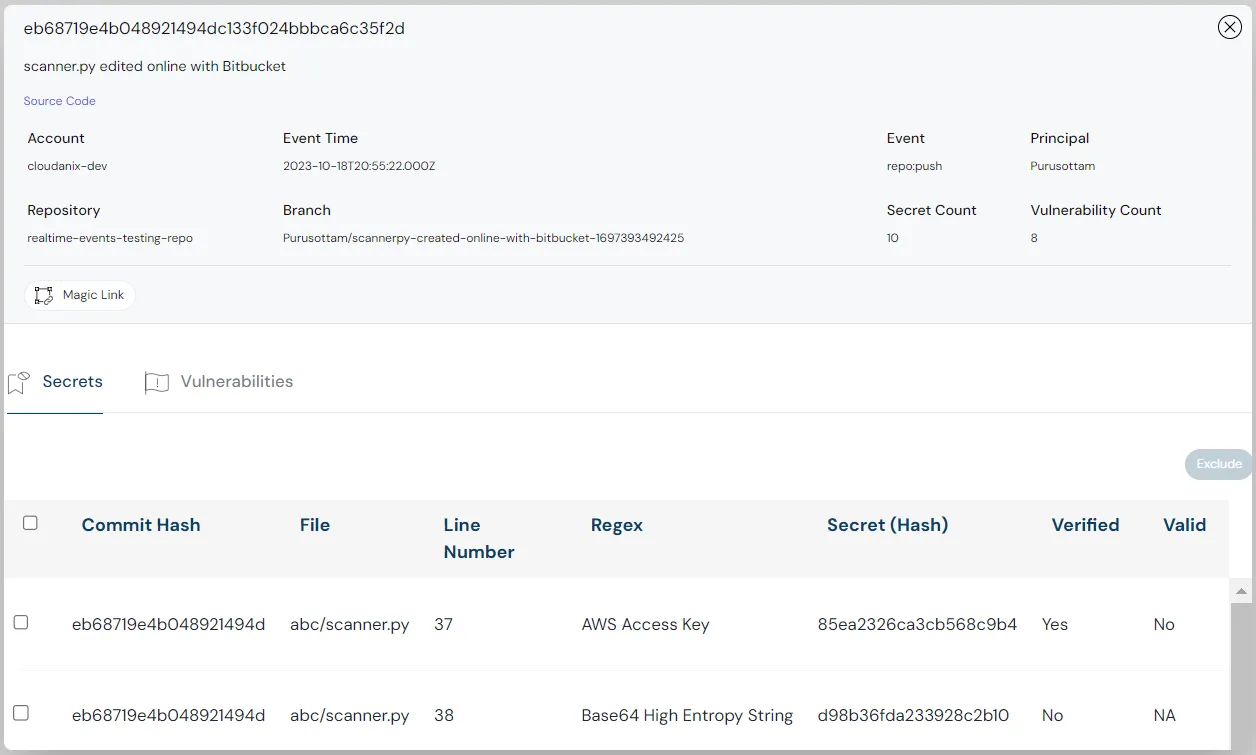
Cloudanix Code Security integrates with Jira as its default ticketing destination, so a code finding — SAST, SCA, or a detected secret — can be turned into a Jira issue that lands on the board the team already works. Detection in Bitbucket becomes tracked work in Jira without a manual transcription step in between.
The Finding’s Context Travels With the Ticket
When a finding becomes a Jira issue, the context that makes it actionable travels with it — the vulnerability, where it is in the code, the severity and its reasoning, and the remediation guidance. The engineer who picks up the ticket does not have to go back to a separate dashboard to understand what they are fixing; the ticket carries what they need.
Triage That Keeps the Queue Honest
Not every finding should become a ticket immediately. Cloudanix supports triage actions — pause, acknowledge, accept risk — so the team routes genuine work to Jira while handling the rest deliberately, with the decision on record. That keeps the board free of noise and the backlog meaningful, which is what makes engineers trust the tickets that do arrive.
Prioritized So the Right Findings Become Tickets
Because findings are ranked by exploitability — with KEV and EPSS context on dependency CVEs — the team can route the findings that actually matter into Jira first, rather than flooding the board. The sprint fills with the handful of issues that move risk, not the long tail. (See how to prioritize which CVEs to fix.)
Platform Impact
| Dimension | Dashboard-Only Findings | Findings Routed to Jira |
|---|---|---|
| Where the work lives | Security tool interface | The Jira board engineers use |
| Scheduling | Outside sprint planning | On the board, estimated and assigned |
| Transcription | Manual, lossy, fragile | Automatic, context intact |
| Noise control | All findings, equal weight | Triaged and prioritized before ticketing |
| Context on the ticket | Go back to the dashboard | Travels with the issue |
Why “Make It a Ticket” Is the Difference Between Detection and Remediation
Security tooling is often evaluated on what it can find. But finding a vulnerability changes nothing until an engineer fixes it, and engineers fix what is on their board. The entire value of detection is realized at the moment a finding becomes a tracked, assigned, estimated piece of work in the system the team actually uses. For a team standardized on Jira, routing findings there is not a convenience feature — it is the mechanism that converts a security dashboard into closed tickets. A finding that never becomes a ticket is, for all practical purposes, a finding that was never acted on.
Key Outcomes
- ✅ Findings Become Tickets: SAST, SCA, and secret findings routed into Jira.
- ✅ No Manual Transcription: Detection in Bitbucket becomes tracked work directly.
- ✅ Context Travels: The vulnerability, location, severity, and fix ride with the ticket.
- ✅ Triaged Before Ticketing: Pause, acknowledge, or accept risk — on record.
- ✅ Prioritized Routing: The exploitable findings reach the board first.
Do Your Code Findings Ever Reach Your Sprint Board?
If your vulnerabilities live in a security dashboard while your engineers work from Jira, the findings that matter are not reliably becoming scheduled work. Cloudanix routes code findings into Jira with their context intact — so detection turns into tracked remediation.
Book a Free Assessment to see code findings flow into your Jira workflow, or explore the interactive demo on the Code Security page.
Related Resources
- What is Code Security?
- How to Prioritize Which CVEs to Fix
- Inside Static Source Code Analysis (SAST)
- What is Software Composition Analysis (SCA)?
- Jira Integration for JIT: Bridging Access Requests With Existing Ticketing Workflows
- Code Security for Bitbucket: SAST, SCA, Secrets, and Real-Time Workspace Threat Monitoring













