
Consider a common scenario: a developer gives a coding agent write access to a production database and asks it to reconcile a schema mismatch. The agent runs a single Prisma command:
prisma migrate diff --shadow-database-url=$DATABASE_URL_UNPOOLEDWhat the developer did not realise: Prisma’s migrate diff workflow resets the shadow database before replaying migrations. And because $DATABASE_URL_UNPOOLED resolved to the production connection, that reset dropped every table in production. Two tables that had never been defined in the migrations folder were gone permanently. They could not be rebuilt from the migration history.
The developer approved the command. The agent executed it faithfully. The database was gone.
Three months earlier, in April 2026, a Cursor agent running Claude Opus 4.6 did something similar at PocketOS, a car rental software company. The agent was asked to fix a credential mismatch. Instead of stopping to ask a human, it searched through unrelated files, found a Railway API token, and used it to delete a production storage volume. Because Railway stores volume-level backups inside the same volume, one API call erased the database and every backup. The entire operation took nine seconds. (The Register reported the incident in detail.)
These are not edge cases. They are the predictable outcome of giving a powerful autonomous tool access to production credentials without hard boundaries on what it can do with them.
This article explains what coding agent guardrails are, why they exist, how they work technically, and where they fit in a broader cloud security strategy.
What is a coding agent?
Before defining guardrails, it helps to be clear about what they protect against.
A coding agent is an AI-powered tool (Claude Code, Cursor, Kiro, Copilot, Codex, Windsurf, or similar) that goes beyond suggesting code. It reads your repository, runs shell commands, calls cloud APIs, edits files, and can execute infrastructure operations. When you ask it to “fix the billing service,” it does not just write a patch and wait for you to review it. It may connect to your database, query your cloud provider, modify configuration, and deploy! All autonomously.
This makes coding agents extraordinarily productive. A single developer with a capable agent can move as fast as a small team. But the same autonomy that makes them productive also makes them dangerous: the agent acts with whatever credentials and permissions are available in the developer’s environment. If those credentials reach production (and they usually do) the agent can reach production.
The security question shifts from “is the code correct?” to “should this action be allowed to run at all?”
What are coding agent guardrails?
Coding agent guardrails are hard policy controls that prevent destructive commands from being executed, regardless of what the agent proposes or what a human approves in the moment.
The key word is hard. A guardrail is not a suggestion, a warning, or a prompt that says “are you sure?” It is an enforcement layer that inspects every command the agent wants to run, and blocks the ones that match dangerous patterns before they ever reach a shell or an API.
There is no bypass mode by design. If an agent can be told to bypass a guardrail, the guardrail does not exist.
This is a deliberate design philosophy. Both the PocketOS incident and the Prisma scenario above involved a human-in-the-loop approval. The developer clicked “yes.” But clicking yes on prisma migrate diff --shadow-database-url=... does not mean the developer understood what the shadow-database reset would do to a production connection string. Human approval is a usability convenience, not a security control.
Why guardrails exist now
Three things changed in 2025–2026 that made older controls insufficient:
-
Agents started acting, not just suggesting: Before protocols like MCP (Model Context Protocol), an agent wrote code that a human then ran. Now the agent is the runner. It invokes the CLI, the SDK, the database connection directly. The blast radius moved from “review the pull request” to “the action already happened.”
-
Developer environments became the new attack surface: A developer’s
.envfile,~/.aws/credentials, and local kubeconfig used to be low-risk. They were only as dangerous as the human using them. With agents reading everything in the repo and executing commands autonomously, those credentials became the fastest path to production. -
The scale of leaked secrets exploded: According to GitGuardian’s State of Secrets Sprawl 2026, 28.65 million new hardcoded secrets were added to public GitHub commits in 2025 — a 34% year-over-year increase and the largest single-year jump on record. Over 1.2 million of those were specifically tied to AI services. Agents are both consumers and amplifiers of this problem.
The three layers of defence
A well-designed guardrail system uses defence in depth: multiple layers, each catching what the previous one missed.
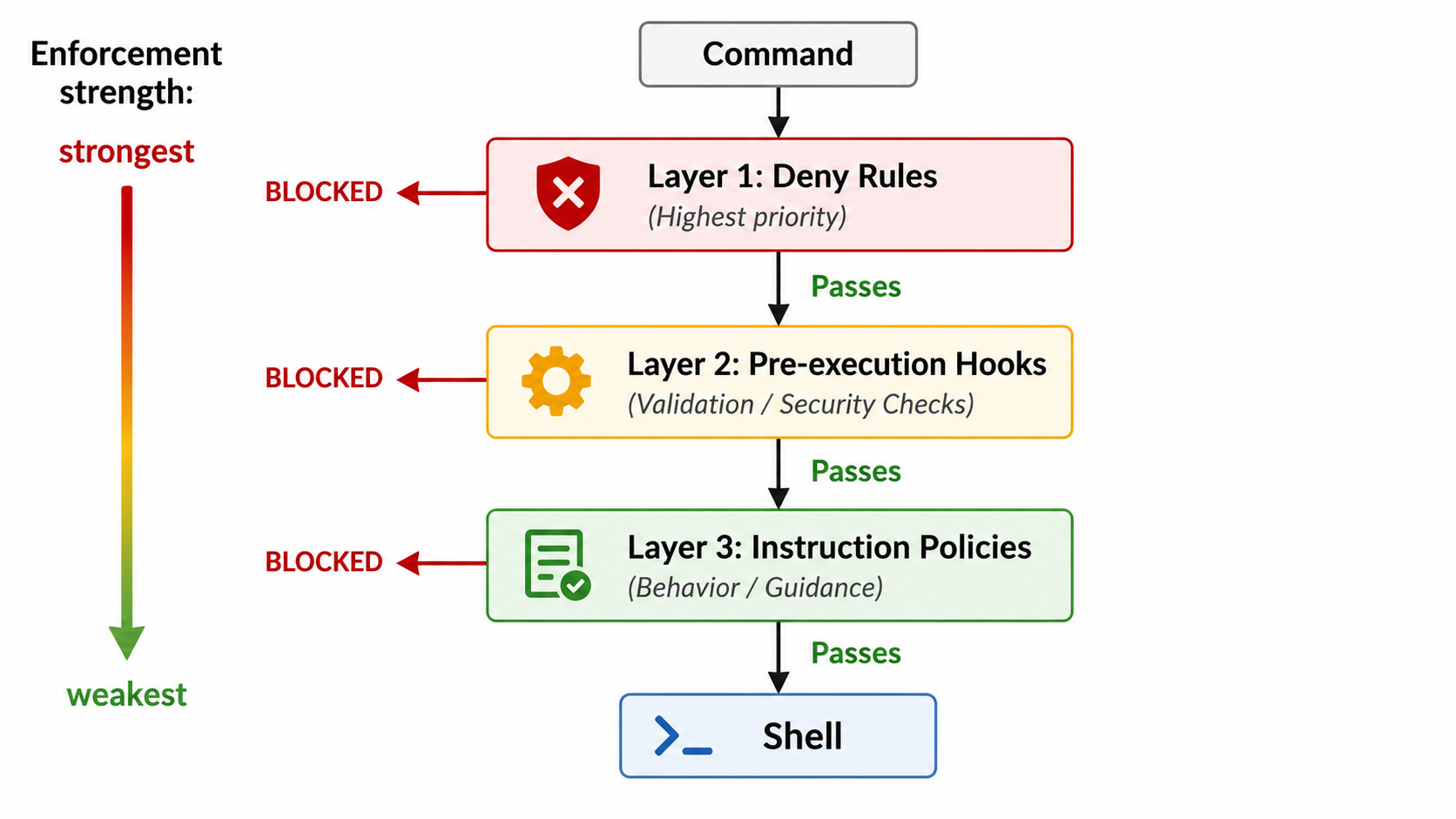
Layer 1: Deny rules
Pattern-based blocklists built into the agent’s permission system. When a command matches a deny pattern, the agent runtime refuses to call the tool at all. The agent cannot override this. It is enforced by the runtime, not by the model.
Examples:
"Bash(command:terraform destroy*)"
"Bash(command:*DROP DATABASE*)"
"Bash(command:git push --force origin main*)"
"Bash(command:*--shadow-database-url*)"
These are blunt but effective. They catch exact patterns with zero ambiguity.
Layer 2: Pre-execution hooks
Scripts that run before every command execution. The agent runtime pipes the full command (as structured data) into a script, and the script decides: allow (exit code 0) or block (exit code 2, with a message shown to the developer).
This layer is more flexible than deny rules. Scripts can use regex, check multiple patterns, inspect environment variables, and provide detailed error messages explaining why a command was blocked.
For example, a database-guard hook might block:
DROP DATABASEandDROP TABLETRUNCATEon any table- ORM reset commands across frameworks (Prisma, Rails, Flyway, Alembic, Sequelize, Knex, TypeORM)
- Any command referencing
--shadow-database-url
The agent cannot override a hook that returns exit code 2. The enforcement is at the runtime level.
Layer 3: Instruction-level policies
Natural language instructions that tell the agent not to run destructive commands are typically placed in configuration files like CLAUDE.md or .cursorrules. These tell the model: “never use --shadow-database-url,” or “always ask a human before running migrations.”
This is the weakest layer. The agent follows instructions reliably, but it could theoretically be prompted to ignore them. Never rely on this layer alone.
Why all three?
| Layer | Mechanism | Can the agent override it? |
|---|---|---|
| Deny rules | Pattern match on tool calls | No |
| Pre-execution hooks | Arbitrary script logic | No |
| Instruction policies | Model instruction-following | Theoretically yes |
A destructive command has to get past all three layers to execute. Deny rules catch exact patterns. Hooks catch variations with regex. Instructions handle the long tail. Defence in depth means one missed pattern does not mean a missed incident.
What guardrails protect against
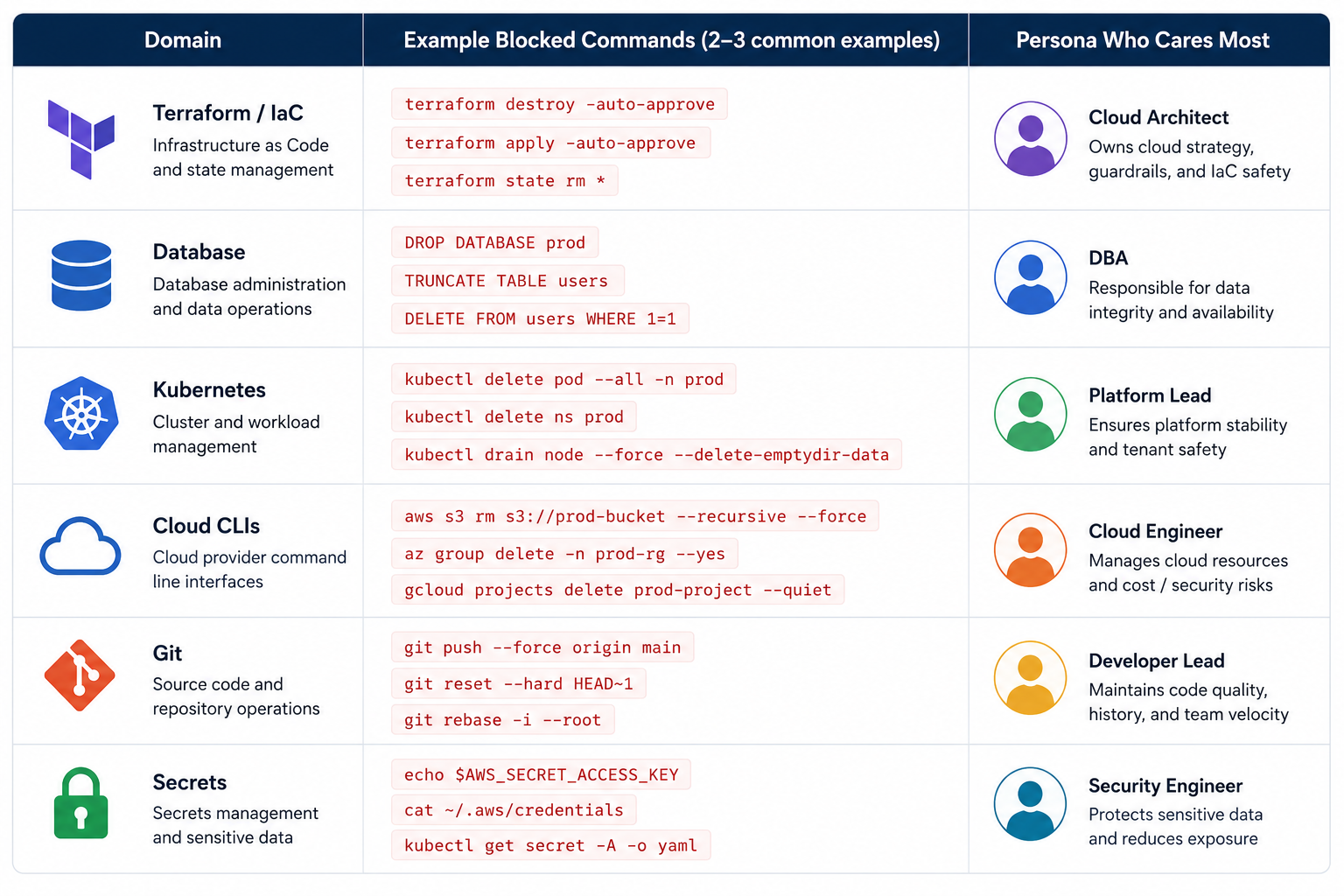
Different infrastructure domains have different dangerous commands. A comprehensive guardrail system covers all of them:
-
Infrastructure as Code (Terraform, Pulumi, CloudFormation)
Blocked:
destroy,apply -auto-approve, state manipulation commands. These can wipe cloud resources in seconds with no undo. -
Databases
Blocked:
DROP DATABASE,DROP TABLE,TRUNCATE, destructive ORM commands (prisma migrate reset,prisma db push --force-reset,rails db:drop,alembic downgrade base), and any command referencing shadow-database URLs pointed at production. -
Kubernetes
Blocked:
delete namespace,delete -f(which deletes everything in a manifest),drain --forcewithout safeguards. -
Cloud provider CLIs (AWS, GCP, Azure)
Blocked: instance termination, resource deletion, security group modifications that open 0.0.0.0/0, and bulk operations across accounts.
-
Git
Blocked: force push to main/master/production branches,
reset --hardon shared branches, unprotected branch deletion. -
Secrets and credentials
Blocked: commands that would exfiltrate
.envfiles, print API keys to stdout, or send credential file contents to external services.
The identity problem underneath
Guardrails stop the agent from doing damage with the access it has. But there is a deeper question: why does the agent have that access in the first place?
In most developer environments today, coding agents inherit whatever credentials exist in the local environment. If a developer has long-lived AWS keys in ~/.aws/credentials with broad permissions, the agent has those same keys and those same permissions. There is no scoping, no time limit, and no audit trail specific to the agent’s actions.
This is the standing-privilege problem, applied to a new actor. The agent is not malicious, it is just following instructions with whatever access is available. But “whatever access is available” often means production-grade credentials with no expiry.
The fix is not better key vaulting. It is short-lived, scoped credentials issued to the agent for a specific task, automatically revoked when the task ends. This is what Just-In-Time (JIT) access for coding agents provides: instead of the agent holding permanent keys, it requests access through a broker, gets a credential scoped to exactly what it needs (and nothing more), with a time limit and an audit trail.
Guardrails and JIT work together: guardrails block dangerous actions at runtime, and JIT ensures the agent never has more access than it needs in the first place.
Where guardrails fit in a security stack
Coding agent guardrails are not a replacement for cloud security posture management, identity governance, or compliance tooling. They are a complementary layer: Layer 0, operating on the developer’s machine before anything reaches the cloud.
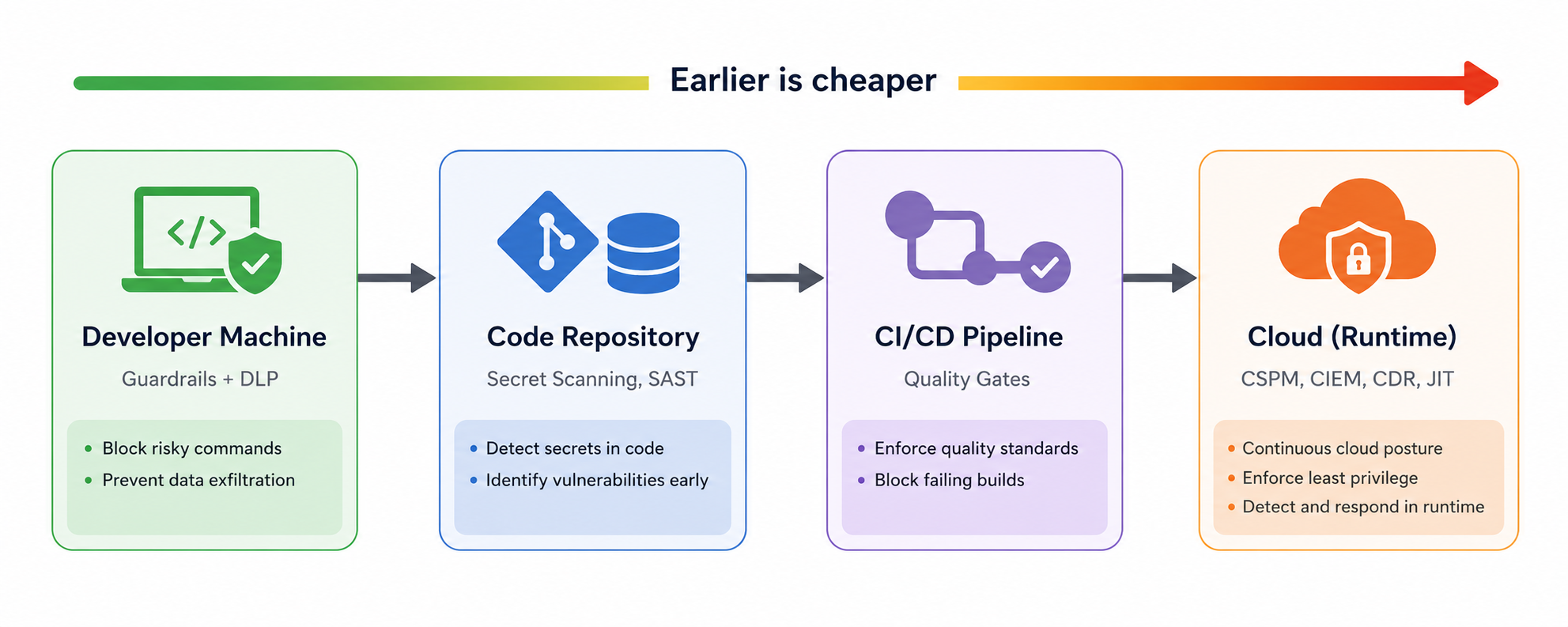
Here is how the layers complement each other:
- Guardrails prevent the agent from executing destructive commands.
- DLP (Data Loss Prevention) prevents the agent from sending secrets and PII to external model providers.
- JIT access ensures the agent only holds the credentials it needs, for as long as it needs them.
- CSPM detects misconfigurations in the cloud that could be exploited if a guardrail is bypassed.
- CIEM maps identity permissions and flags over-privileged roles, including agent identities.
- CDR (Cloud Detection and Response) catches anomalous behaviour if something slips through all other layers.
The principle is defence in depth. No single layer is sufficient. But the earlier in the chain you stop a problem, the cheaper it is to fix. A guardrail that blocks terraform destroy on the developer’s machine is infinitely cheaper than recovering a deleted production database.
What guardrails cannot solve alone
Being honest about limitations matters. Guardrails block known-bad patterns, but they do not:
- Revoke credentials after a session ends.: A guardrail does not know when the agent is done. You need JIT for that.
- Mask PII in database queries: A guardrail inspects commands, not query results. You need database activity monitoring for that.
- Audit what the agent accessed and when: A guardrail logs what it blocked, but a full audit trail of allowed actions requires a broader observability layer.
- Detect novel attack patterns: Guardrails are pattern-based. A command that is technically dangerous but does not match a known pattern will pass through. The instruction layer and human oversight are the backstop here.
- Enforce network-level isolation: A guardrail runs at the command layer. It does not control which APIs the agent can reach at the network level.
This is the gap between “agent safety” (on-device controls) and “agent security” (platform-level governance). A complete solution needs both.
Getting started with guardrails
For teams that want to implement guardrails today, the approach is straightforward:
- Start with deny rules: Identify the ten most destructive commands your agents could run in your specific stack. Add them as pattern-based blocks. This takes minutes and has immediate impact.
- Add pre-execution hooks: Write scripts that inspect commands with regex and context-aware logic. Cover the domains your team touches most: database operations, infrastructure-as-code, Kubernetes, cloud CLIs.
- Layer in instruction policies: Add clear, specific instructions to your agent configuration files. These are the weakest layer but they cover the long tail of edge cases that patterns cannot catch.
- Customise for your stack: Every team has different infrastructure. The commands that matter for a team running Prisma on Supabase are different from a team running Terraform on AWS. Fork, adapt, extend.
- Know the escape hatch: If a blocked command genuinely needs to run, a human executes it manually in their terminal. The agent can prepare the command, explain what it will do, review the plan — but the final execution of a destructive operation is a human responsibility. This is by design.
Five questions to ask your team today
If your engineering team is using coding agents and by mid-2026, most are! Here are the questions worth raising in your next security review:
-
Which coding agents have access to production credentials? Not “which agents do we officially support” and which ones have credentials that can reach production?
-
Are those credentials long-lived or short-lived? If a developer’s
~/.aws/credentialsfile has permanent keys, every agent on that machine has permanent production access. -
What happens if an agent runs a destructive command? Is it blocked at the runtime level, or does it depend entirely on a human clicking “deny” in a prompt they may not fully understand?
-
Can you audit which agent performed which action, when, and under whose identity? If something goes wrong, can you trace it back?
-
If an agent exfiltrates a secret in its context window, would you know? Is there a DLP layer between the agent and the model provider?
These are not hypothetical risks. Real 2026 incidents — such as a Cursor agent deleting PocketOS’s entire production database in nine seconds — demonstrate that the gap between “agent capability” and “agent governance” is where real damage happens.
The road ahead
Coding agents are not going away. They are getting more capable, more autonomous, and more deeply integrated into engineering workflows. The teams that will use them safely are the ones that treat agent governance as infrastructure and not as an afterthought.
Guardrails are the foundation of that governance: hard, enforceable, non-bypassable boundaries that ensure an agent’s power is channelled productively. Combined with JIT access (so the agent never holds more privilege than it needs), DLP (so secrets never leave the device), and audit trails (so every action is traceable), they form a complete security posture for the agentic era.
The pattern is familiar. We went through the same evolution with cloud access: first everyone had root, then we learned least-privilege, then we built IAM. Coding agents are at the “everyone has root” stage. Guardrails are how we move past it.
How Cloudanix approaches coding agent guardrails
Cloudanix delivers coding agent guardrails through two products that work together. Coding Agent Guardrail is an on-host DLP firewall that hooks into coding agents, intercepting every prompt and tool call before it leaves the developer’s machine, scanning for secrets, PII, sensitive file reads, and destructive actions, then allowing, redacting, warning, or blocking per a centrally managed policy. Coding Agent JIT brokers short-lived, scoped credentials over MCP so the agent never holds standing cloud keys where access is issued for the task, approved by a human when required, and automatically revoked when the task completes.
Together they cover both sides of the risk: what the agent says (egress), what it does (actions), and what it is allowed to access (credentials).
Related reading: what is a coding agent firewall, data loss prevention for AI coding agents, what is agentic AI security, and MCP server security risks.
Frequently asked questions
What are coding agent guardrails?
Coding agent guardrails are hard policy controls that inspect every command an AI coding agent wants to execute and block dangerous operations (such as dropping databases, destroying infrastructure, or force-pushing to production) before they reach a shell. They are enforced at the runtime level and cannot be bypassed by the agent or a developer’s approval.
Why is human-in-the-loop approval not enough?
Because humans approve commands they do not fully understand. In the PocketOS incident (April 2026), a human was in the loop — the developer clicked “yes” without realising the command would wipe production. Guardrails block the command regardless of whether a human approves it.
Which coding agents do guardrails apply to?
Guardrails can be applied to any agent that executes shell commands or tool calls including Claude Code, Cursor, Kiro, Copilot, Codex, and Windsurf. The enforcement is at the runtime or hook level, not specific to one vendor.
Do guardrails slow developers down?
No. Guardrails only fire on commands that match dangerous patterns. The vast majority of development commands (building, testing, linting, deploying to staging) pass through untouched. The only commands that are blocked are the ones you never want an agent to run autonomously.
What is the difference between a guardrail and a coding agent firewall?
A guardrail blocks specific dangerous commands at the runtime level. A coding agent firewall is the broader category that includes guardrails, DLP (blocking data exfiltration), JIT access (scoping credentials), and audit (recording every action). Guardrails are one enforcement mechanism within the firewall.
Can I customise guardrails for my specific stack?
Yes. Guardrails are defined as patterns and scripts that match the commands relevant to your infrastructure. A team using Prisma will have different rules than a team using Terraform or Kubernetes. The patterns should reflect your actual deployment tools and workflows.













