
What is Google Kubernetes Engine?
Most scalable and fully automated Kubernetes service
What is Google Kubernetes Engine (GKE)?
Google Kubernetes Engine or GKE is a managed service that is used for deploying containerized applications. It is a fully managed and production-ready Kubernetes service that is easy to deploy, scale, and manage containerized applications on the Google Cloud Platform.
Benefits of using GKE
Google Kubernetes Engine can be a good fit for organizations wanting to deploy containerized applications, gain advantages of GCP’s infrastructure, or eliminate the need for managing the Kubernetes cluster.
We have listed some benefits of using GKE:
- Scalability: GKE clusters can be scaled up or down according to one’s needs.
- Managed Kubernetes cluster: GKE takes care of managing the Kubernetes control plane, so organizations can focus on developing and deploying their applications with ease.
- High availability: GKE clusters are highly available so that your applications never fail.
- Secured: GKE provides various security features to protect organizational assets.
- OS Support: GKE fully supports both Windows and Linux workloads.
- Cost optimization: GKE provides an auto-pilot mode that charges only for the resources used.
How does Google Kubernetes Engine work?
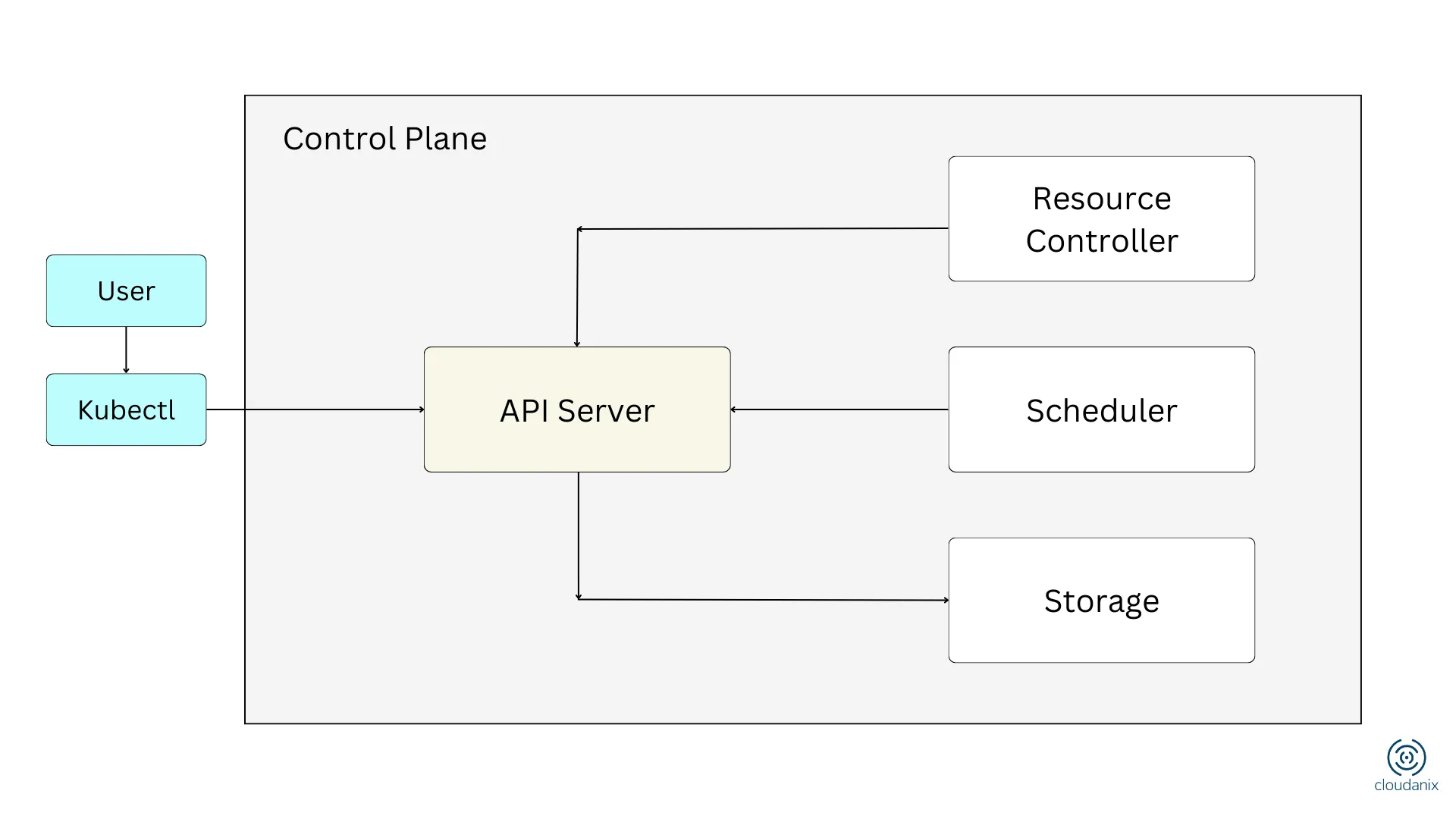
GKE works with the help of a control plane to manage the nodes in a cluster. In general, the control plane focuses on scheduling pods, managing resources, and providing a consistent view of clusters to users. Things like running pods and providing details of the underlying infrastructure of the organization’s assets are taken care of by the nodes in a cluster.
The control plane consists of 3 major components:
- Kubernetes API server: It is considered the main entry point to interact with the Kubernetes cluster.
- Scheduler: It is responsible to schedule pods using nodes in the cluster.
- Controller manager: It manages the state of the cluster (whether pods are running and resources are allotted).
In GKE, Google runs and secures the control plane for you — you never patch the API server or manage etcd. What you own is the nodes, the workloads, the networking policy, and the identity configuration. That split is the GCP side of the shared responsibility model, and it is where most GKE security work actually happens.
Autopilot vs Standard mode
One of the first decisions in GKE is which operating mode to run, and it materially changes both cost and security responsibility.
- Standard mode gives you full control over the node pools: VM sizes, node configuration, and how you scale. You pay for the nodes you provision and you are responsible for right-sizing and hardening them.
- Autopilot mode manages the nodes for you. Google provisions and scales compute per workload, applies hardened defaults, and bills per pod resource request rather than per node. Autopilot enforces a number of security-relevant restrictions out of the box — for example, it disallows certain privileged configurations — which reduces the surface for misconfiguration but also limits some lower-level workloads.
For teams that want fewer knobs and safer defaults, Autopilot is a reasonable starting point. Teams that need node-level control or specialized workloads often stay on Standard and take on the extra hardening work themselves.
GKE identity: Workload Identity Federation
GKE ties Kubernetes service accounts to Google Cloud IAM through Workload Identity Federation, which lets a pod act as a specific Google service account with scoped permissions. This is the recommended pattern because the alternative — mounting node service account credentials or long-lived keys — means every pod on a node inherits the same broad permissions. Over-permissioned node identities are one of the most common ways a single compromised pod turns into a much larger incident, because the attacker inherits whatever the node can reach in the project.
Limitations of using GKE
Overall, GKE is one of the most powerful platforms available for deploying and managing containers. However, some drawbacks carry out using GKE. But organizations should weigh the pros and cons carefully before concluding their decisions.
Below are 5 disadvantages of using GKE:
- Limited customization: GKE being a managed service, users have limited control over the underlying framework. This means, users are not allowed to customize the operating system, kernel, or network configuration of the nodes.
- Bounded: As GKE is a proprietary platform, organizations cannot easily move applications from GCP to another platform in case they decide to switch.
- Limited access to features: GKE does not support all the features that are easily available in the open-source Kubernetes project. Limiting users to use features that are supported by GKE only.
- Complexity: If the user is not familiar with the general Kubernetes, GKE can be complex to use.
- Cost: The resources that are being used, organizations need to pay for them. The cost of GKE varies depending on factors like the resources used, the amount of memory or CPU usage, and the region of the located cluster.
Despite these disadvantages, GKE remains a popular platform for deploying and managing containerized applications.
Most common use cases of Google Kubernetes Engine
Overall, GKE is a versatile platform with widespread advantages. GKE can be used in numerous ways varying with industries and requirements.
We have listed the most common use cases according to GCP:
-
Continuous integration and delivery
GKE’s continuous integration and delivery (CI/CD) helps organizations in different ways such as automatic deployment, testing, and monitoring of containerized applications. -
Migrate workloads
With the help of GKE, organizations can migrate their workloads from on-premise to the cloud, from one Kubernetes to another, or from an older Kubernetes version to a new one. -
Deploy and run applications
GKE is considered a good platform for deploying microservices, web applications, or even batch jobs.
Securing a GKE cluster
GKE ships with good defaults, but a production cluster still needs deliberate hardening. The failure modes that show up most often:
- Public control plane and public nodes. Prefer private clusters, restrict the API server with authorized networks, and avoid giving nodes public IPs unless a workload truly needs them.
- Legacy metadata endpoint exposure. The instance metadata server can leak node credentials to a compromised pod; enabling Workload Identity and disabling legacy metadata closes that path.
- Over-broad IAM and RBAC. Grant least privilege at both the Google IAM layer and the Kubernetes RBAC layer. A broad
cluster-adminbinding is a common escalation route. - No network policies. Without them, any pod can talk to any other pod. Enforce network policy to limit east-west movement.
- Unscanned images and outdated versions. Scan images before deploy (GKE integrates with Artifact Registry scanning) and keep clusters on supported release channels so security fixes land automatically.
- Secrets in plaintext. Use envelope encryption and a secrets manager rather than embedding secrets in manifests.
It helps to reason about GKE security in layers — build (scan images), deploy (admission control), runtime (watch live behavior), and control plane (IAM, RBAC, API exposure). A weakness in any one layer undermines the others. For depth, see Kubernetes runtime security and importance of Kubernetes security.
Related Topics
People Also Read
- Creating CNAME for Google Cloud Functions
- Creating CNAME for Google Cloud Run Service Functions
- Implementing IAM in the Google Cloud Platform (GCP)
- Importance of Kubernetes Security
- Kubernetes Security with Add-On for Spectro Cloud
- What is Kubernetes?
- What is Azure AKS?
- What is AWS EKS?
- Recommended best practices to secure your workloads
Audit Check Resources
- AWS Cloud – Audit checks available for AWS cloud
- Azure Cloud – Audit checks available for Azure cloud
- GCP Cloud – Audit checks available for GCP cloud
Secure Your Containers With Cloudanix
Cloudanix provides a central dashboard for securing AWS, Azure, GCP, and other cloud platforms through its Cloud Security Platform, which includes features such as CWPP, container security, IAM permission boundaries, misconfigurations, and many more.
Where Cloudanix goes further than a standalone scanner is context. A list of GKE misconfigurations does not tell you which one to fix first. Cloudanix builds a unified asset graph that links a pod to its Google service account, the IAM roles that account holds, the GCP resources those roles can reach (a Cloud Storage bucket, a Cloud SQL instance), and whether the workload is exposed to the internet. That lets a finding be scored by real blast radius and traced along an attack path, so a security engineer works the handful of issues that actually chain into an incident rather than a flat backlog. Runtime detection then sits on top, so posture, exposure, and live behavior are triaged together — which is what regulated FSI, healthcare, and AI-forward teams running GKE at scale need to keep their queue sortable. See our container security product for how this comes together across clouds.













