
What is Amazon EKS?
Amazon Elastic Kubernetes Service (Amazon EKS) is a managed Kubernetes service by AWS that eliminates the need to install, operate, and maintain your own Kubernetes control plane or nodes. In simple terms, AWS handles the infrastructure and operational overhead, allowing you to focus on deploying and managing your containerized applications.
What is the Difference Between Kubernetes and EKS?
While Kubernetes is an open-source system to automate deployment, scaling, and operations of application containers, EKS is the managed version of Kubernetes offered by AWS.
Key Differences:
- Kubernetes: Self-managed by your organization.
- EKS: Fully managed by AWS with automatic control plane provisioning.
- High Availability: EKS spreads control plane across multiple Availability Zones.
- Security: EKS uses Amazon VPC network policies to isolate cluster traffic.
- Scalability: EKS handles scaling automatically; Kubernetes requires manual config.
Why Use Amazon EKS Over Regular Kubernetes?
Here are some key benefits of Amazon EKS:
- Usability: A single API and CLI interface to manage Kubernetes clusters.
- Reliability: No need to manually configure control plane components.
- Scalability: Automatically adjusts cluster size based on load.
- Integration with AWS Services: Easily integrates with ECR, ELB, IAM, CloudWatch, and more.
Watch This Video
Additional Features:
- Automatic Updates: Run secure, up-to-date versions of Kubernetes.
- Fargate Support: Run serverless containers with zero infrastructure management.
- Kubernetes Add-Ons: Built-in support for tools like Prometheus and Grafana.
Overall, Amazon EKS simplifies Kubernetes adoption while offering enterprise-grade security, scalability, and ease of use.
Components of Amazon EKS
Control Plane
Handles cluster management and includes:
- API Server: Entry point to interact with the cluster.
- Controller Manager: Manages cluster objects like pods, deployments, etc.
- etcd: A distributed key-value store for storing cluster state.
Worker Nodes
These are EC2 instances configured to run Kubernetes workloads. In EKS you can run nodes three ways, and the choice affects how much you have to secure yourself:
- Managed node groups — AWS provisions and manages EC2 instances for you, handling the node lifecycle (draining, upgrades) while you still own the OS and what runs on it.
- Self-managed nodes — You run your own EC2 Auto Scaling groups. Maximum control, maximum responsibility for patching and hardening.
- Fargate — Serverless pods with no EC2 instances to manage. AWS runs each pod in an isolated compute environment, which removes node-level patching but limits some workloads (for example, DaemonSets and privileged pods).
Networking
Uses Amazon VPC to securely connect the control plane and worker nodes and enable communication with internal and external services. The default networking model is the Amazon VPC CNI, which gives each pod a real VPC IP address. That is powerful — pods are first-class citizens on your network — but it also means pod-to-pod traffic and pod-to-AWS-service traffic follow your VPC routing, security groups, and network policies. Getting this wrong is one of the most common ways an EKS cluster ends up unintentionally exposed.
How EKS handles identity
EKS ties Kubernetes identity to AWS IAM in ways that are easy to misconfigure. Two mechanisms matter:
- IAM roles and
aws-auth/ access entries map AWS principals to Kubernetes RBAC, controlling who can talk to the API server and what they can do. - IRSA (IAM Roles for Service Accounts) and the newer EKS Pod Identity let individual pods assume scoped IAM roles instead of inheriting the node’s role. This is the correct pattern: without it, every pod on a node shares the node instance profile, which usually has far more permissions than any single workload needs. Over-permissioned node roles are a classic source of blast radius, because a single compromised pod inherits everything the node can do.
Common EKS security risks
Managed control planes remove a lot of undifferentiated work, but the shared responsibility line still leaves plenty for you to own. The failures that show up most often in real clusters:
- Public API server endpoint left open to the internet instead of restricted by CIDR or made private.
- Over-permissioned node instance roles that pods inherit, instead of scoping permissions per workload with IRSA/Pod Identity.
- No network policies, so any pod can talk to any other pod and reach cloud metadata endpoints.
- Outdated Kubernetes versions that miss security fixes; EKS versions reach end of standard support and must be upgraded on a cadence.
- Unscanned images pulled from public registries with known CVEs.
- Secrets in plaintext in manifests or environment variables instead of using envelope encryption and a secrets manager.
For the broader picture of why these matter, see importance of Kubernetes security and Kubernetes runtime security.
Best Practices for Amazon EKS Setup
- Allow inbound traffic only on Port 443 (HTTPS)
- Enable audit and activity logging
- Use the latest stable Kubernetes version
- Configure high availability across zones
- Make ECR repositories private
- Enable image tag immutability
- Attach lifecycle policies to ECR repositories
- Enable image vulnerability scanning for ECR
- Scope pod permissions with IRSA or EKS Pod Identity instead of relying on the node role
- Apply Kubernetes network policies to restrict pod-to-pod and egress traffic
- Encrypt secrets with envelope encryption (KMS) and keep them out of manifests
- Upgrade on a cadence so the cluster stays on a supported Kubernetes version
A useful way to think about EKS security is in layers, mapping to CWPP concepts. Build-time: scan images before they reach ECR. Deploy-time: enforce admission policy so risky manifests never land. Runtime: watch live behavior for the activity a scanner can’t predict. Control plane: keep IAM, RBAC, and API exposure tight. A gap in any one layer undermines the others — a perfectly scanned image still gets compromised at runtime if a pod runs privileged with a wide-open node role.
AWS EKS Audit with Cloudanix
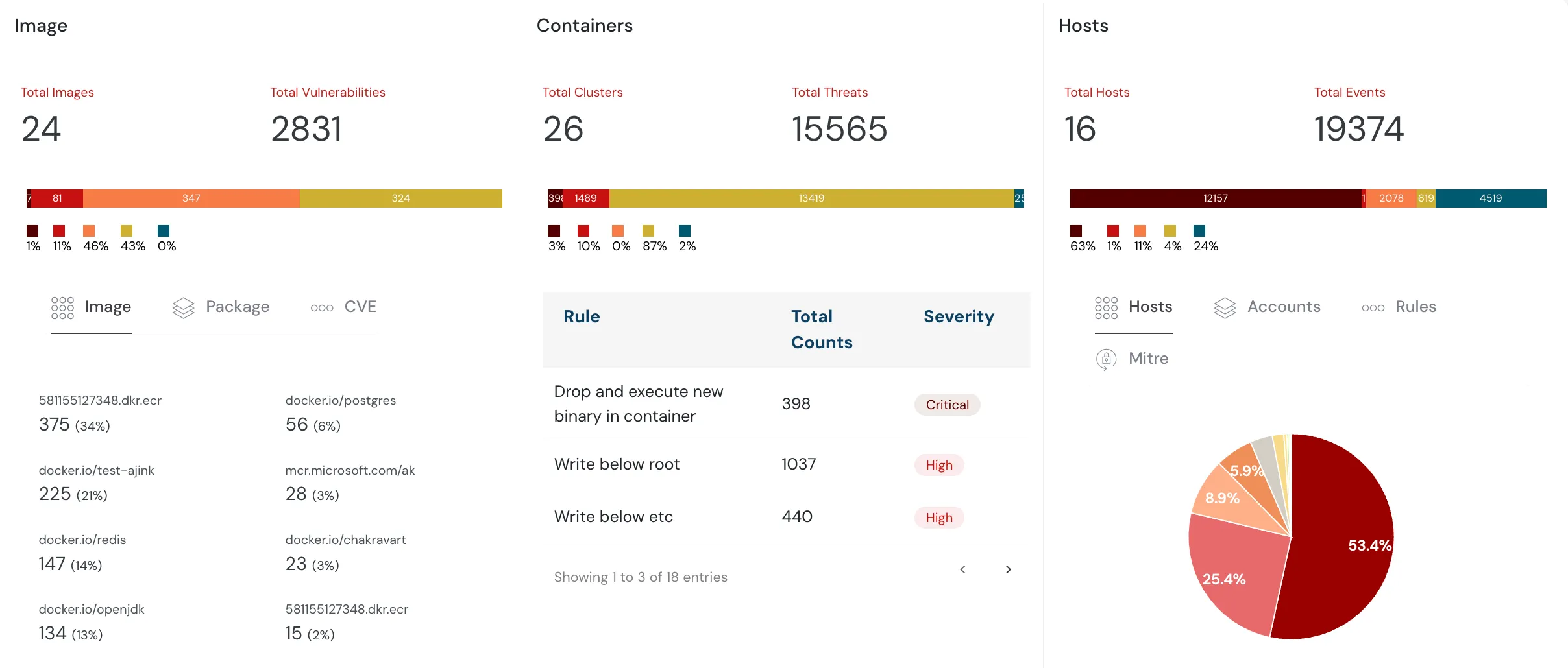
Cloudanix provides curated Kubernetes audit checks and helps enforce best practices across:
- Amazon EKS
- Azure Kubernetes Service (AKS)
- Google Kubernetes Engine (GKE)
Secure your containers with Cloudanix’s centralized dashboard and detect threats related to:
- IAM misconfigurations
- Workload exposure
- Vulnerabilities (like CVE-2022-0185)
- Compliance gaps across AWS, Azure, and GCP
What makes this more than another scanner is context. EKS security findings are only actionable when you can answer “so what?” — and that requires connecting the cluster to the rest of your AWS account. Cloudanix builds a unified asset graph that links a pod to its service account, the IAM role that account can assume, the resources that role can reach (an S3 bucket, an RDS instance), and whether the workload is reachable from the internet. That lets a finding like “pod runs with a node role that has broad S3 access” be scored by real blast radius and mapped along an attack path instead of sitting in a flat list. Runtime detection then layers on top, so misconfiguration, exposure, and live behavior are triaged together — which is exactly what regulated FSI, healthcare, and cloud-native teams running EKS at scale need to keep their alert queue sortable.
Secure Your Containers With Cloudanix
Additional Resources
- What is Azure AKS?
- What is Google Kubernetes Engine (GKE)?
- What is Kubernetes?
- Importance of Kubernetes Security













